Auto Reheat
Feature
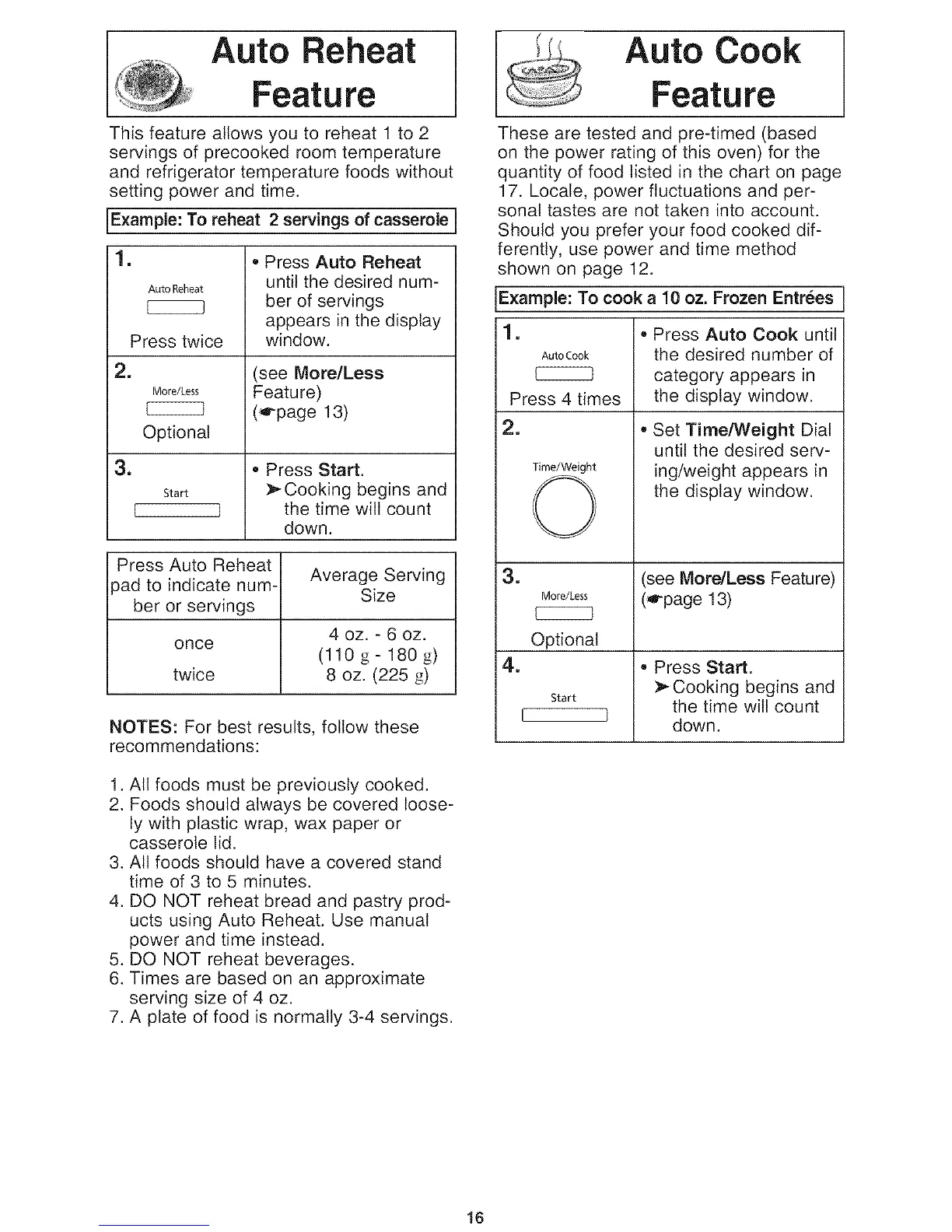
This feature allows you to reheat 1 to 2
servings of precooked room temperature
and refrigerator temperature foods without
setting power and time.
Example: To reheat 2 servings of casserole
1. • Press Auto Reheat
AutoReheat until the desired num-
[222222B ber of servings
appears in the display
Press twice window.
i2. (see More/Less
More/Less Featu re)
(,G-page 13)
Optional
i3.
Start
L ]
• Press Start.
:_ Cooking begins and
the time will count
down.
Press Auto Reheat
ipad to indicate num- Average Serving
Size
ber or servings
4 oz. - 6 oz.
once
(110 g- 180 g)
twice 8 oz. (225 g)
NOTES: For best results, follow these
recommendations:
1. All foods must be previously cooked.
2. Foods should always be covered loose-
ly with plastic wrap, wax paper or
casserole lid.
3. All foods should have a covered stand
time of 3 to 5 minutes.
4. DO NOT reheat bread and pastry prod-
ucts using Auto Reheat. Use manual
power and time instead.
5. DO NOT reheat beverages.
6. Times are based on an approximate
serving size of 4 oz.
7. A plate of food is normally 3-4 servings.
Auto Cook
Feature
These are tested and pre-timed (based
on the power rating of this oven) for the
quantity of food listed in the chart on page
17. Locale, power fluctuations and per-
sonal tastes are not taken into account.
Should you prefer your food cooked dif-
ferently, use power and time method
shown on page 12.
Example: To cook a 10 oz. Frozen Entrees
1. • Press Auto Cook until
AutoCook the desired number of
category appears in
Press 4 times the display window.
2.
Time/Weight
©
=
More/Less
CCCCC]
Optional
4.
Start
I I
• Set TimeA_eight Dial
until the desired serv-
ing/weight appears in
the display window.
(see More/Less Feature)
(,G-page13)
• Press Start.
Cooking begins and
the time will count
down.
16



 To Next Page