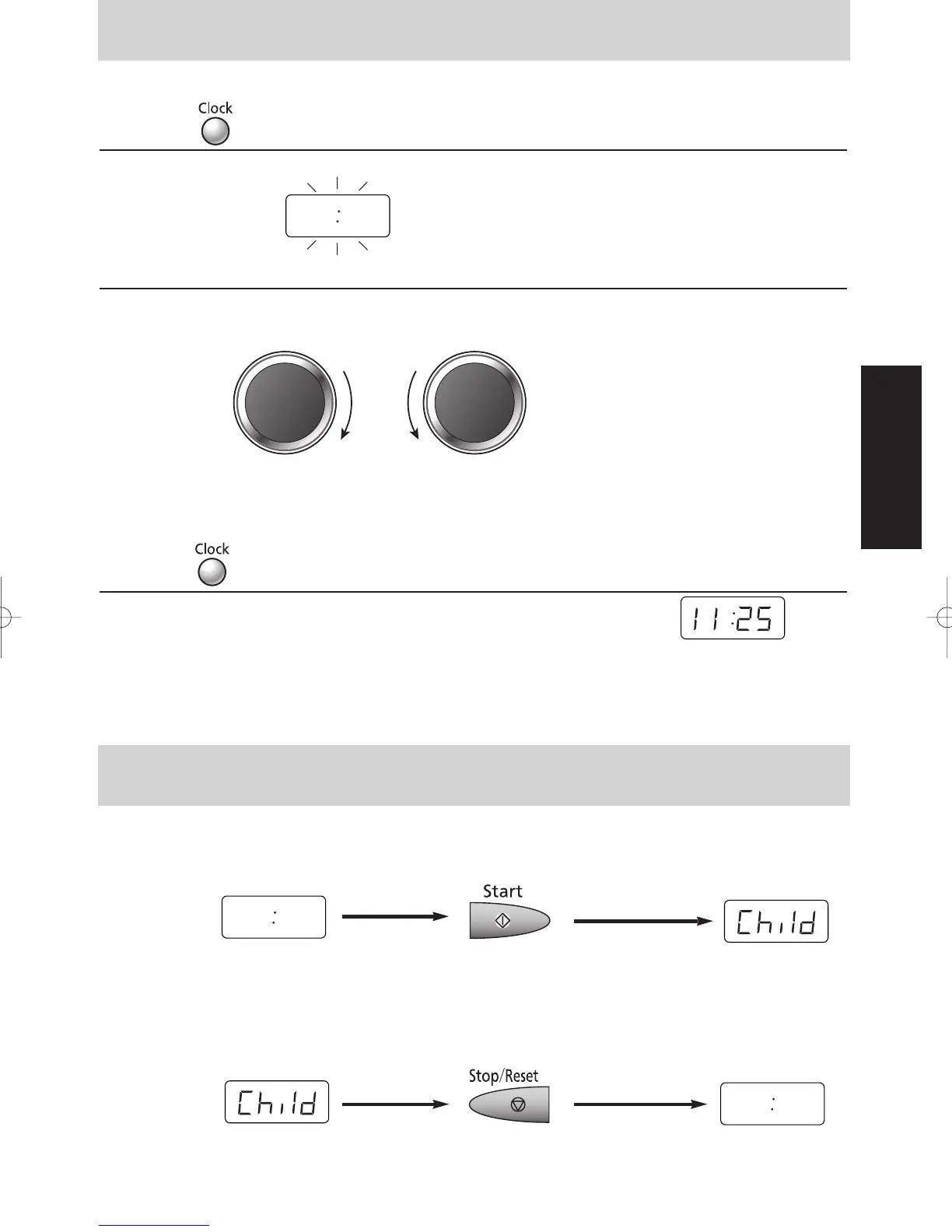
You can use the oven without setting the clock.
1 Press Once
The colon start to blink.
2 Enter Time of Day
Enter time of day by turning Time/Weight Dial
e.g. 11:25 (12 hour Clock)
Time appears in the Display Window, colon is blinking.
Verify time of day in the Display Window.
3 Press
The colon stops blinking; time of day is now locked into Display Window.
NOTES: Oven will not operate while colon is still blinking
1. To reset time of day, repeat step 1 through 3.
2. The clock will keep the time of day as long as oven is plugged in and electricity is supplied.
3. This is a 12 hour clock, ie 2pm = 2:00 not 14:00
This feature allows you to prevent operation of the oven by a young child; however, the door will open.
You can set Child Safety Lock when colon or time of day is displayed.
To set:
Colon or time of Press 3 times. Display Window
day is displayed
To cancel:
Display Window Press 3 times. Colon or time of
day is displayed
– 9 –
To Set Clock
Operation & Hints
To Use Child Safety Lock
or



 To Next Page