– 16 –
To Use Timer
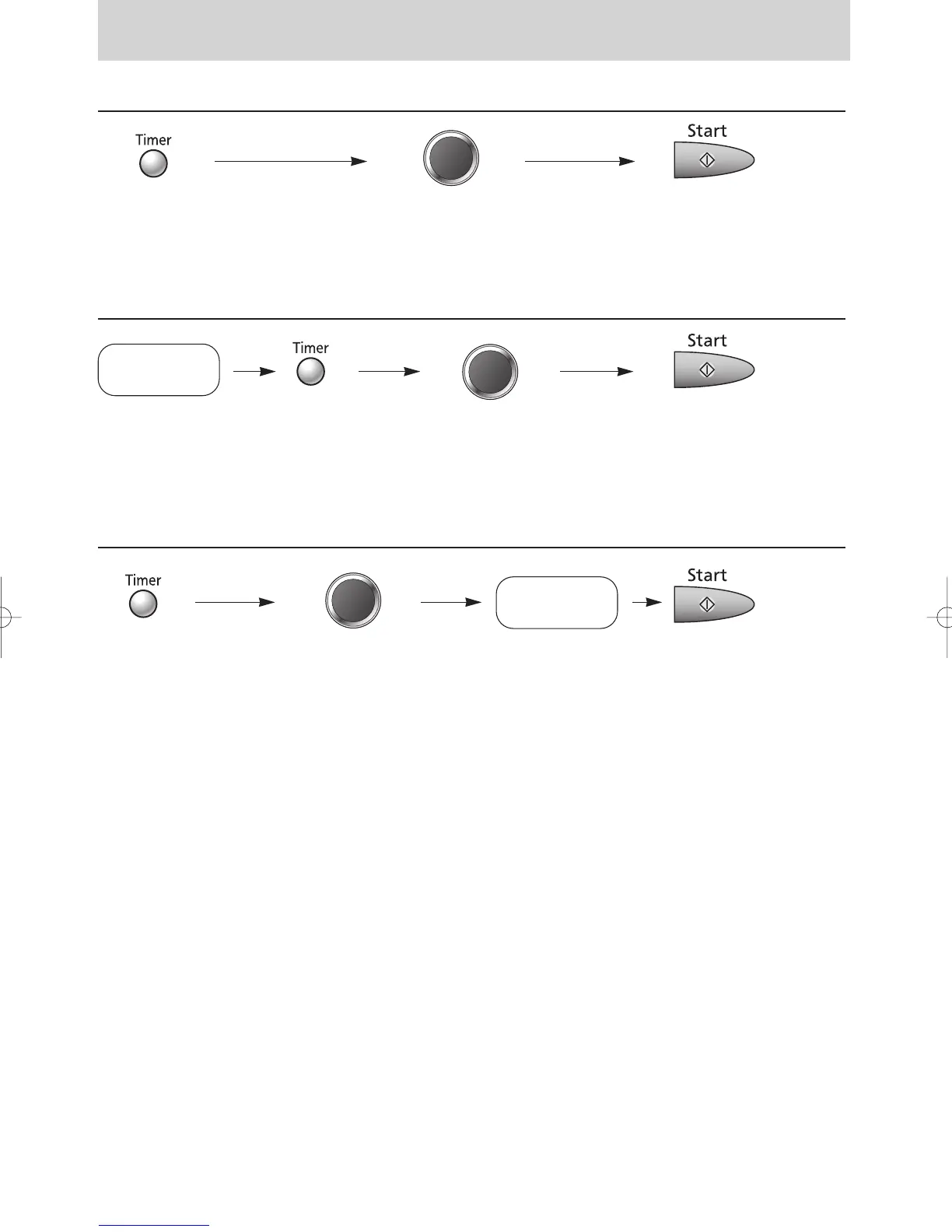
To Use as a Kitchen Timer
Press once. Set desired amount of time. Press.
(up to 90 minutes) Time will count down
without oven operating.
To Set Standing Time
Press. Set desired amount of standing time. Press.
(up to 90 minutes) Cooking will start.
After cooking, standing
time will count down
without oven operating.
To Set Delay Start
Press once. Set desired amount of delay time. Press.
(up to 90 minutes) Delayed time will count
down. Then cooking
will start.
NOTES:
1. If oven door is opened during the Standing Time or Kitchen Timer, the time in the Display Window will
continue to count down.
2. Delay Start and Standing Time cannot be programmed before any Auto Control function.
This is to prevent the starting temperature of the food rising before defrosting or cooking begins.
A change in the starting temperature could cause inaccurate results.
Set the desired
cooking programme.
(see Page 8)
Set the desired
cooking programme.
(see Page 8)



 To Next Page