20
Appendix
Changing the water lter
Change the water lter periodically. As a rule of thumb, it should be changed once every six months.
When it is time to change the lter, the “ ” icon appears on the Ice/Water dispenser panel.
This time differs depending on the quantity of water used as well as the quality and pressure of the water, and it may be much shorter than six
months.
Also change the water lter under the following circumstances:
● When the ice or water have odours or an unpleasant taste (this means that the lter capacity is reduced)
● When the amount of water entering the refrigerator has diminished (this means that the lter is clogged)
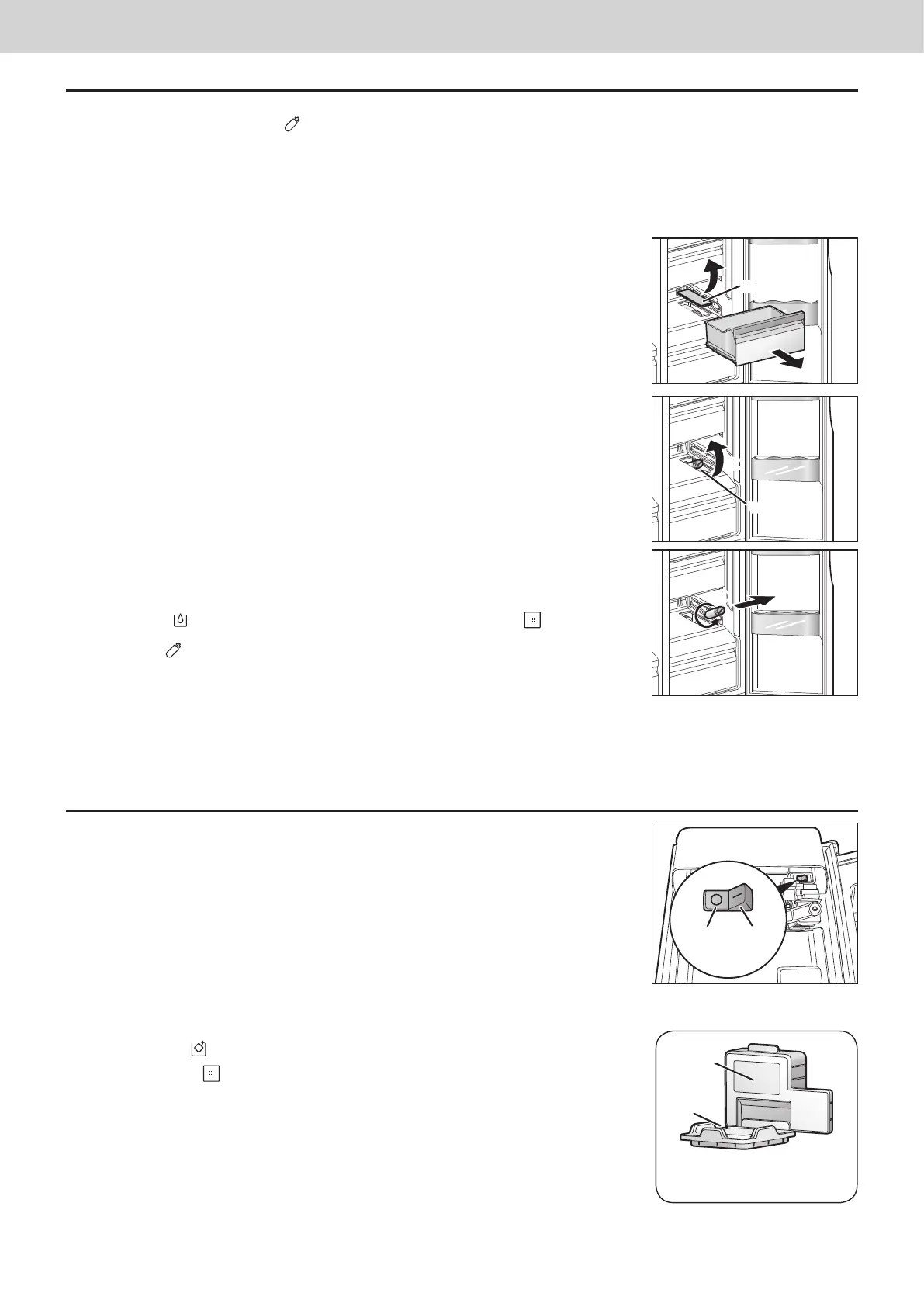
How to change the lter
a
Remove the drawer of the Vitamin-Safe Zone.
b
Remove the lter panel.
Place your ngers in the cutout at the front of the lter panel, and remove the lter panel.
c
Tilt the water lter slightly upward.
d
Turn the water lter counterclockwise by 90 degrees, and pull it toward you.
e
Install the new water lter.
Follow the steps for removing the lter in reverse.
f
With “ ” displayed on the Ice/Water dispenser panel, hold down on the Ice/Water
dispenser for at least 3 seconds.
The “ ” icon on the Ice/Water dispenser panel goes off.
Notes:
● When the water lter has been removed, the water inside it may spill.
If water has spilled, remove the 5° Fresh Zone drawer and wipe up the water at the bottom of
the refrigerator.
● When a new water lter is to be purchased, ask your dealer or an authorized service centre to supply you with one.
Water lter type : CNRAH-257760
Stopping the automatic ice-making
The automatic ice-making function can be shut down when, for instance, it is not going to be used for a
prolonged period of time to dispense ice.
Remove the icebox, and set the switch on the inside of the automatic ice maker to the OFF position.
Note:
● After the switch has been set to the OFF position, return the icebox to its original position. Even after
the switch has been set to OFF, the ice remaining on the ice-cube tray will be deposited in the icebox.
Using the freezer with the icebox removed
When the icebox is removed, large food items can be placed on the glass shelves of the freezer.
To use the freezer with the icebox removed, take the steps below, and shut down the Ice
dispenser.
a
Shut down the automatic ice-making function.
b
Display “
” on the Ice/Water dispenser panel.
c
Hold down for at least 3 seconds.
d
Attach the ice shooter cover.
For safety and energy saving, please attach the ice shooter cover provided with the
refrigerator to the ice dispensing area.
The ice shooter cover consists of 2 parts. Attach
1
rst and then attach
2
.
Notes:
● The Water dispenser can still be used even when the Ice dispenser has been shut down by
taking the steps described above.
● To re-install the icebox and use it again, take the steps below.
1. Remove the ice shooter cover.
2. Set the switch of the automatic ice-making function to the ON position.
3. Install the icebox.
Filter panel
a
b
c
Water lter
d
OFF ON
Ice shooter cover
(accessory)
1
2


 To Next Page
 Loading...