15
English
Operation
Setting the temperature
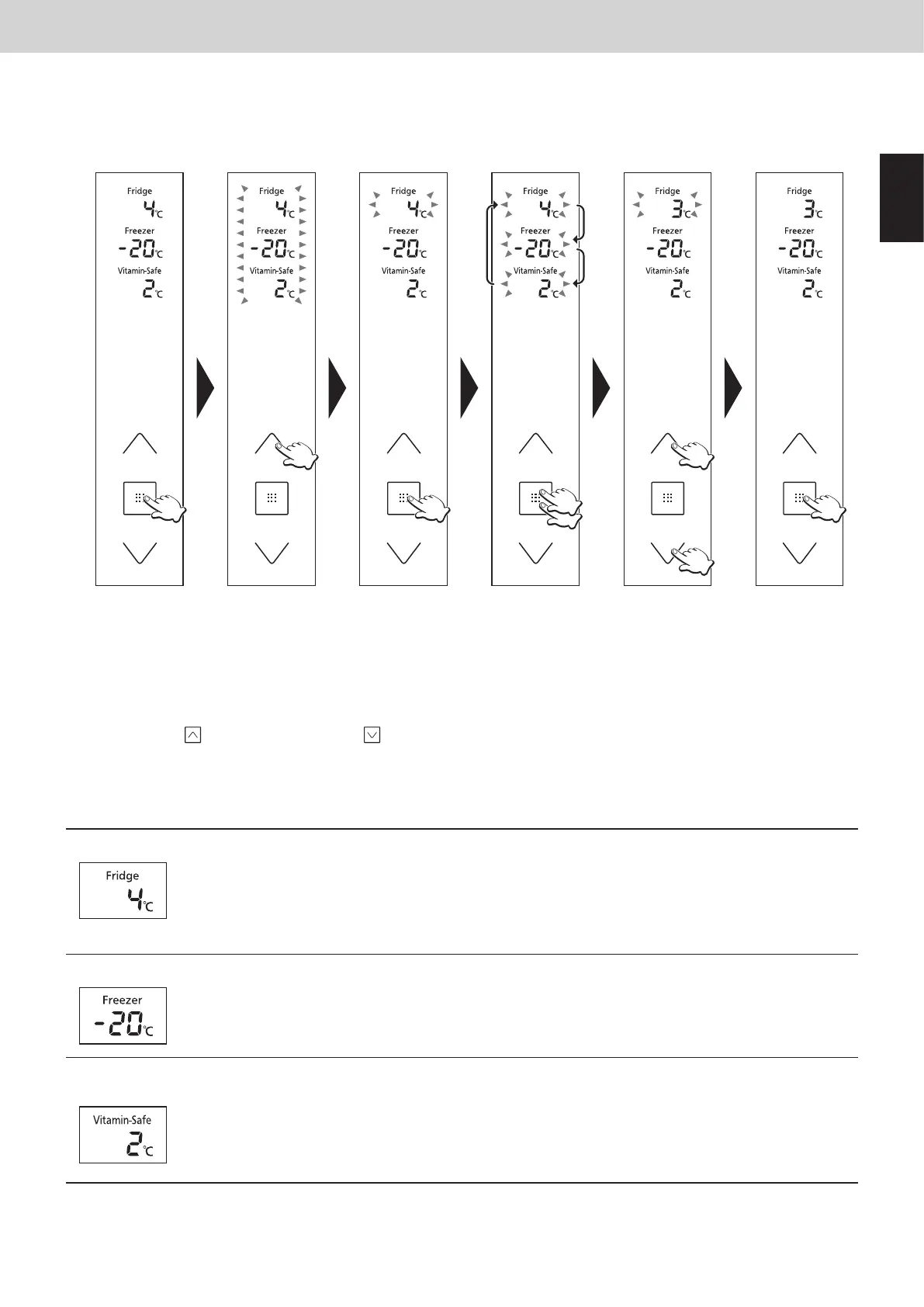
The temperatures of the fridge, freezer and Vitamin-Safe Zone can be changed.
At the time of purchase, the temperatures are set as shown below.
Fridge: 4 °C Freezer: -20 °C Vitamin-Safe Zone: 2 °C
b c e
a
fd
a
The control panel lights up, the temperature inside the refrigerator is displayed.
b
The temperature display start ashing, indicating that the temperatures can be set.
c
The temperature set for the fridge starts ashing.
d
Each time the button is pressed, the ashing display changes by one step in the sequence of fridge, freezer and Vitamin-
Safe Zone.
e
Adjust the temperature.
● Press to raise the temperature and to lower it.
f
The display stops ashing and lights up, indicating that the temperatures are now set.
● Approximately 30 seconds later, the control panel goes off.
Note:
● The display in
a
is restored if no operations are performed for 5 or so seconds during the setting process.
Fridge Set the temperature for the inside of the fridge.
Any temperature within the range from 1 °C to 7 °C can be set.
Notes:
● When the temperature is set at 1 °C for a prolonged period, some food may freeze.
● In the Holiday Mode, the temperature is not displayed, and the temperature cannot be set.
● In the Eco Mode, the temperature cannot be set either.
Freezer
Set the temperature for the inside of the freezer.
Any temperature within the range from -17 °C to -25 °C can be set.
Note:
● In the Eco Mode, the temperature cannot be set.
Vitamin-Safe
Zone
Set the temperature of the Vitamin-Safe Zone.
Any temperature within the range from 0 °C to 5 °C can be set.
Notes:
● When the temperature is set between 0 °C and 1 °C for a prolonged period, some food may freeze.
● In the Holiday Mode, the temperature is not displayed, and the temperature cannot be set.
● In the Eco Mode, the temperature cannot be set either.


 To Next Page
 Loading...