CARD Mode
-32-
Recording from a Cassette (VCR Mode)
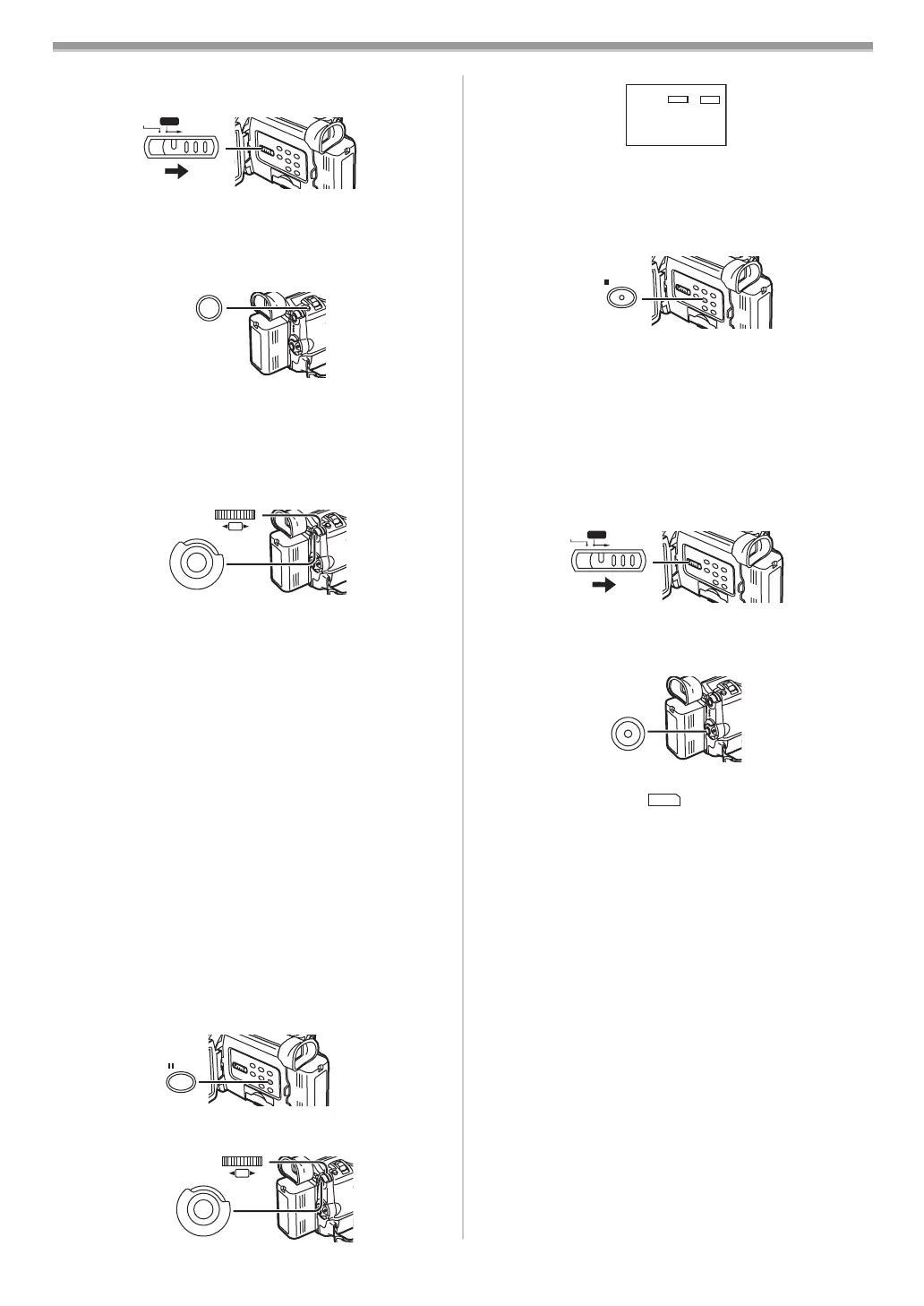
1 Set the [TAPE/CARD/CARD MODE] Selector (13) to
[CARD].
2 Slide the [TAPE/CARD/CARD MODE] Selector (13) to
[CARD MODE] until the [PICTURE] Indication appears.
3 Start playback and set the Movie Camera to Still
Playback Mode at the scene you wish to record, and
press the [PHOTO SHOT] Button
(25).
Selecting the size of Card Photoshot images
In the Camera Mode, 2 sizes are available for Card
Photoshot.
1 Set [CAMERA FUNCTIONS] >> [CARD SETUP] >>
[PICTURE SIZE] >> [2048k1496] or [640k480].
Selecting the quality of Card Photoshot images
1 Set [CAMERA FUNCTIONS] or [VCR FUNCTIONS] >>
[CARD SETUP] >> [PICTURE QUALITY] >> a desired
image quality.
Maximum number of images recordable on the supplied
Card (16MB)
When the picture size is 2048k1496:
[FINE] (high image quality): approximately 7 pictures
[NORMAL] (normal image quality): approximately 12 pictures
[ECONOMY] (low image quality): approximately 17 pictures
When the picture size is 640k480:
[FINE] (high image quality): approximately 95 pictures
[NORMAL] (normal image quality): approximately
190 pictures
[ECONOMY] (low image quality): approximately 380 pictures
≥These figures vary depending on the subject being
photographed.
ª Automatically Copying Still Pictures That Have
Already Been Recorded on a Tape
The images with the Photo Index signals are automatically
recorded to the Card.
1 Set the Movie Camera to Still Playback Mode at the
scene immediately before you want to start copying
images.
2 Set [VCR FUNCTIONS] >> [PLAYBACK FUNCTIONS]
>> [RECORD TO CARD] >> [YES].
CARD MODE
TAPE
CARD
(13)
PHOTO
SHOT
(25)
(26)
(51)
M
E
N
U
PUSH
SHUTTER/IRIS/
VOL/JOG
STILL
(23)
(26)
(51)
M
E
N
U
PUSH
SHUTTER/IRIS/
VOL/JOG
≥During copying, the Indication appears.
≥Search starts from the current Tape position, and images
with Photo Index signals are recorded onto the Card
sequentially.
To Stop Automatic Recording
Press the [∫] Button (21).
≥For other notes concerning this item, see
-46-.
ª Recording a Moving Picture (MPEG4)
You can record moving pictures for e-mailing on a Card. The
recorded data can be also played back on Windows Media
Player.
Recording from the Movie Camera Lens (Camera Mode)
1 Set the [TAPE/CARD/CARD MODE] Selector (13) to
[CARD].
2 Slide the [TAPE/CARD/CARD MODE] Selector (13) to
[CARD MODE] until the [MPEG4] Indication appears.
3 Press the Recording Start/Stop Button (32).
≥It takes 2 to 3 seconds to start recording.
≥During recording the [ ] Indication is lit in red.
≥The maximum continuous recording times are:
[SUPERFINE] (super high image quality): 2 minutes
[FINE] (high image quality): 2 minutes
[NORMAL] (normal image quality): 120 minutes
The Movie Camera will automatically stop recording
when the relevant time listed above has elapsed.
≥When Remaining Time Indication becomes [R:0h00m], this
Indication flashes in red. Recording may not be started.
≥The picture size of the moving picture (MPEG4) is set to
be:
[SUPERFINE]: 320k240
[FINE]: 176k144
[NORMAL]: 176k144
≥When attaching to email, we recommend the file size to be
less than 1MB.
[SUPERFINE]: approximately 15 seconds
[FINE]: approximately 20 seconds
[NORMAL]: approximately 1 minute
≥For other notes concerning this item, see
-46-.
NOW WRITING
;
TAPE
CARD
%
WEB CAMERA
(21)
CARD MODE
APE
CARD
(13)
(32)
MPEG
4
B5-B.book 32 ページ 2002年8月6日 火曜日 午前11時33分



 To Next Page