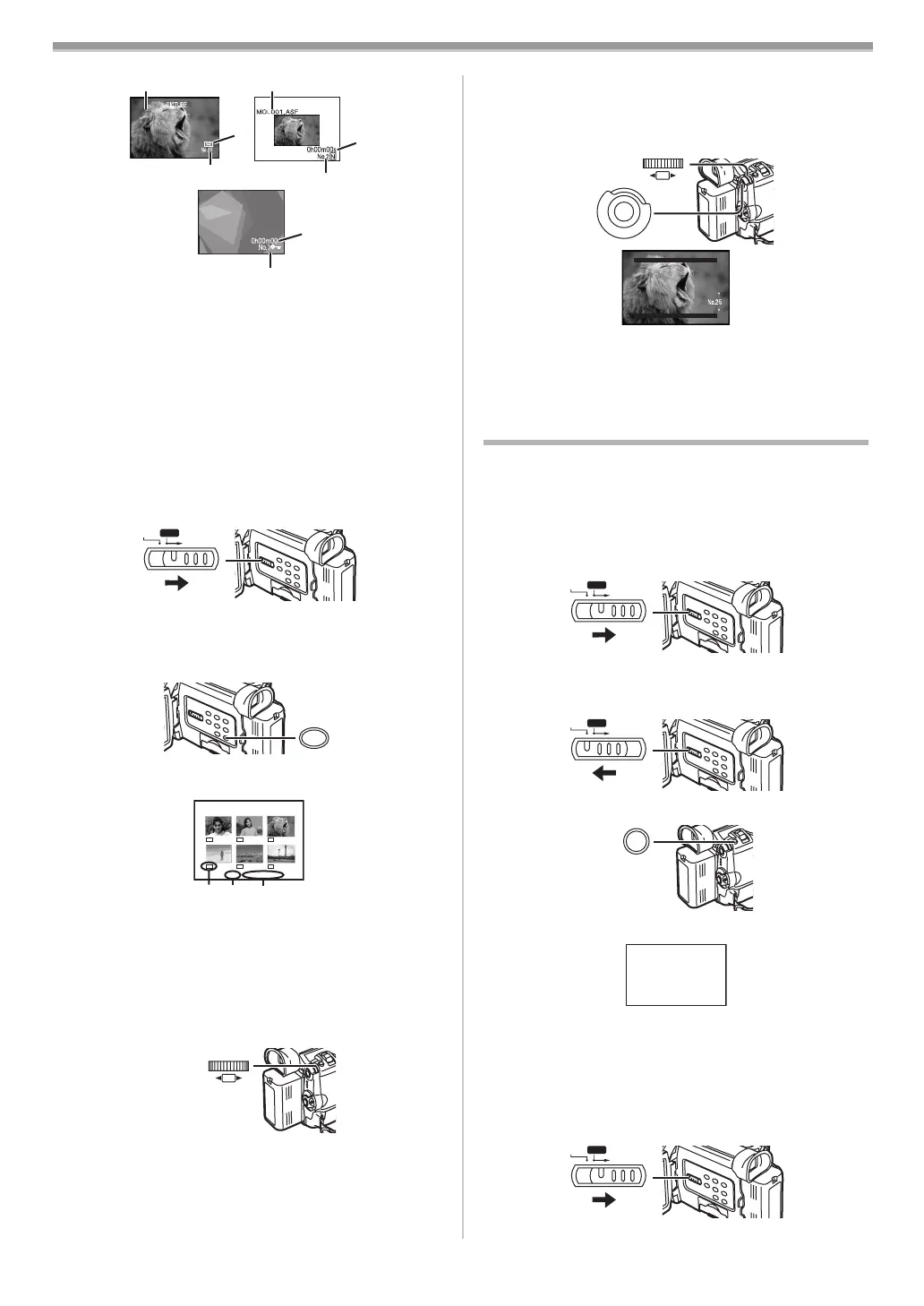
CARD Mode
-34-
1 Folder-File Number (When the picture is played back)
File Name (When the MPEG4 data is played back)
2 Picture Size (When the picture is played back) (
-41-)
Playback time (When MPEG4 data or Voice data is
played back)
3 File Number (When the picture or Voice data is played
back)
File Number and MPEG4 Picture Quality (When the
MPEG4 data is played back)
To Select a Desired File and Play It Back
1 Set the [TAPE/CARD/CARD MODE] Selector (13) to
[CARD].
2 Slide the [TAPE/CARD/CARD MODE] Selector (13) to
[CARD MODE] until the desired type of data indication
appears.
3 Press the [MULTI] Button (24).
≥The files recorded on the Card are displayed in
Multi-Picture Mode.
1 Picture Size (When [PICTURE] is selected at Step 2)
MPEG4 Picture Quality (When [MPEG4] is selected at
Step 2)
2 File Number
3 Folder-File Number (When [PICTURE] is selected at
Step 2)
File Name (When [MPEG4] is selected at Step 2)
4 Turn the [PUSH] Dial (26) and select a desired file.
≥The selected file is marked with a frame.
≥When 7 or more files have been recorded, turn the
[PUSH] Dial to display the next file. (The [6] Button or
[5] Button can be used instead of the [PUSH] Dial.)
5 Press either the [PUSH] Dial (26) or the [MULTI] Button
(24).
100-0001
MPEG4
VOICE
3
2
1
2
3
2
1
CARD MODE
TAPE
CARD
(13)
MULTI/P-IN-P
(24)
PICTURE
12 3
No.25 100-0014
640
640
640
640
640
640
PUSH
SHUTTER/IRIS/
VOL/JOG
(26)
≥The selected file is shown on the entire screen.
Using File Search Mode
1 Set [CARD FUNCTIONS] >> [CARD EDITING] >>
[FILE SEARCH] >> [YES].
2 Turn the [PUSH] Dial (26) and select the desired file
number, and press the [PUSH] Dial
(26).
≥For other notes concerning this item, see
-47-.
Recording Pictures on a Card to a Tape
Card Images can be recorded on the Tape one at a time or
all automatically.
After setting to Card Playback Mode, please carry out the
following procedures.
To Copy 1 Picture
1 Slide the [TAPE/CARD/CARD MODE] Selector (13) to
[CARD MODE] until the [PICTURE] Indication appears.
2 Display a desired picture.
3 Set the [TAPE/CARD/CARD MODE] Selector (13) to
[TAPE].
4 Press the [PHOTO SHOT] Button (25).
≥During the copying, the Indication appears.
≥It takes a few seconds to record a picture to the Tape.
≥When recording to tape, select the tape position before
recording. The picture will be recorded to the tape position
when the [PHOTO SHOT] Button is pressed at Step 4.
To Copy All the Pictures
1 Slide the [TAPE/CARD/CARD MODE] Selector (13) to
[CARD MODE] until the [PICTURE] Indication appears.
2 Display the first picture.
(26)
(51)
M
E
N
U
PUSH
SHUTTER/IRIS/
VOL/JOG
FILE SEARCH
PRESS MENU TO RETURN
CARD MODE
APE
CARD
(13)
CARD MODE
APE
CARD
(13)
PHOTO
SHOT
(25)
NOW RECORDING
REC
CARD MODE
APE
CARD
(13)
B5-B.book 34 ページ 2002年8月6日 火曜日 午前11時33分



 To Next Page