CARD Mode
-33-
Recording from a Cassette (VCR Mode)
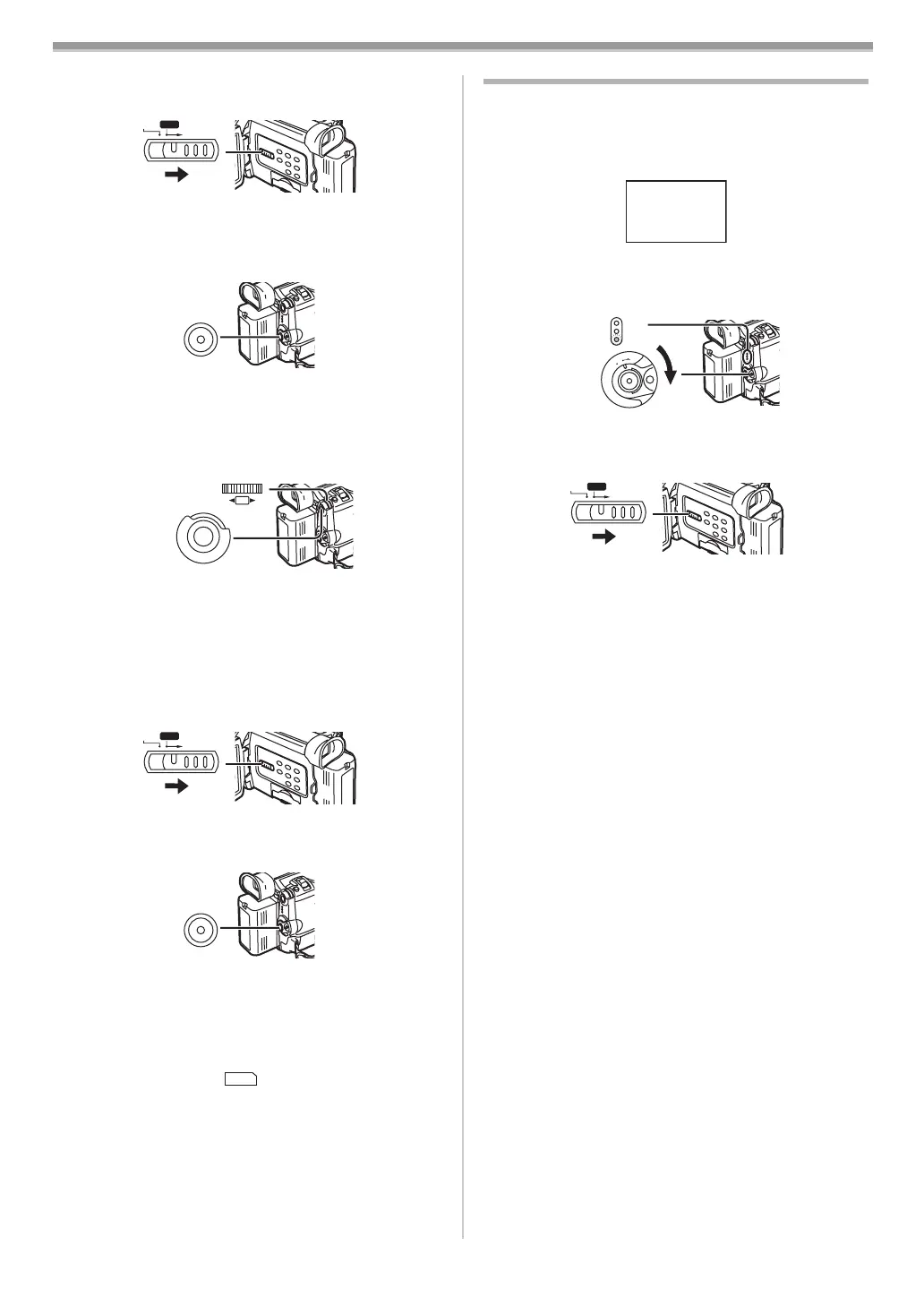
1 Set the [TAPE/CARD/CARD MODE] Selector (13) to
[CARD].
2 Slide the [TAPE/CARD/CARD MODE] Selector (13) to
[CARD MODE] until the [MPEG4] Indication appears.
3 Start playback and press the Recording Start/Stop
Button
(32) at the desired scene.
Selecting the quality of MPEG4 Recording images
1 Set [CAMERA FUNCTIONS] or [VCR FUNCTIONS] >>
[CARD SETUP] >> [MPEG4 MODE] >> a desired image
quality.
Maximum recording time on the supplied Card (16MB)
[SUPERFINE]: approximately 4 minutes
[FINE]: approximately 5 minutes
[NORMAL]: approximately 15 minutes
ª Recording Voice (Voice Recording Function)
You can record voice data on a Card. (Camera Mode only)
1 Set the [TAPE/CARD/CARD MODE] Selector (13) to
[CARD].
2 Slide the [TAPE/CARD/CARD MODE] Selector (13) to
[CARD MODE] until the [VOICE] Indication appears.
3 Press the Recording Start/Stop Button (32).
≥Voice from built-in microphone is recorded.
≥It takes 2 to 3 seconds to start recording.
≥The recorded file is automatically locked (to prevent
accidental erasure).
≥Voice from external microphone connected to the [MIC]
Socket can also be recorded.
≥During recording, the [ ] Indication is lit in red.
≥When Remaining Time Indication becomes [R:0h00m],
this Indication flashes in red. Recording may not be
started.
Maximum recording time on the supplied Card (16MB)
Approximately 55 minutes
≥For other notes concerning this item, see
-46-.
CARD MODE
TAPE
CARD
(13)
(32)
(26)
(51)
M
E
N
U
PUSH
SHUTTER/IRIS/
VOL/JOG
CARD MODE
TAPE
CARD
(13)
(32)
VOICE
Playing Back a Card
It plays back files recorded on a Card.
≥When you set the Movie Camera to Card Playback Mode,
the Card Contents are displayed to inform you which
kind(s) of data (still picture, moving picture and/or voice
data) are recorded on the Card.
1 Set the Movie Camera to Card Playback Mode.
≥The [CARD P.B] Lamp
(31) lights up.
≥The file that was recorded last on the Card is displayed.
2 Slide the [TAPE/CARD/CARD MODE] Selector (13) to
[CARD MODE] until [PICTURE], [MPEG4] or [VOICE]
Indication appears.
3 Start Playback.
[PICTURE]:
1: Starting the Slide Show
5: Playing back the next picture
6: Playing back the previous picture
∫: Stop the Slide Show
[MPEG4] or [VOICE]:
1: Playing back the File
5: To the beginning of the next File (in Stop Mode)
6: To the beginning of the previous File (in Stop Mode)
∫: Stop playing back
;: Pause playing back (When playing back MPEG4 Data,
this button does not pause playing back within
1 second of finishing playing back.)
When [MPEG4] Indication appears at Step 2
≥File is numbered in hexadecimal.
≥When the object is moving fast or zoom operation is
performed, picture may appear to be still or causes
mosaic-pattern noise, but this is not a malfunction.
When [VOICE] Indication appears at Step 2
≥If the [6] Button or [5] Button is pressed for 1 or more
seconds, it becomes 10k playback and keep pressing for 7
or more seconds, it becomes 60k playback. Releasing the
button brings back to normal playback.
≥When [MPEG4] or [VOICE] Indication appears at step 2,
during playback, keep pressing [PUSH] Dial until the
volume Indication appears and turn it to adjust the volume.
(
-25-)
CARD CONTENTS
PICTURE
MPEG4
VOICE
CAMERA
VCR
CARD P.B
O
F
F
O
N
M
O
D
E
(31)
(33)
CARD MODE
APE
CARD
(13)
B5-B.book 33 ページ 2002年8月6日 火曜日 午前11時33分



 To Next Page