4
ENGLISH
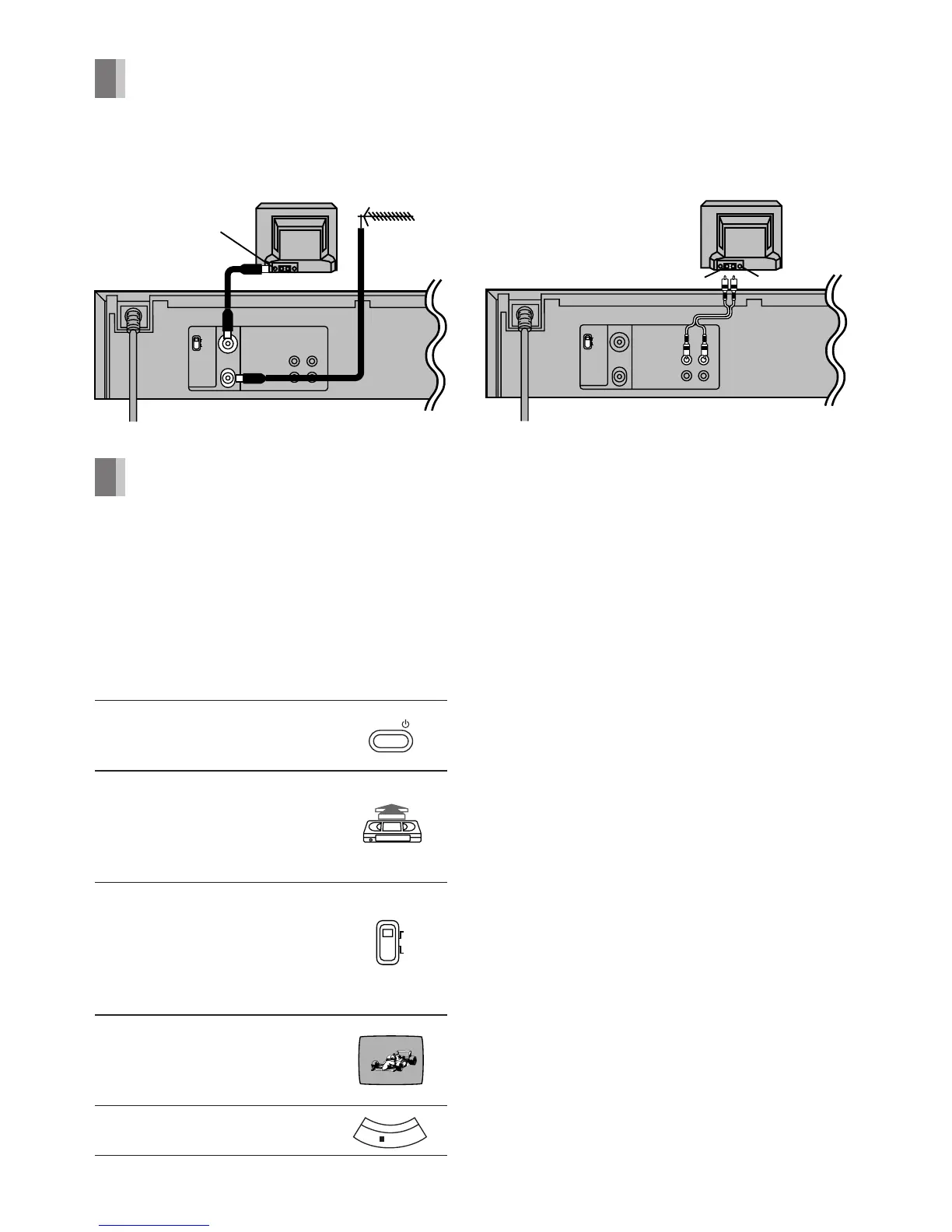
Connections
A: Basic Connections
B: Connection to a TV using
the Audio/Video Input Socket
Tuning the TV to your VCR (Line Recording)
It is possible to view the video picture on your
TV in the same way that you watch TV
broadcasts.
If you have connected the VCR (Line
Recording) to the TV through the Audio/
Video Input Sockets, then you do not need
to follow the procedure below.
Operations
1 Turn on the TV and VCR
(Line Recording).
2 Insert a recorded video
cassette tape.
– To start playback, see
page 6.
3 Select the video playback
channel not used for any TV
station.
– L: Channel E3
– H: Channel E4
4 Select the TV channel on
which the playback picture
is viewed.
5 Stop playback.
POWER
ÍÍ
ÍÍ
Í/I Button
Press to switch the VCR (Line Recording)
from on to the standby mode or vice versa. In
the standby mode, the VCR (Line Recording)
is still connected to the mains. When the VCR
(Line Recording) is turned off, the [STANDBY]
indicator (on the front panel) is lit. When the
VCR (Line Recording) is turned on, the [120]
indicator (on the front panel) is lit.




 To Next Page