9
30
60
180
240
120
REC/
STANDBY
LP(EP)
30
60
180
240
120
REC/
STANDBY
LP(EP)
30
60
180
240
120
REC/
STANDBY
LP(EP)
POWER VCR/TV
SEARCH
MENU
REW
INDEX
STOP
REC
OSD
FF
PLAY
RESET
TRACKING/V-LOCK
SPEED
2
1
Recording and
Editing
Recording
Preparations
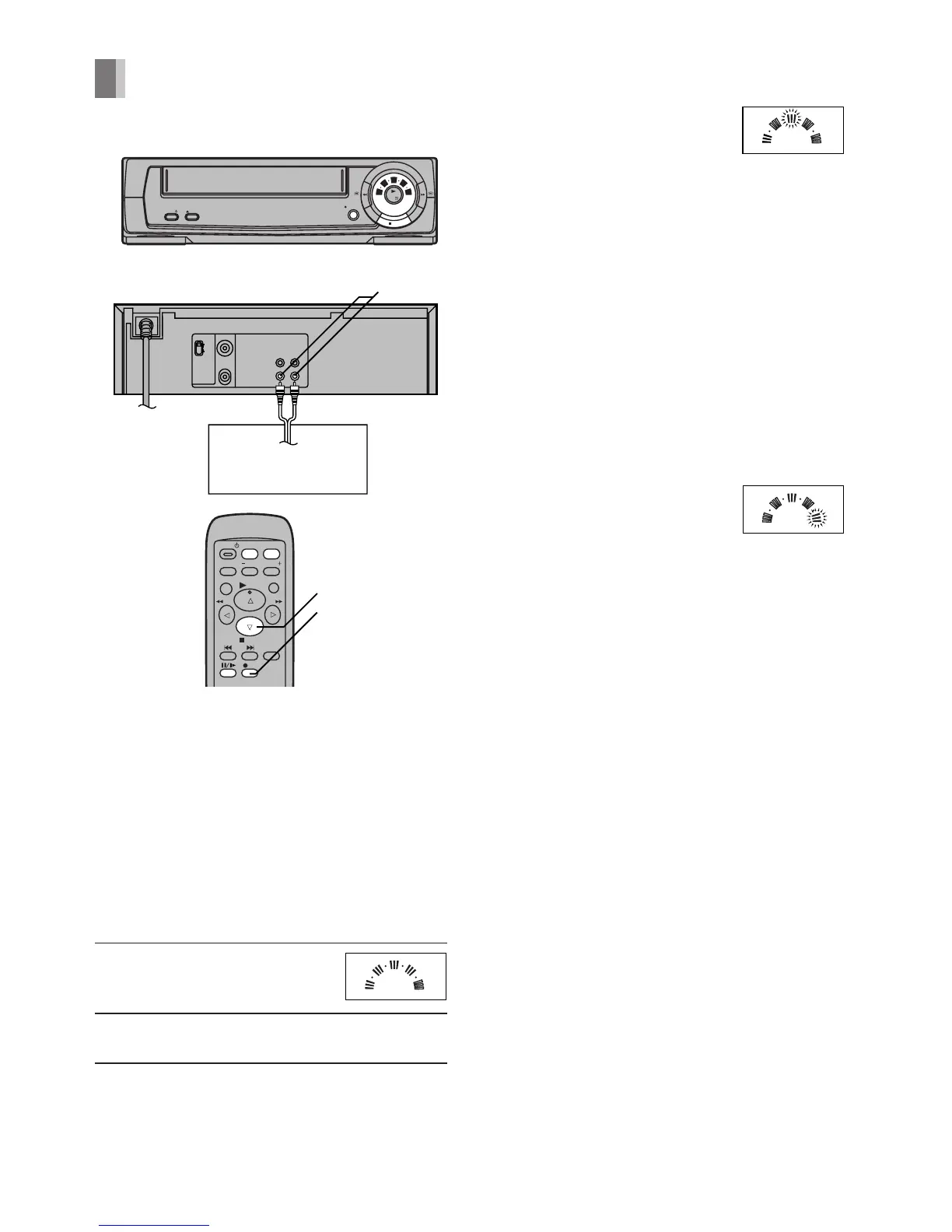
– Press [VCR/TV] to select VCR mode.
– Connect a movie camera or another VCR to
this VCR (Line Recording) as shown.
– Insert a video cassette tape with an intact
erasure prevention tab.
– Set [SYSTEM]. (See page 5.)
Operations
1 Start recording by pressing
[REC].
2 Stop recording by pressing [STOP].
To Interrupt Recording
Press [PAUSE/SLOW]
during recording.
Press it again to continue
recording.
To Select the Desired Tape
Speed
Press [SPEED] before recording.
Repeatedly pressing this button changes the
tape speed in the following order.
PAL: SP>LP>EP>SP
NTSC: SP>EP>SP
EP mode means Super Long Play (SLP).
– When LP or NTSC EP mode is selected, the
[LP (EP)] indicator is lit.
– When PAL EP mode is
selected, the [LP (EP)]
indicator flashes.
Notes:
– The Recording Pause mode will be
automatically released after 5 minutes.
– It is not possible to record via the RF input
Socket because this VCR (Line Recording) is
not equipped with a TV tuner.
– When playing back a cassette recorded in the
LP or EP mode, some picture and sound
distortion may occur. However, this is not a
malfunction.
– The tape recorded in the EP mode on this
VCR (Line Recording) cannot be played back
on the other VCR without EP mode function.
OUT
IN
AUDIO VIDEO
RF OUT
RF IN
POWER EJECT
REC/OTR
PLAY/
OFF
REW FF
/I
30
60
180
240
120
REC/
STANDBY
LP(EP)
STOP
L
H
AUDIO/VIDEO IN
Other VCR
Video Movie Camera




 To Next Page