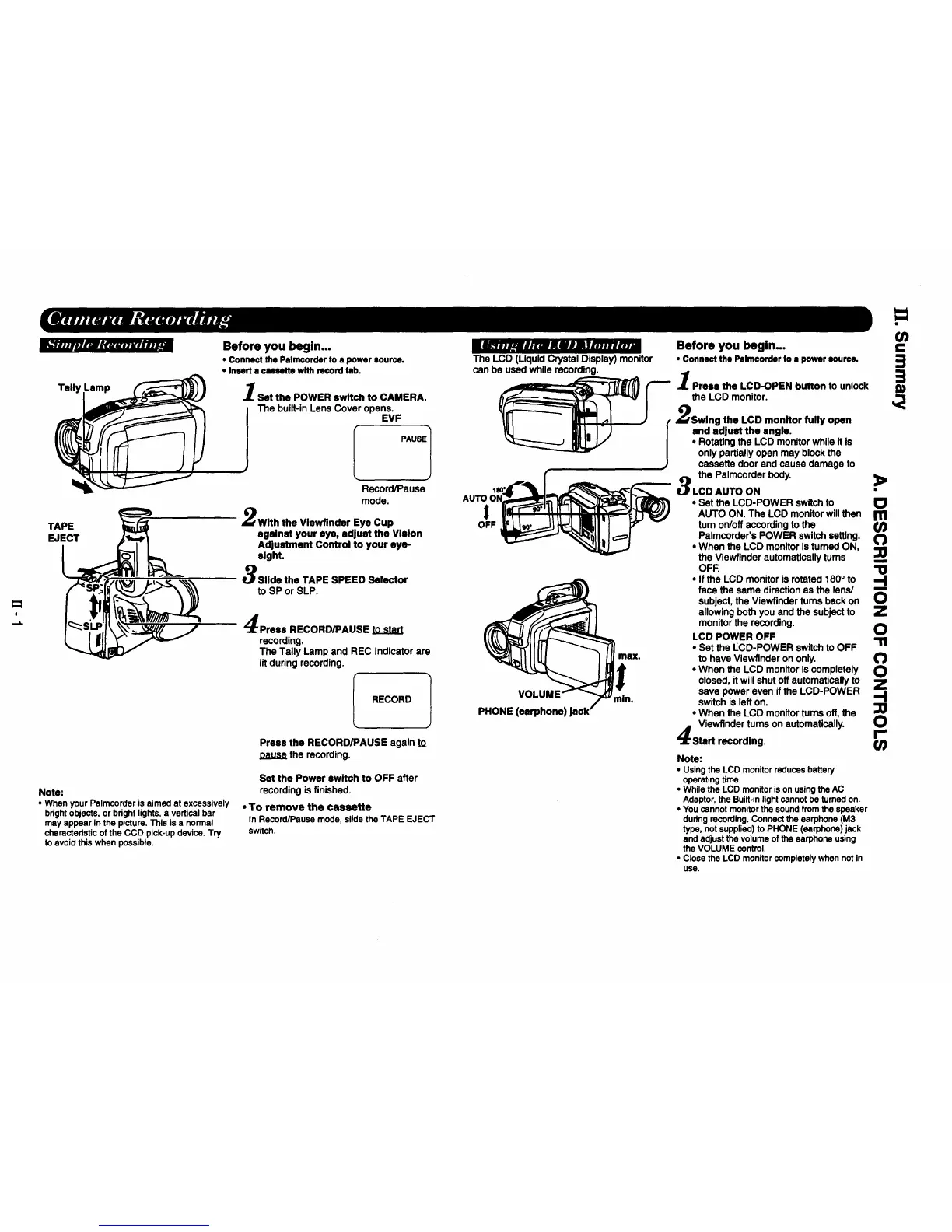
Tally
TAPE
EJECT
Before you begin...
• Connect the Palmcorder to • power aoun:e.
• Insert a cassette with recordtab.
Set the POWER switch to CAMERA.
The built-in Lens Cover opens.
EVF
PAUSE1
Record/Pause
mode.
With the Vlewflnder Eye Cup
against your eye, adjust the Vision
Ad|ustment Control to your eye-
eight.
Slide the TAPE SPEED Selector
to SP or SLP.
Press RECORD/PAUSE to start
recording,
The Tally Lamp and REC Indicatorare
litduringrecording.
RECORD 1
Press the RECORD/PAUSE again to
the recording.
Note:
• When yourPatmcorderis aimed at excessively
bdghtobjects, or bdght lights,a verticalbar
may appear inthe picture. This is a normal
charactedsticof the CCD pick-updevice. Try
to avoid this when possible.
Set the Power switch to OFF after
recording is finished.
• To remove the cassette
In Record/Pause mode, slide the TAPE EJECT
switch.
l_.a ._ajnz_KiOlYma.u.m
The LCD (LiquidCrystalDisplay) monitor
can be used whilerecording.
OFF
max.
VOI
PHONE (earphone)
min.
Before you begin...
• Connect the Palmcorder to a power source.
Press the LCD-OPEN button to unlock
the LCD monitor.
,_Swing the LCD monitor fully open
I andadjust the angle.
• Rotating the LCD monitor while It is
only partially open may block the
cassette door and cause damage to
the Palmcorderbody.
LCD AUTO ON
>
Note:
• Usingthe LCD monitorreducesbattery
operatingtime.
• While the LCD monitoris on usingthe AC
Adaptor,the Built.inlightcannot be turnedon,
• Youcannot monitorthe soundkom the speaker
dudng recording.Connectthe earphone (M3
type, notsupplied)to PHONE (earphone)jack
and adjust the volume of the earphone using
the VOLUME control.
• Close the LCD monitorcompletelywhennot in
use.
.=
O_
3=
• Set the LCD-POWER switch to
AUTO ON. The LCD monitor will then r_
tum on/off according to the Or)
Palmcorcler's POWER switch setting.
• When the LCD monitor is turned ON,
the Viewflnder automatically tums
OFF.• If the LCD monitor is rotated 180 ° to
face the same direction as the lens/
subject, the Viewfinder turns back on
allowing both you and the subject to
monitor the recording.
LCD POWER OFF
• Set the LCD-POWER switch to OFF
to have Viewfinder on only. (")
• When the LCD monitor is completely O
closed, itwill shut off automatically to Z
save power even if the LCD-POWER -'1
switch is left on.
• When the LCD monitor turns off, the
Viewfinder turns on automatically. 0
Start recording, r-







 To Next Page