VUtl,,v.ltu_t_'_an_uwJntw Ntl-v J_/__ltlel&VO]m#Mr,_mlmWllllUll_uu
laae.y_Md IVI_J Illi rel,:_uhi
)14
T
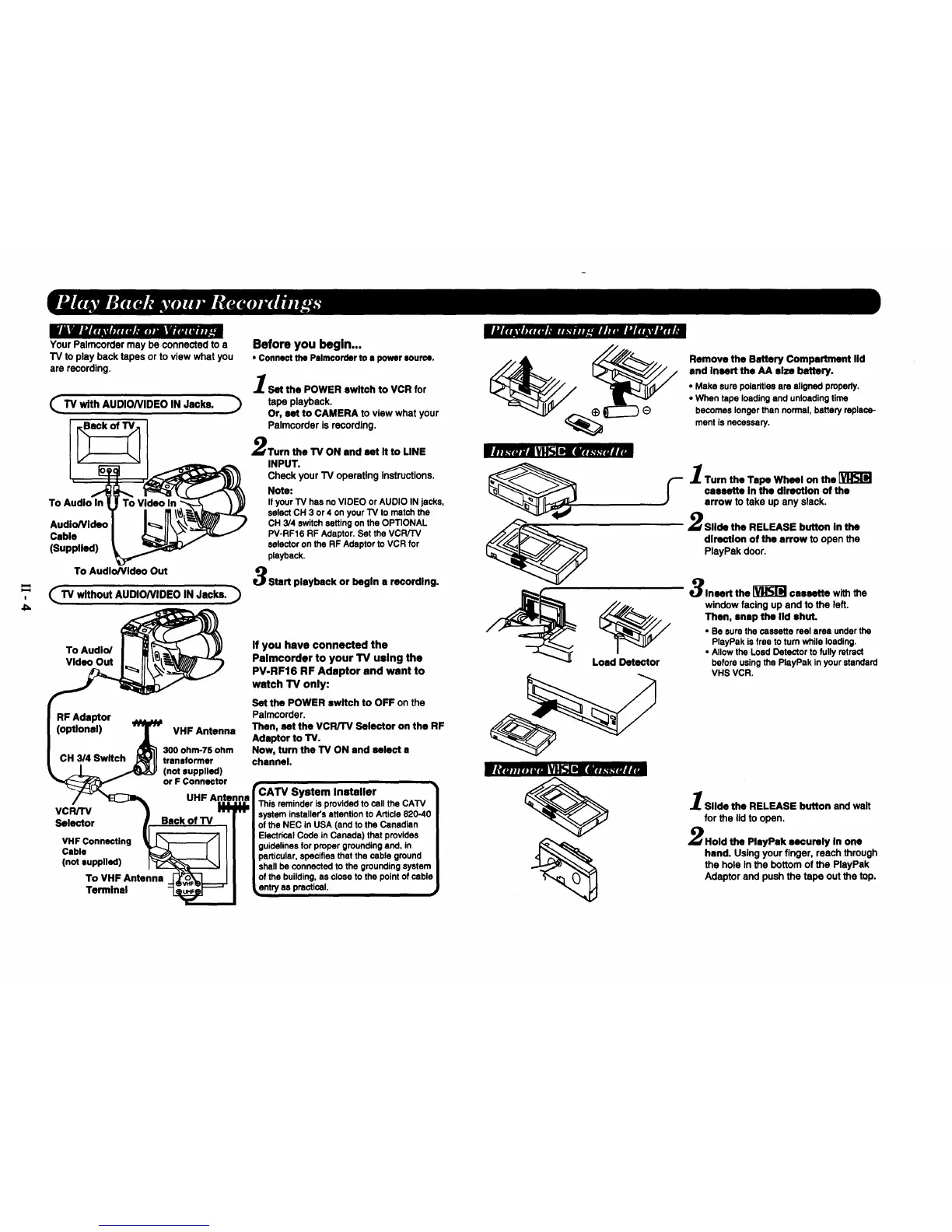
Your Palmcordermay be connectedto a
TV to play backtapes orto view what you
are recording.
(_TV with AUDIONIDEO IN Jacks.
To Audio In
Cable
(Supplied)
To Audio/Video Out
(_TV without AUDIONIDEO IN Jacks.
To Audio/
Video Out
RF Adaptor
(optional)
VHF Antenna
300 ohm-T5 ohm
CH 3/4 Switch transformer
(not supplied)
or F Connector
• UHF Antenna
vc.=v
Selector I Back of TV /
Ceb,a _ I III
,n..,,.ed) I ll
To VHF Antenna -_NL---.J I
Terminal
Before you begin...
* Connect the Palmcorder to a power source.
l Set the POWER switch to VCR for
tape playback.
Or, set to CAMERA to view what your
Palmcorder is recording.
Turn the TV ON and set it to LINE
INPUT.
Check your TV operating Instructions.
Note:
Ifyour TV has no VIDEO or AUDIO IN jacks,
select CH 3 or4 on your TV to match the
CH 3/4 switchsetting on the OPTIONAL
PV-RF16 RF Adaptor. Set the VCR/TV
selector on the RF Adaptor to VCR for
playback.
Start playback or begin a recording.
If you have connected the
Palmcorder to your TV using the
PV-RF16 RF Adaptor and want to
watch TV only:
Set the POWER switch to OFF on the
Palmcorder.
Then, set the VCR/'rv Selector on the RF
Adaptor to TV.
Now, turn the TV ON and select a
channel.
rhu.z.h'_ 1I_1SISI[ wl_.-_.-ruti_
'CATV System Installer
This reminderis provided to call the CATV
system installer'sattention to Article 820-4C
of the NEC in USA (and to the Canadian
ElectricalCode in Canada) that provides
guidelinesfor proper groundingend, in
particular,specifiesthat the cable ground
shallbe connected to the groundingsystem
of the building,as close to the pointof cable
_ntry as practical. ,J
Load Detector
Remove the Battery Compartment lid
and insert the AA size battery.
• Make sure polaritieeare aligned properly.
• When tape loading and unloadingtime
becomes longer than normal, battery replace-
ment is necessary.
--'1 Turn the Tape Wheel on the
cassette in the direction of the
arrow to take up any slack.
Slide the RELEASE button in the
direction of the arrow to open the
PlayPak door.
Insert the _ cassette with the
window facing up and to the left.
Then, snap the lid shut.
* Be sure the cassette reel area under the
PlayPak is free to turn while loading.
• Allow the Load Detector to fully retract
before usingthe PlayPak inyour standard
VHS VCR.
Slide the RELEASE button and wait
for the lid to open.
Hold the PlayPak securely In one
hand. Using your finger, reach through
the hole In the bottom of the PlayPak
Adaptor and push the tape out the top.








 To Next Page