rk, L_wAwll'lJ _E*m*RJ,J_
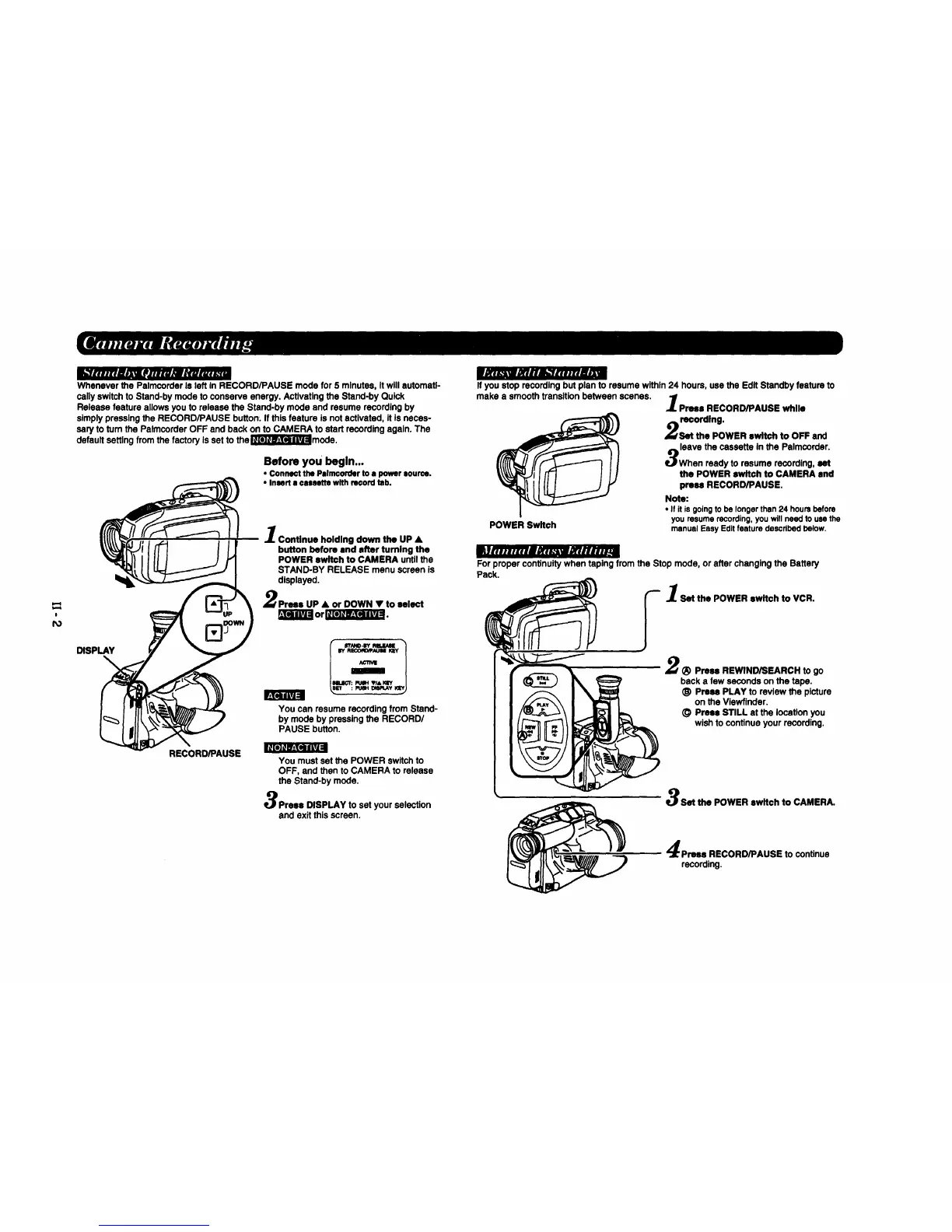
Whenever the Pslmcorder Is left In RECORD/PAUSE mode for 5 minutes, Itwill automatl-
cally switch to Stand-by mode to conserve energy. Actlvatlng the Stand-by Quick
Release feature allows you to release the Stand-by mode and resume recording by
slmply pressing the RECORD/PAUSE button. If this feature is not activated, it Is necas-
sary to turn the Palmcorder OFF and back on to CAMERA to start recording again. The
default setting from the factory Is set to the_mode.
Before you begin...
• Connect the Palm€order to a power source.
• Insert • cassette with record tab.
DISPLAY
B[e]lll_J=
RECORD/PAUSE
Continue holding down the UP •
button before and after turning the
POWER switch to CAMERA until the
STAND-BY RELEASE menu screen is
displayed.
Prses UP • or DOWN • to select
_]_ or I__ I .
PUSH VI& KEY
: Pt_H DlSlq.Ay tq_.
You can resume recording from Stand-
by mode by pressing the RECORD/
PAUSE button.
You must set the POWER switch to
OFF, and then to CAMERA to release
the Stand-by mode.
Press DISPLAY to set your selection
and exit this screen.
If you stop recording but plan to resume within 24 hours, use the Edit Standby feature to
make a smooth transition between scenes,
Proel RECORD/PAUSE while
recording.
Set the POWER switch to OFF and
leave the cassette In the Palmcordsr.
When ready to resume recording, set
the POWER switch to CAMERA and
press RECORD/PAUSE.
Note:
• If it isgoingto be longerthen24 hoursbefore
youresumerecording,youwillneedto usethe
POWER Switch manualEasyEditfeaturedescribedbelow.
For proper continuity when taping from the Stop mode, or after changing the Battery
Pack.
"-- I Set the POWER ewltch to VCR.
2_) Press REWIND/SEARCH to go
back a few seconds on the tape.
_) Press PLAY to review the picture
on the Viewfinder.
(_ Press STILL at the location you
wish to continue your recording.
Set the POWER switch to CAMERA.
Prsee RECORD/PAUSE to continue
recording.









 To Next Page