6. Appendix
Diagnosis by Test Pattern (1)
<Purpose>
<Model>
<Symptom>
<Diagonosis>
<How to enter the Test Pattern>
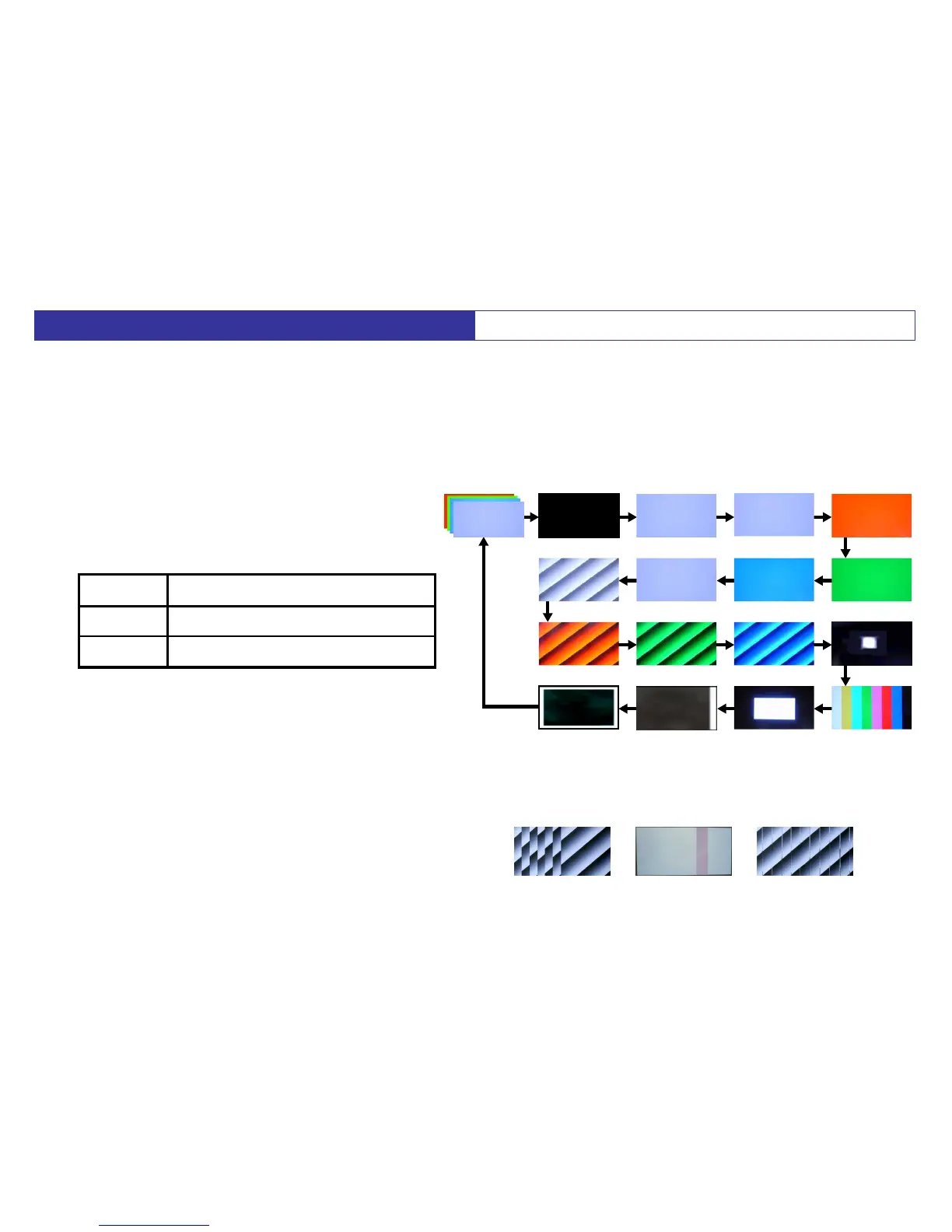
< Test Pattern (Normal)>
< Test Pattern (Abnormal)>
Full HD Models (PZ850,PZ800,PZ85,PZ80 series)
Picture Noise, Full Vertical Line
Example Picture
26
TEMP
000
TIME
0
1 : R/G/B/W
(by A Board)
2 : Black
(by A Board)
3 : White
(by A Board)
4 : White
(by D Board)
5 : Red
9 : Ramp White 8 : ON/OFF Aging 7 : Blue 6 : Green
10 : Ramp Red 11 : Ramp Green 12 : Ramp Bule 13 : 1% window
17 : White Frame 16 : Scroll 15 : A and B zone 14 : Color bar
In case of PDP, the picture problem at all over the screen (Picture Noise, Full Vertical Line) is mainly caused
by D or A board defective. This Test Pattern is able to diagnose D or A board. Because, D board had Test
Pattern. So, we can judge by using Test Pattern which is defective. Regarding diagnosis for these board,
please confirm as follows.
Defective BoardPattern
Abnormal
Normal
D Board
A Board (or D Board)
1. While pressing "VOLUME-" button of the TV set,
press "
INFO
" button of the remote control three
times within 2 seconds.
2. Push button "1" of Remote Controller several times,
and select "
Aging
" setting,then “Test pattern” will appear.
3. Press "3" button for next picture in forward direction.
(Press "4" button in reverse direction)
(except PX80 series)





 To Next Page