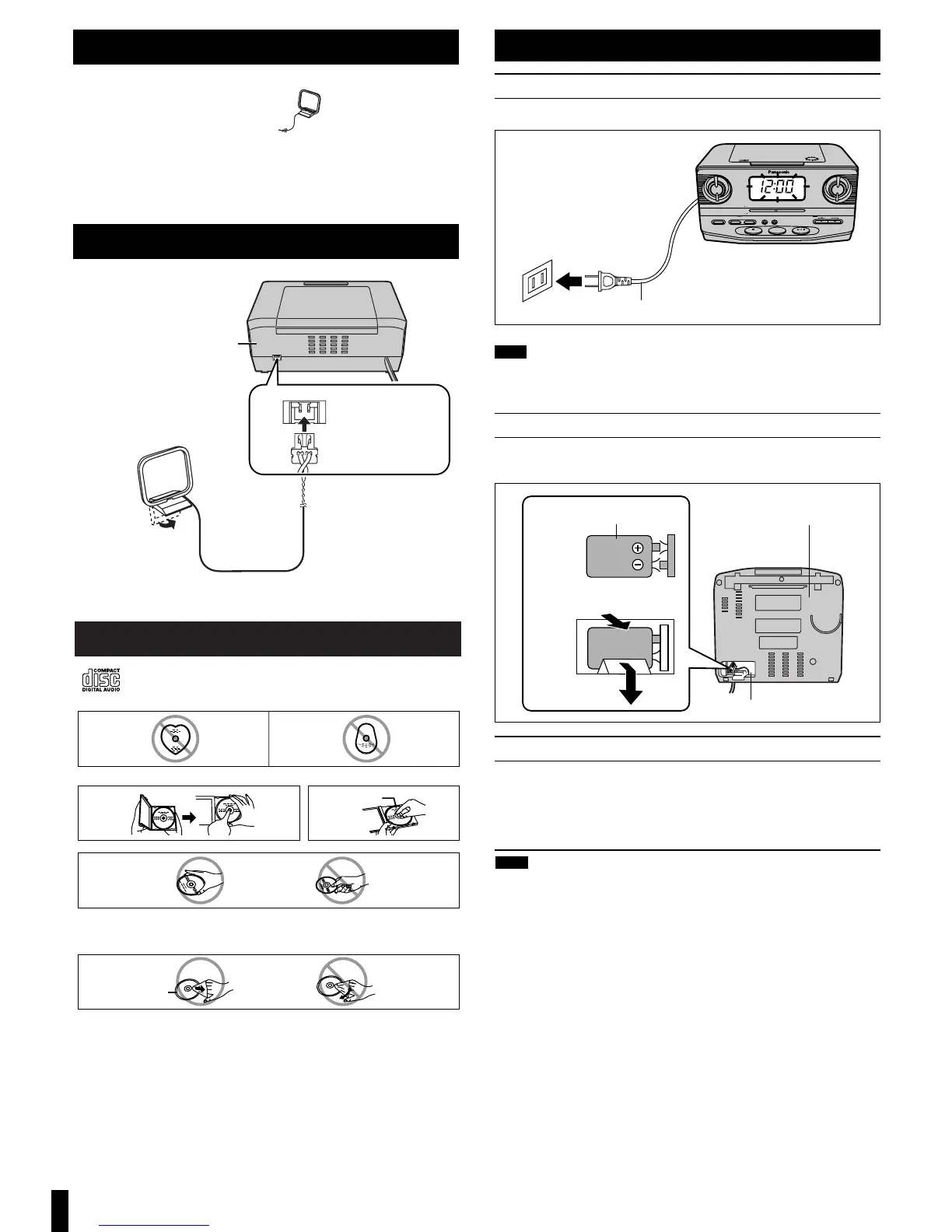
Concerning Compact Discs
Only compact discs bearing this mark can be used with this unit.
However, continued use of irregularly shaped CDs can damage the unit.
If the surface is dirty
Wipe it with a damp cloth and then wipe dry.
Wipe from the center toward the outer circumference.
How to hold a disc
How to store the disc in its caseHow to remove a disc from its case
Play surface
(shiny surface)
Label side up
Handling precautions
≥If you are taking the CD from a cold to
a warm environment, moisture may
form on the CD. Wipe this off with a
soft, dry, lint-free cloth before using the
CD.
≥Do not write on the label side with a
ball-point pen or other writing instru-
ment.
≥Do not use record cleaning sprays,
benzine, thinner, static electricity pre-
vention liquids or any other solvent.
≥Do not attach labels or stickers to CDs.
(Do not use CDs with exposed adhe-
sive from tape or left over peeled off
stickers.)
≥Do not use scratch-proof protectors or
covers other than those specified for
use with this unit.
Storage precautions
Be sure to store CDs in their cases to
protect them from dust, scratches, and
warping.
Do not place or store CDs in the fol-
lowing places
≥Locations exposed to direct sunlight
≥Humid or dusty locations
≥Locations directly exposed to a heat
vent or heating appliance
≥In the glove compartment or on the
rear deck of an automobile
Supplied accessories
Please check and identify the supplied accessories.
∑1 FM/AM loop antenna (RSA0031)
Use numbers in parentheses when asking for replacement parts.
(Only for U.S.A.)
To order accessories, contact 1-800-332-5368 or the website
(http://www.panasonic.com
).
2
AC power supply cord
Connect the AC power supply cord to a household AC outlet.
These speakers do not have magnetic shielding. Do not place them near
televisions, personal computers or other devices easily influenced by mag-
netism.
Memory back-up battery (not included)
This battery saves the clock and alarm settings if there is a power
interruption.
Replacing the battery
≥The battery lasts about a year.
The battery lasts about a month if the unit is disconnected from the
household AC outlet.
≥Protect the memory by connecting the AC power cord before changing
the battery.
≥Align the poles (- and +) properly when inserting the battery.
≥Do not heat or disassemble batteries. Do not allow them to contact flame
or water.
≥Remove the battery if the unit is not to be used for a long time.
≥Do not use the battery if the covering has been peeled off.
Mishandling of batteries can cause electrolyte leakage which can damage
items the fluid contacts and may cause a fire.
If electrolyte leaks from the batteries, consult your dealer.
Wash thoroughly with water if electrolyte comes in contact with any part of
your body.
Note
Power sources


 To Next Page