EasyManua.ls Logo

Panasonic RC-CD300 - Listening to the Radio; Tuning and Volume Control; Improving Radio Reception; Using the Sleep Timer

Panasonic RC-CD300
8 pages
Print Icon
To Next Page IconTo Next Page
To Previous Page IconTo Previous Page
Loading...
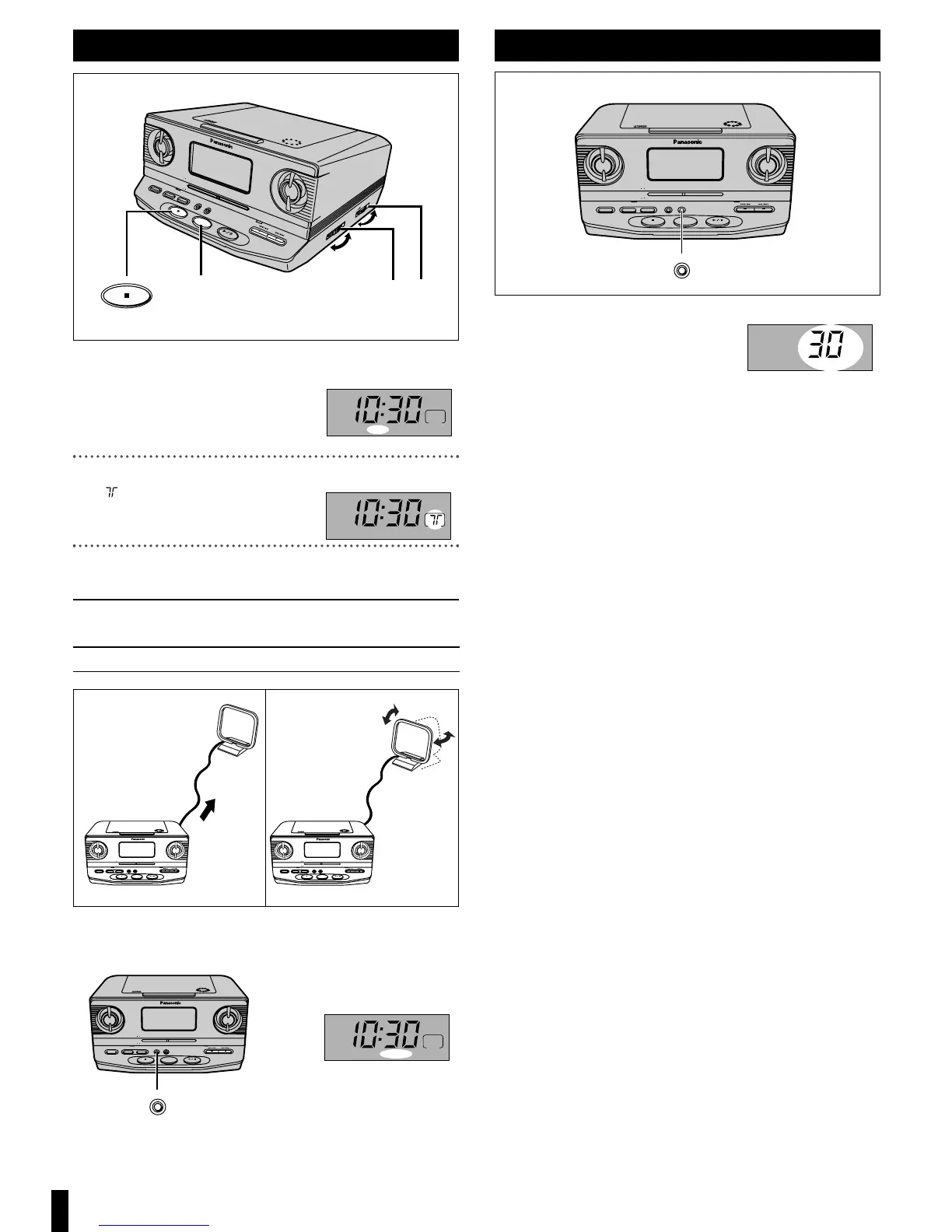
Press [FM/AM, RADIO] to select the band.
Each time [FM/AM, RADIO] is pressed
FM ) AM
^----------n
Turn the dial to tune to the desired station.
“” lights up when the station is
tuned in.
Adjust the volume.
ª To turn off
Press [, OFF].
To improve reception
ª If noise is excessive in the FM stereo mode
Press [MODE].
“MONO” lights up.
Sound will be produced in monaural, but this also reduces noise.
Press the button again to cancel. (“MONO” goes out.)
SLEEPDISP /
-
TIME SET AL 1 /
-
SET AL 2 /
-
SET MODE
OFF RADIO
FM/AM
CD
FM
88 92 96 100 104 108
MHz
53 60 70 80 100 130 170
kHz
X10
AM
RC
-
CD300
CD CLOCK RADIO
DOZE
5
SLEEPDISP /
-
TIME SET AL 1 /
-
SET AL 2 /
-
SET MODE
OFF RADIO
FM/AM
CD
FM
88 92 96 100 104 108
MHz
53 60 70 80 100 130 170
kHz
X10
AM
RC
-
CD300
CD CLOCK RADIO
DOZE
FM AM
Extend and change the
direction of the antenna
lead.
SLEEPDISP /
-
TIME SET AL 1 /
-
SET AL 2 /
-
SET MODE
OFF RADIO
FM/AM
CD
FM
88 92 96 100 104 108
MHz
53 60 70 80 100 130 170
kHz
X10
AM
RC
-
CD300
CD CLOCK RADIO
DOZE
MODE
RQTT0530
Listening to the radio
AM
FM
AM
FM
F
M
8
8
9
2
9
6
1
0
0
1
0
4
1
0
8
M
H
z
5
3
6
0
7
0
8
0
1
0
0
1
3
0
1
7
0
k
H
z
X
1
0
AM
RC
-
CD300
C
D
C
L
O
C
K
R
A
D
IO
D
O
Z
E
S
L
E
E
P
D
I
S
P
/
-
T
I
M
E
S
E
T
T
U
N
I
N
G
A
L
1
/
-
S
E
T
A
L
2
/
-
S
E
T
M
O
D
E
O
F
F
RADIO
C
D
V
O
L
U
M
E
1
3
F
M
/A
M
OFF
2
1
2
3
Press [SLEEP].
Each time [SLEEP] is pressed
30 ) 60 ) 90 ) 120
(min.)
^------------ OFF ------------}
ª To release the timer
Press [SLEEP] to select “OFF”.
ª To check the remaining time
Press [SLEEP] once.
The time display is restored after the remaining time is displayed.
ª To change the remaining time
Press [SLEEP] to display the remaining time then press again to
change the time.
For your reference:
You can combine the alarm and sleep timer. Be sure the volume is at an
appropriate level before you turn the unit off.

SLEEPDISP /
-
TIME SET AL 1 /
-
SET AL 2 /
-
SET MODE
OFF RADIO
FM/AM
CD
FM
88 92 96 100 104 108
MHz
53 60 70 80 100 130 170
kHz
X10
AM
RC
-
CD300
CD CLOCK RADIO
DOZE
SLEEP
SLEEP
Using the sleep timer

Related product manuals