6
CD
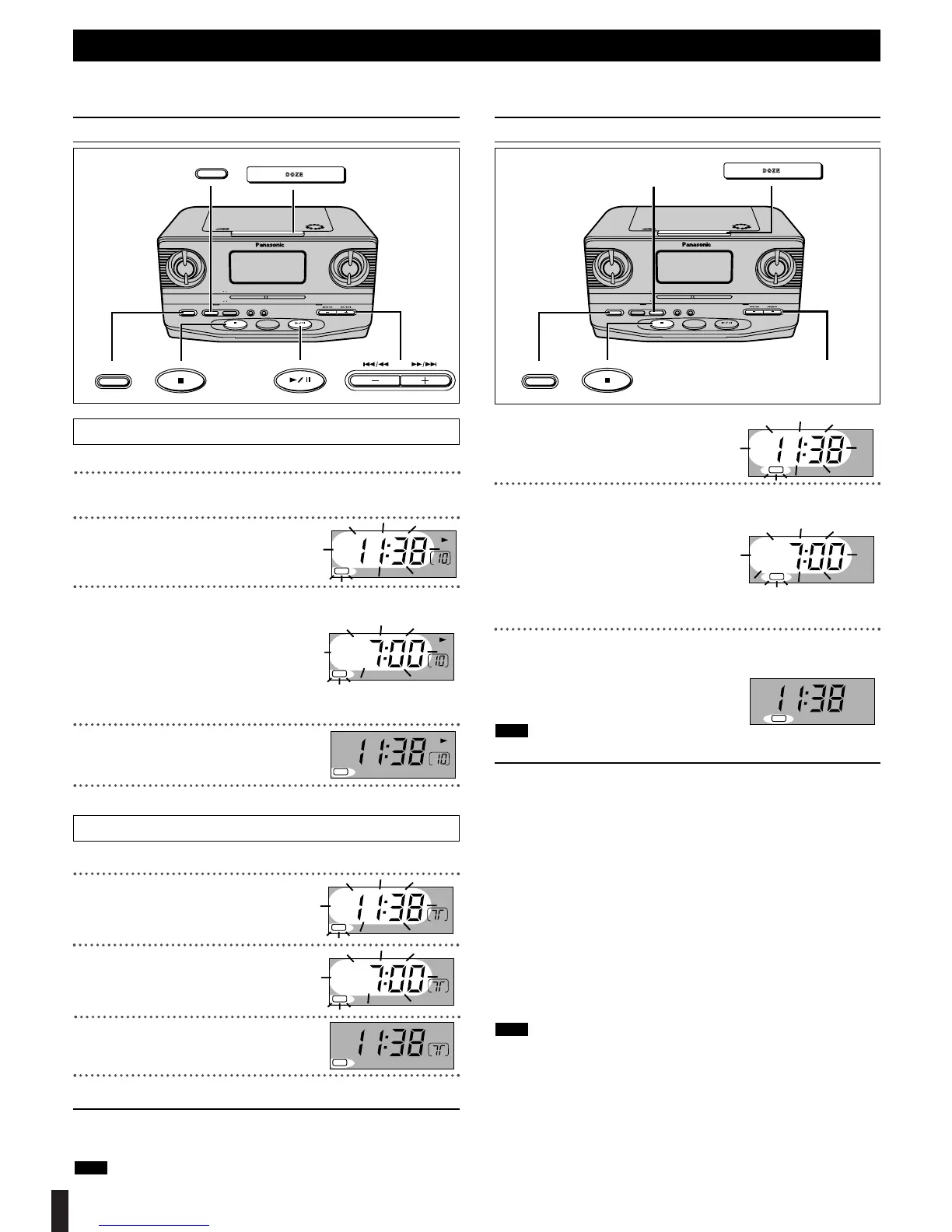
Press [
1/ ;, CD] to start play.
Press [i, 5/9] or [j, :/6] to select the desired
track.
Press and hold [AL 1/-SET]
until the display flashes.
Press [i, 5/9] or [j, :/6]
to adjust the alarm time.
2 [i, 5/9]: Increases the time
by one-minute units.
2 [j, :/6]: Decreases the time
by one-minute units.
The time changes faster if you hold [i, 5/9] or [j, :/6]
down.
Press [
AL 1/-SET
].
The alarm time is set and “AL 1” is
indicated on the display .
Press [
∫, OFF
] to turn off.
RADIO
Tune to the station.
(Refer to page 5 “Listening to the radio” )
Press and hold [AL 1/-SET]
until the display flashes.
Press [i, 5/9] or [j, :/6]
to adjust the alarm time.
Press [
AL 1/-SET
].
The alarm time is set and “AL 1” is
indicated on the display .
Press [
∫, OFF
] to turn off.
For your reference:
The unit can be used after the CD/Radio alarm has been set. Be sure the
volume is at an appropriate level before you turn the unit off.
If you set the CD alarm but do not insert a CD or set the radio alarm but
do not receive a station, the buzzer will sound at the set time instead.
Note
Using the alarm
You can set the unit to come on at a set time and play a CD, the radio or a buzzer. The unit turns off automatically after one hour.
Preparation: Set the current time. (Refer to page 3 “Setting the time”)
Setting the CD/Radio alarm (ALARM 1)
5
Example: set the alarm
time for “7:00 AM”.
Press and hold [AL 2/-SET]
until the display flashes.
Press [i, 5/9] or [j, :/6]
to adjust the alarm time.
2 [i, 5/9]: Increases the time
by one-minute units.
2 [j, :/6]: Decreases the time
by one-minute units.
The time changes faster if you hold [i, 5/9] or [j, :/6]
down.
Press [
AL 2/-SET
].
The alarm time is set and “AL 2” is indicated on the display.
You cannot adjust the volume of the buzzer alarm.
ª To shut off the alarm
Press [∫, OFF].
The alarm is turned off but the setting remains intact so the alarm will op-
erate as set the next day as well.
ª To clear the alarm setting
Press [AL 1/-SET] or [AL 2/-SET] again.
“AL 1” or “AL 2” is cleared.
ª To snooze a few more minutes even after the alarm has sounded
Press [DOZE].
The alarm sounds again 6 minutes later.
Press [∫, OFF] to shut off the alarm.
ª To check the alarm time
Press [DISP/-TIME SET].
The alarm time is displayed. (ALARM 1 and then ALARM 2)
This unit enables two alarms (ALARM 1, ALARM 2) to be set separately.
Note
Note


 To Next Page