EasyManua.ls Logo

Panasonic RC-CD500 - Power Sources and Controls; AC Power Supply and Memory Back-up; Control Panel Overview; Alarm, Sleep Timer Settings

Panasonic RC-CD500
8 pages
Print Icon
To Next Page IconTo Next Page
To Previous Page IconTo Previous Page
Loading...
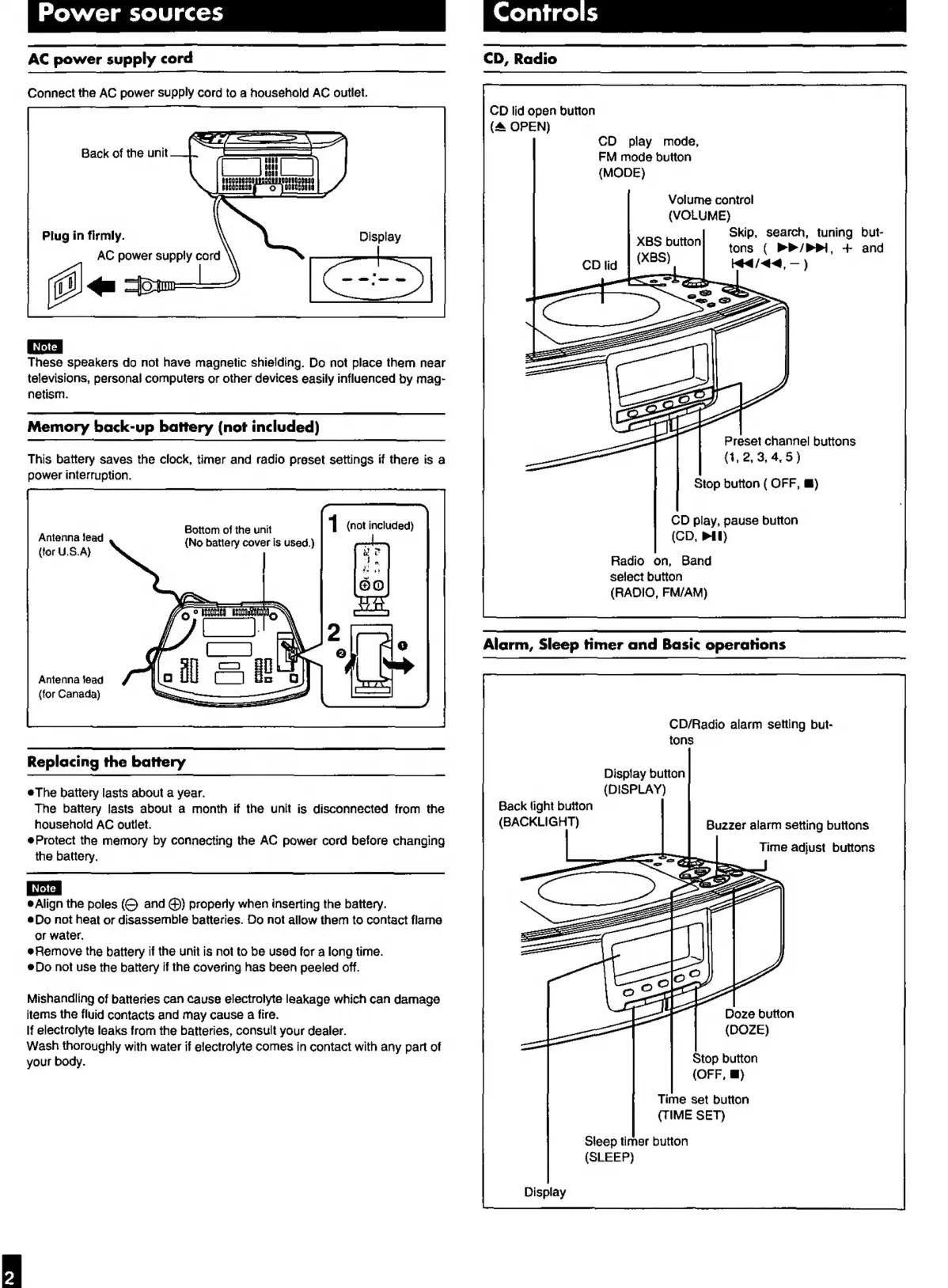
Power
sources
AC
power
supply
cord
Connect
the
AC
power
supply
cord
to
a
household
AC
outlet.
Back
of
the
unit
Plug
in
firmly.
AC
power
supply
cord
Display
These
speakers
do
not
have
magnetic
shielding.
Do
not
place
them
near
televisions,
personal
computers
or
other
devices
easily
influenced
by
mag-
netism.
Memory
back-up
battery
(not
included)
This
battery
saves
the
clock,
timer
and
radio
preset
settings
if
there
is
a
power
interruption.
Bottom
of
the
unit
1
(not
included)
Antenna
lead
(No
battery
cover
is
used.)
(tor
U.S.A)
Antenna
lead
(for
Canada)
Replacing
the
battery
eThe
battery
lasts
about
a
year.
The
battery
lasts
about
a
month
if
the
unit
is
disconnected
from
the
household
AC
outlet.
Protect
the
memory
by
connecting
the
AC
power
cord
before
changing
the
battery.
è
Align
the
poles
and
@)
properly
when
inserting
the
battery.
è
Do
not
heat
or
disassemble
batteries.
Do
not
allow
them
to
contact
flame
or
water.
eRemove
the
battery
if
the
unit
is
not
to
be
used
for
a
long
time.
Do
not
use
the
battery
if
the
covering
has
been
peeled
off.
Mishandling
of
batteries
can
cause
electrolyte
leakage
which
can
damage
items
the
fluid
contacts
and
may
cause
a
fire.
If
electrolyte
leaks
from
the
batteries,
consult
your
dealer.
Wash
thoroughly
with
water
if
electrolyte
comes
in
contact
with
any
part
of
your
body.
CD,
Radio
CD
lid
open
button
{4
OPEN)
CD
play
mode,
FM
mode
button
(MODE)
Volume
control
(VOLUME)
Skip,
search,
tuning
but-
eras
tons
(
PP
/PPRI,
+
and
cpg
|
8S)
Kd
/<4,
)
Cs
<<
pay
=
Preset
channel
buttons
(1,
2,
3,
4,
5
)
Stop
button
(
OFF,
E)
CD
play,
pause
button
(CD,
MI)
Radio
on,
Band
select
button
(RADIO,
FM/AM)
Alarm,
Sleep
timer
and
Basic
operations
CD/Radio
alarm
setting
but-
tons
Display
button
(DISPLAY)
Back
light
button
(BACKLIGHT)
Buzzer
alarm
setting
buttons
Time
adjust
buttons
Doze
button
(DOZE)
Stop
button
(OFF,
E)
Time
set
button
(TIME
SET)
Sleep
timer
button
(SLEEP)
Display

Other manuals for Panasonic RC-CD500

Related product manuals