EasyManua.ls Logo

Panasonic RC-CD500 - Setting the Time and Basic CD Playback; Setting the Clock; Operating the CD Player; Backlight Control

Panasonic RC-CD500
8 pages
Print Icon
To Next Page IconTo Next Page
To Previous Page IconTo Previous Page
Loading...
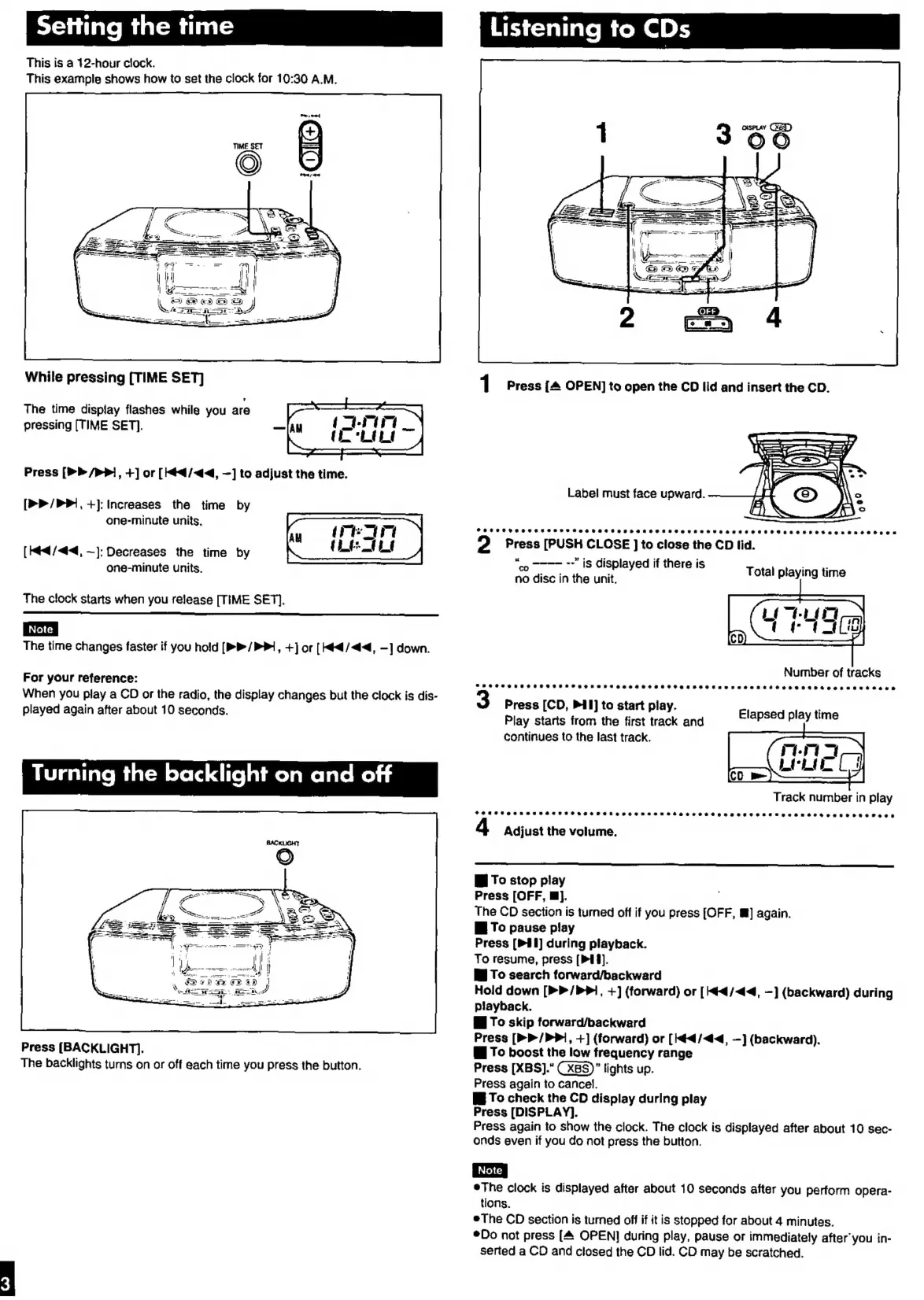
This
is
a
12-hour
clock.
This
example
shows
how
to
set
the
clock
for
10:30
A.M.
S
-_———
o.
ti
Ped
E
a4
Ss
ee
iA
2k
in
See
=..
nw
While
pressing
[TIME
SET]
The
time
display
flashes
while
you
are
pressing
[TIME
SET].
Press
[>>
/>P],
+]
or
[¢4/4<4,
—]
to
adjust
the
time.
[>>
/PPi,
+]:
Increases
the
time
by
one-minute
units,
[Med
/<44,
~):
Decreases
the
time
by
one-minute
units.
The
clock
starts
when
you
release
[TIME
SET).
The
time
changes
faster
if
you
hold
[P
/
PP,
+]
or
[He
/<44,
—]
down.
For
your
reference:
When
you
play
a
CD
or
the
radio,
the
display
changes
but the
clock
is
dis-
played
again
after
about
10
seconds.
Turning
the
backlight
on
and
off
Press
[BACKLIGHT].
The
backlights
turns
on
or
off
each
time
you
press
the
button.
Listening
to
CDs
Label
must
face
upward.
SCHROTHSHESSHES
SSS
HSSHSESEHEHEOSCHEFO
THEO
THESE
ESHER
ECS
RARER
OReEREBORRE
2
Press
[PUSH
CLOSE
]
to
close
the
CD
lid.
“co
~~~
~”
iS
displayed
if
there
is
mere
no
disc
in
the
unit.
Total
playing
time
Number
of
tracks
Press
[CD,
Pl]
to
start
play.
Play
starts
from
the
first
track
and
continues
to
the
last
track.
Elapsed
play
time
Track
number
in
play
CHT
MS
RSMDESTHEC
OSHC
HOTCHE
HEH
RESTO
HEHE
EOS
HTFC
HAE
REESE
REDE
REEDO
EDS
Adjust
the
volume.
W
To
stop
piay
Press
[OFF,
E}.
The
CD
section
is
turned
off
if
you
press
[OFF,
W]
again.
i
To
pause
play
Press
[P41]
during
playback.
To
resume,
press
[P14].
W
To
search
forward/backward
Hold
down
[>>
/PP1,
+)
(forward)
or
[44
/<44,
—]
(backward)
during
playback.
W
To
skip
forward/backward
Press
[>>
/PPi,
+]
(forward)
or
[44
/<44,
—]
(backward).
Gi
To
boost
the
low
frequency
range
Press
[XBS]."
CXBS)”
lights
up.
Press
again
to
cancel.
W
To
check
the
CD
display
during
play
Press
[DISPLAY].
Press
again
to
show
the
clock.
The
clock
is
displayed
after
about
10
sec-
onds
even
if
you
do
not
press
the
button.
eThe
clock
is
displayed
after
about
10
seconds
after
you
perform
opera-
tions.
e
The
CD
section
is
turned
off
if it
is
stopped
for
about
4
minutes.
¢Do
not
press
[4
OPEN]
during
play,
pause
or
immediately
after
you
in-
sérted
a
CD
and
closed
the
CD
lid.
CD
may
be
scratched.

Other manuals for Panasonic RC-CD500

Related product manuals