EasyManua.ls Logo

Panasonic RC-CD500 - Alarm Functions; Setting CD;Radio Alarm (ALARM 1); Setting Buzzer Alarm (ALARM 2); Alarm Operation and Clearing

Panasonic RC-CD500
8 pages
Print Icon
To Next Page IconTo Next Page
To Previous Page IconTo Previous Page
Loading...
Using
the
alarm
|
|
You
can
set
the
unit
to
come
on
at
a
set
time
and
play
a
CD,
the
radio
or
a
buzzer.
The
unit
turns
off
automatically
after
one
hour.
Wi
Preparation:
Set
the
current
time.
Setting
the
CD/Radio
alarm
(ALARM
1)
{T
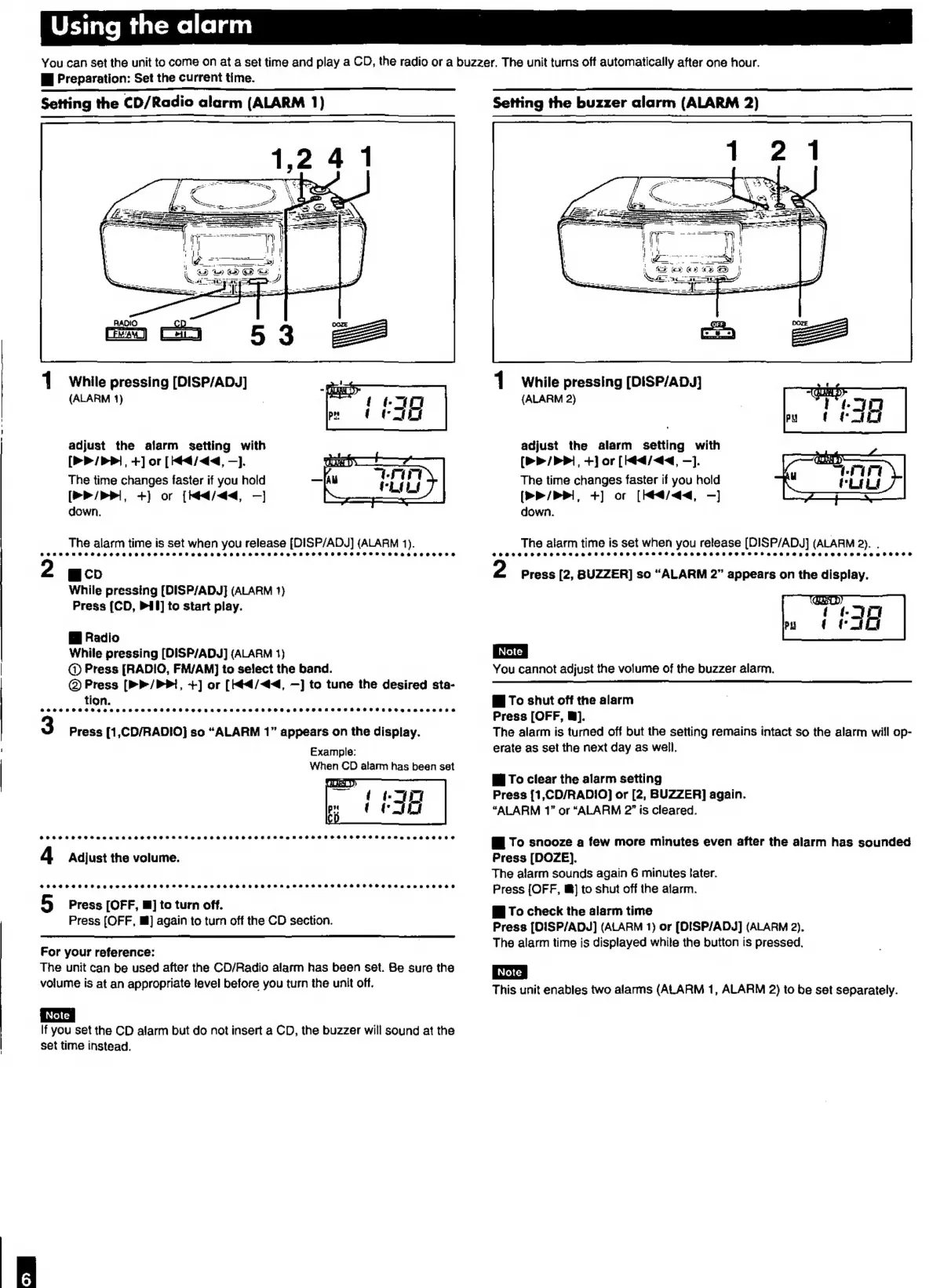
While
pressing
[DISP/ADy]
(ALARM
1)
adjust
the
alarm
setting
with
[P/P
+]
or
[did
—].
The
time
changes
faster
if
you
hold
[>P
+)
or
[Meda
—]
down.
The
alarm
time
is
set
when
you
release
[DISP/ADJ]
(ALARM
1).
g
cio
While
pressing
[DISP/ADJ}
(ALARM
1}
Press
[CD,
PI]
to
start
play.
B
Radio
While
pressing
[DISP/ADJ]
(ALARM
1)
C)
Press
[RADIO,
FM/AM]
to
select
the
band.
@)
Press
(P>>/PPi,
+]
or
[4
/44,
—]
to
tune
the
desired
sta-
tion.
eeee
woe
eczeegaenaneeaosseseeeeoeoeseaneaeaaeoen
@eoeoecegecoveeaceceosrbteotestCeeetegaseeaonnne
Press
[1,CD/RADIO]
so
“ALARM
1”
appears
on
the
display.
Example:
When
CD
alarm
has
been
set
SCOR
SHES
HSKSe
SORTER
F
SR
At
ee
seeSeeseSeeHAeSea
tees
eeethweeeazeeeeseees
4
Adjust
the
volume.
@#eeecoeoece
eta
seg¢eaneesepeetcaeteeenaeeos
@ereeeee
sea
geaeaeeeeaeese
eee
eaaeaaannesece
5
Press
[OFF,
m]
to
turn
off.
Press
(OFF,
ll]
again
to
turn
off
the
CD
section.
For
your
reference:
The
unit
can
be
used
after
the
CD/Radio
alarm
has
been
set.
Be
sure
the
volume
is
at
an
appropriate
level
before
you
turn
the
unit
off.
If
you
set
the
CD
alarm
but
do
not
insert
a
CD,
the
buzzer
will
sound
at
the
set
time
instead.
Setting
the
buzzer
alarm
(ALARM
2)
i;
(PSS
--
E
1
While
pressing
[DISP/ADJ]
(ALARM
2)
adjust
the
alarm
setting
with
[P/P
+]
or
[Hidd
—].
The
time
changes
faster
if
you
hold
[>>
/
P,
+)
or
[Edda
—]
down.
The
alarm
time
is
set
when
you
release
[DISP/ADJ]
(ALARM
2).
.
@oaeeveeooue
Re
ceoasee
Stee
seeesseeatteeesseseeeo
eon
eebaceottrepeaenaneaaewtzeaseuteeee
Press
(2,
BUZZER]
so
“ALARM
2”
appears
on
the
display.
You
cannot
adjust
the
volume
of
the
buzzer
alarm.
W
To
shut
off
the
alarm
Press
[OFF,
W].
The
alarm
is
turned
off
but
the
setting
remains
intact
so
the
alarm
will
op-
erate
as
set
the
next
day
as
well.
Wi
To
clear
the
alarm
setting
Press
[1,CD/RADIO]
or
[2,
BUZZER]
again.
“ALARM
1”
or
“ALARM
2”
is
cleared.
Gi
To
snooze
a
few
more
minutes
even
after
the
alarm
has
sounded
Press
[DOZE].
The
alarm
sounds
again
6
minutes
tater.
Press
[OFF,
@]
to
shut
off
the
alarm.
E
To
check
the
alarm
time
Press
[DISP/ADJd]
(ALARM
1)
or
[DISP/ADJ]
(ALARM
2).
The
alarm
time
is
displayed
while
the
button
is
pressed.
This
unit
enables
two
alarms
(ALARM
1,
ALARM
2)
to
be
set
separately.

Other manuals for Panasonic RC-CD500

Related product manuals