EasyManua.ls Logo

Panasonic RF-888JB - Power Supply; Battery Operation; AC Power Operation; How to Check Batteries

Panasonic RF-888JB
17 pages
Print Icon
To Next Page IconTo Next Page
To Previous Page IconTo Previous Page
Loading...
POWER
SUPPLY
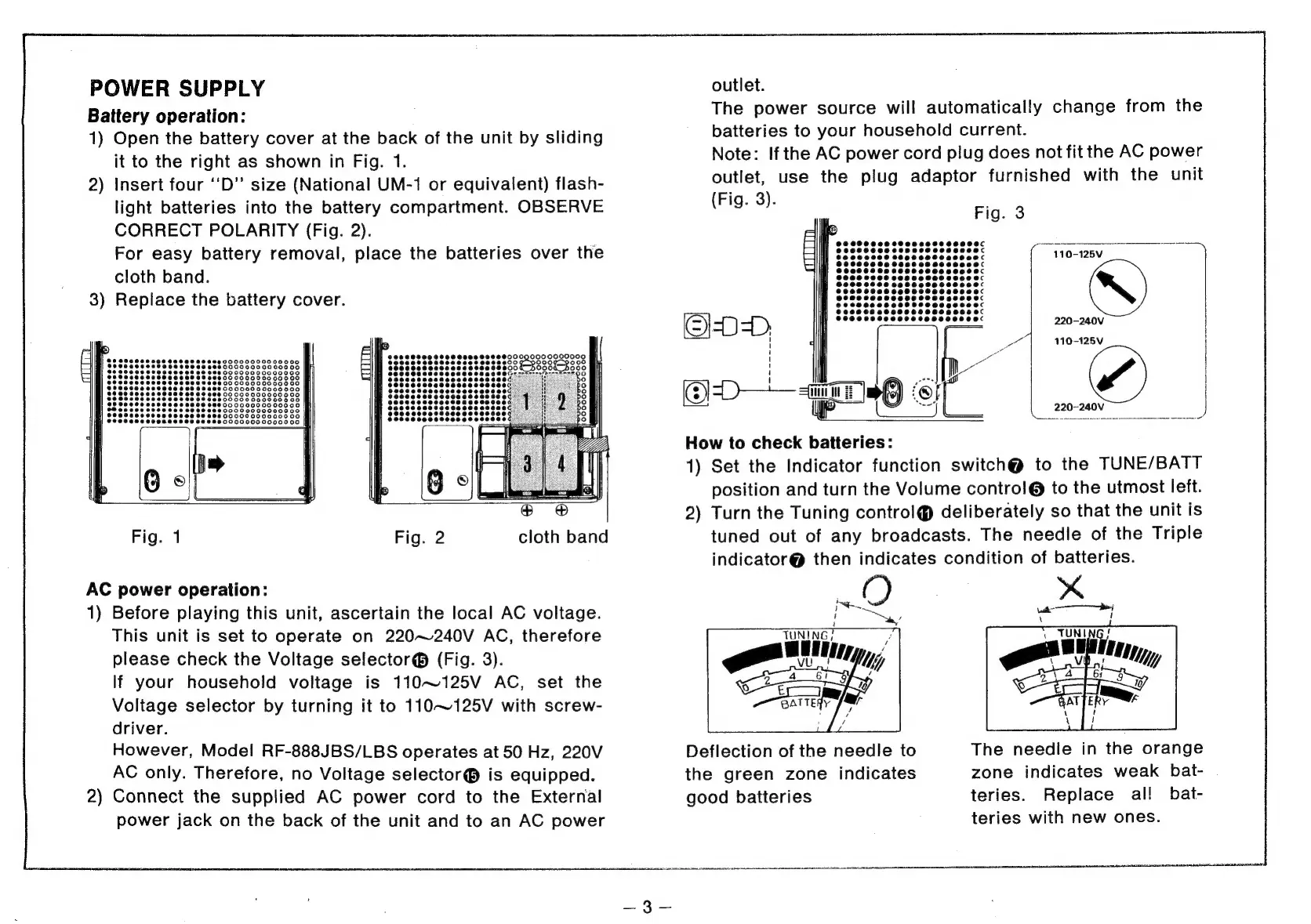
Battery
operation:
1)
Open
the
battery
cover
at
the
back
of
the
unit
by
sliding
it
to
the
right
as
shown
in
Fig.
1.
2)
Insert
four
‘‘D’’
size
(National
UM-1
or
equivalent)
flash-
light
batteries
into
the
battery
compartment.
OBSERVE
CORRECT
POLARITY
(Fig.
2).
For
easy
battery
removal,
place
the
batteries
over
the
cloth
band.
3)
Replace
the
battery
cover.
AC
power
operation:
1)
Before
playing
this
unit,
ascertain
the
local
AC
voltage.
This
unit
is
set
to
operate
on
220~240V
AC,
therefore
please
check
the
Voltage
selector®
(Fig.
3).
If
your
household
voltage
is
110~125V
AC,
set
the
Voltage
selector
by
turning
it
to
110~125V
with
screw-
driver.
However,
Model
RF-888JBS/LBS
operates
at
50
Hz,
220V
AC
only.
Therefore,
no
Voltage
selector®
is
equipped.
2)
Connect
the
supplied
AC
power
cord
to
the
External
power
jack
on
the
back
of
the
unit
and
to
an
AC
power
outlet.
The
power
source
will
automatically
change
from
the
batteries
to
your
household
current.
Note:
Ifthe
AC
power
cord
plug
does
not
fit
the
AC
power
outlet,
use
the
plug
adaptor
furnished
with
the
unit
(Fig.
3).
110-125V
220-240V
EDD.
How
to
check
batteries:
1)
Set
the
Indicator
function
switch@
to
the
TUNE/BATT
position
and
turn
the
Volume
contro!l@
to
the
utmost
left.
2)
Turn
the
Tuning
control@
deliberately
so
that
the
unit
is
tuned
out
of
any
broadcasts.
The
needle
of
the
Triple
indicator@
then
indicates
condition
of
batteries.
110-125V
!
220~-240V
pista
tc
pesca
cra
cine
Fl
os
&
on
BATTERY
Deflection
of
the
needle
to
The
needle
in
the
orange
the
green
zone
indicates
zone
indicates
weak
bat-
good
batteries
teries.
Replace
al!
bat-
teries
with
new
ones.