EasyManua.ls Logo

Panasonic RF-B20L - Location of Controls and Components

Panasonic RF-B20L
8 pages
Print Icon
To Next Page IconTo Next Page
To Previous Page IconTo Previous Page
Loading...
aig
=
74!)
@
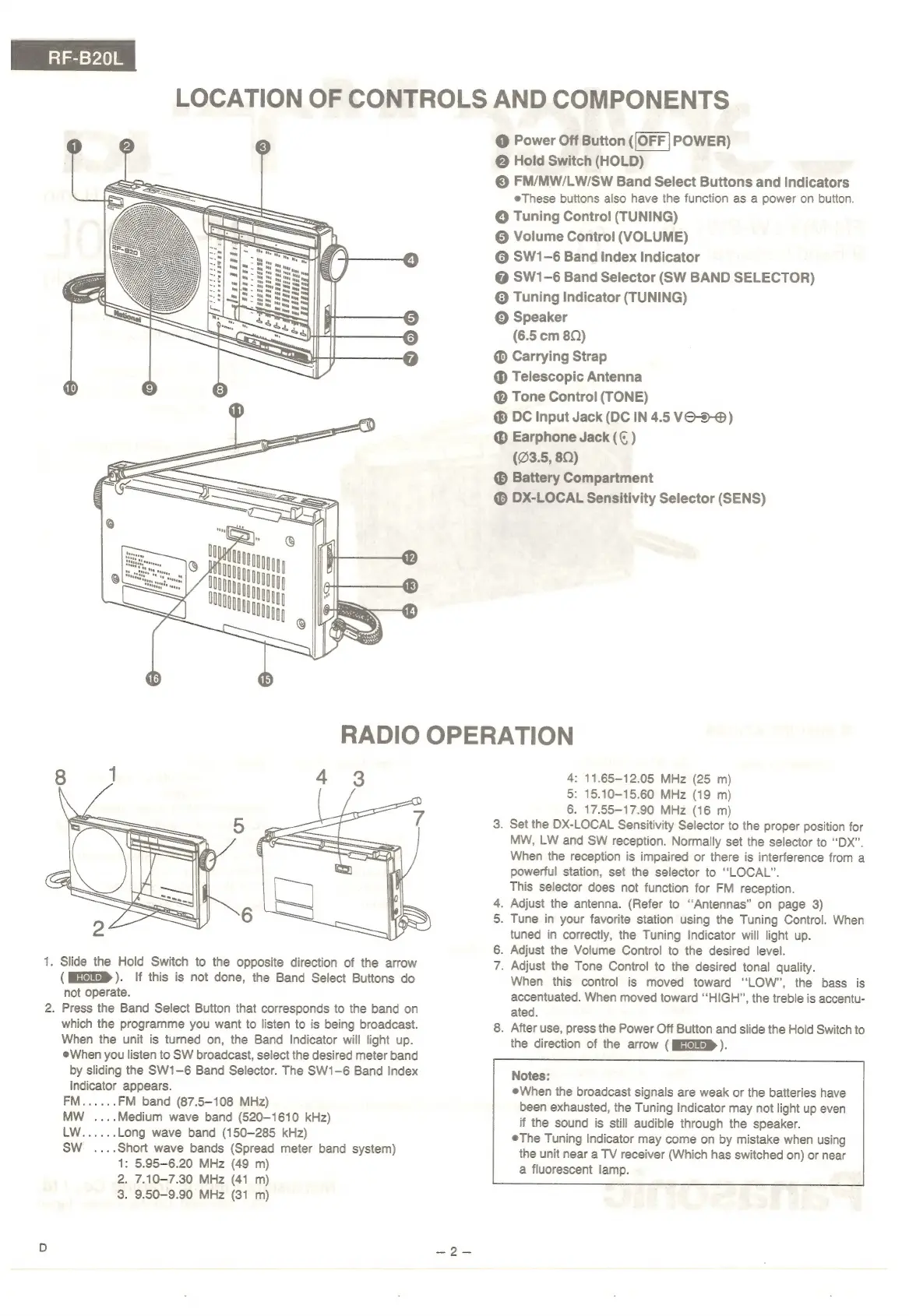
LOCATION
OF
CONTROLS
AND
COMPONENTS
@
Power
Off
Button
([OFF]
POWER)
@
Hold
Switch
(HOLD)
©
FM/MW/LW/SW
Band
Select
Buttons
and
Indicators
eThese
buttons
also
have
the
function
as
a
power
on
button.
@
Tuning
Control
(TUNING)
©
Volume
Control
(VOLUME)
©
SW1-6
Band
Index
Indicator
@
SW1-6
Band
Selector
(SW
BAND
SELECTOR)
©
Tuning
Indicator
(TUNING)
©
Speaker
(6.5
cm
8Q)
Carrying
Strap
@
Telescopic
Antenna
@
Tone
Control
(TONE)
®
DC
Input
Jack
(DC
IN
4.5
VO-5-@)
Earphone
Jack
)
(23.5,
8Q)
Battery
Compartment
@
DX-LOCAL
Sensitivity
Selector
(SENS)
4:
11.65-12.05
MHz
(25
m)
5:
15.10-15.60
MHz
(19
m)
6.
17.55-17.90
MHz
(16
m)
3.
Set
the
DX-LOCAL
Sensitivity
Selector
to
the
proper
position
for
MW,
LW
and
SW
reception.
Normally
set
the
selector
to
“DX”.
When
the
reception
is
impaired
or
there
is
interference
from
a
powerful
station,
set
the
selector
to
“LOCAL”.
This
selector
does
not
function
for
FM
reception.
4.
Adjust
the
antenna.
(Refer
to
“Antennas”
on
page
3)
5.
Tune
in
your
favorite
station
using
the
Tuning
Control.
When
tuned
in
correctly,
the
Tuning
Indicator
will
light
up.
6.
Adjust
the
Volume
Control
to
the
desired
level.
1.
Slide
the
Hold
Switch
to
the
opposite
direction
of
the
arrow
7.
Adjust
the
Tone
Control
to
the
desired
tonal
quality.
(HQ).
If
this
is
not
done,
the
Band
Select
Buttons
do
When
this
control
is
moved
toward
“LOW”,
the
bass
is
not
operate.
accentuated.
When
moved
toward
‘‘HIGH”,
the
treble
is
accentu-
2.
Press
the
Band
Select
Button
that
corresponds
to
the
band
on
ated.
which
the
programme
you
want
to
listen
to
is
being
broadcast.
8.
After
use,
press
the
Power
Off
Button
and
slide
the
Hold
Switch
to
When
the
unit
is
turned
on,
the
Band
Indicator
will
light
up.
the
direction
of
the
arrow
(
MGI
).
When
you
listen
to
SW
broadcast,
select
the
desired
meter
band
by
sliding
the
SW1-—6
Band
Selector.
The
SW1-—6
Band
Index
Notes:
Indicator
appears.
@When
the
broadcast
signals
are
weak
or
the
batteries
have
FM......
FM
band
(87.5-108
MHz)
been
exhausted,
the
Tuning
Indicator
may
not
light
up
even
MW
....Medium
wave
band
(520-1610
kHz)
if
the
sound
is
still
audible
through
the
speaker.
LW......
Long
wave
band
(150-285
kHz)
©The
Tuning
Indicator
may
come
on
by
mistake
when
using
SW
_
....Short
wave
bands
(Spread
meter
band
system)
the
unit
near
a
TV
receiver
(Which
has
switched
on)
or
near
a
fluorescent
lamp.
1:
5.95-6.20
MHz
(49
m)
2.
7.10-7.30
MHz
(41
m)
3.
9.50-9.90
MHz
(31
m)

Related product manuals