EasyManua.ls Logo

Panasonic RF-B20L - Hold Switch; Listening with the Earphone

Panasonic RF-B20L
8 pages
Print Icon
To Next Page IconTo Next Page
To Previous Page IconTo Previous Page
Loading...
@
Hold
Switch
lf
you
slide
the
switch
to
the
direction
of
the
arrow
( )
after
the
set
has
been
turned
off
by
pressing
the
Power
Off
Button,
the
set
will
not
be
turned
on
even
if
the
Band
Select
Buttons
are
pressed
by
mistake.
This
prevents
the
batteries
from
being
wasted.
It
is
useful
when
carrying
the
set.
Especially
before
putting
the
set
into
the
carrying
case,
be
sure
to
slide
the
switch
to
the
direction
of
the
arrow
(
HEC»
).
When
listening
to
the
radio,
if
you
slide
the
switch
to
the
direction
of
the
arrow
(
),
the
other
Band
Select
Buttons
and
the
Power
Off
Button
do
not
operate.
So
you
can
avoid
changing
the
received
band
or
turning
the
set
off
by
mistake.
B
Antennas
Caution
when
adjusting
the
Telescopic
Antenna
elf
you
wish
to
adjust
the
Telescopic
Antenna,
pull
the
base
of
the
antenna
until
you
hear
a
click,
and
then
pull
the
remaining
sections
to
extend
it
fully.
If
this
unit
is
positioned
horizon-
tally
and
used,
you
will
not
be
able
to
adjust
the
antenna
unless
the
base
has
been
pulled
free
of
the
set.
When
folding
up
the
antenna,
first
push
the
base
back
into
the
set
and
then
push
the
antenna
elements
back
together
starting
with
the
thicker
ones.
(D)
nl!
(C)
(B)
Fig.
1
RF-B20L
aie
740)
FM:
Pull
out
the
Telescopic
Antenna
and
adjust
its
length
and
angle
for
optimum
reception.
MW/LW:
The
sensitive
ferrite
core
antenna
inside
the
set
will
provide
excellent
MW/LW
reception
in
most
areas.
For
optimum
reception,
turn
the
set
in
the
direction
which
gives
the
best
results
since
the
ferrite
core
antenna
is
directional.
Swi-6:
Extend
the
Telescopic
Antenna
fully,
keep
it
vertical.
FM
MW/LW
SW1-6
@
Listening
with
the
Earphone
Plug
the
supplied
earphone
into
the
Earphone
Jack.
The
Speaker
in
the
radio
is
automatically
disconnected
when
the
plug
is
inserted.
eAdjust
the
volume
to
lower
level
so as
not
to
injure
your
ear.
(F)
Fig.
4
(G)
(H)
(G)
Fig.
5
Front
Cabinet
Fig.
7
Pet
8
|
Front
Cabinet
LED
Circuit
Board
Main
Circuit
Board
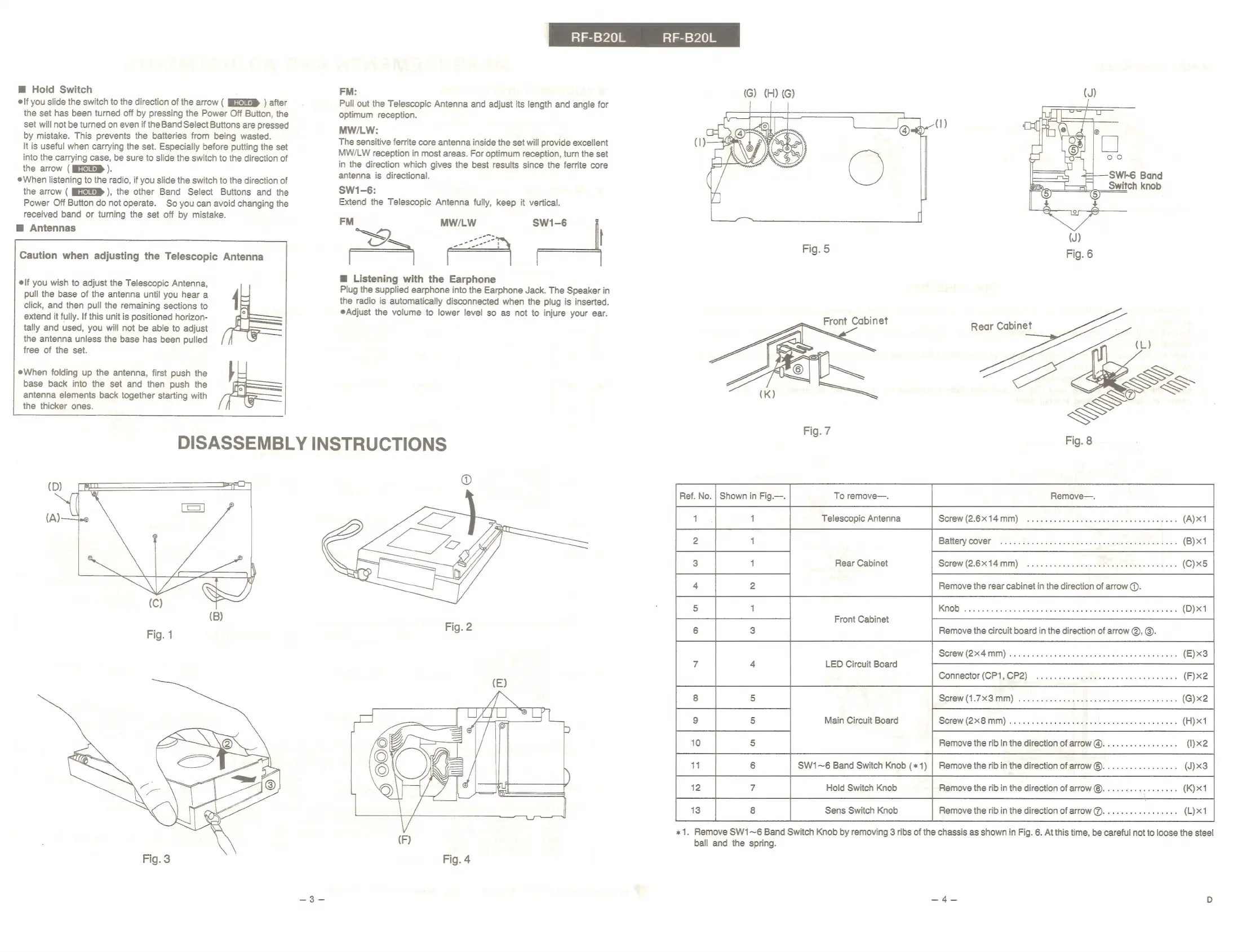
«x1.
Remove
SW1~6
Band
Switch
Knob
by
removing
3
ribs
of
the
chassis
as
shown
in
Fig.
6.
At
this
time,
be
careful
not
to
loose
the
steel
ball
and
the
spring.

Related product manuals