EasyManua.ls Logo

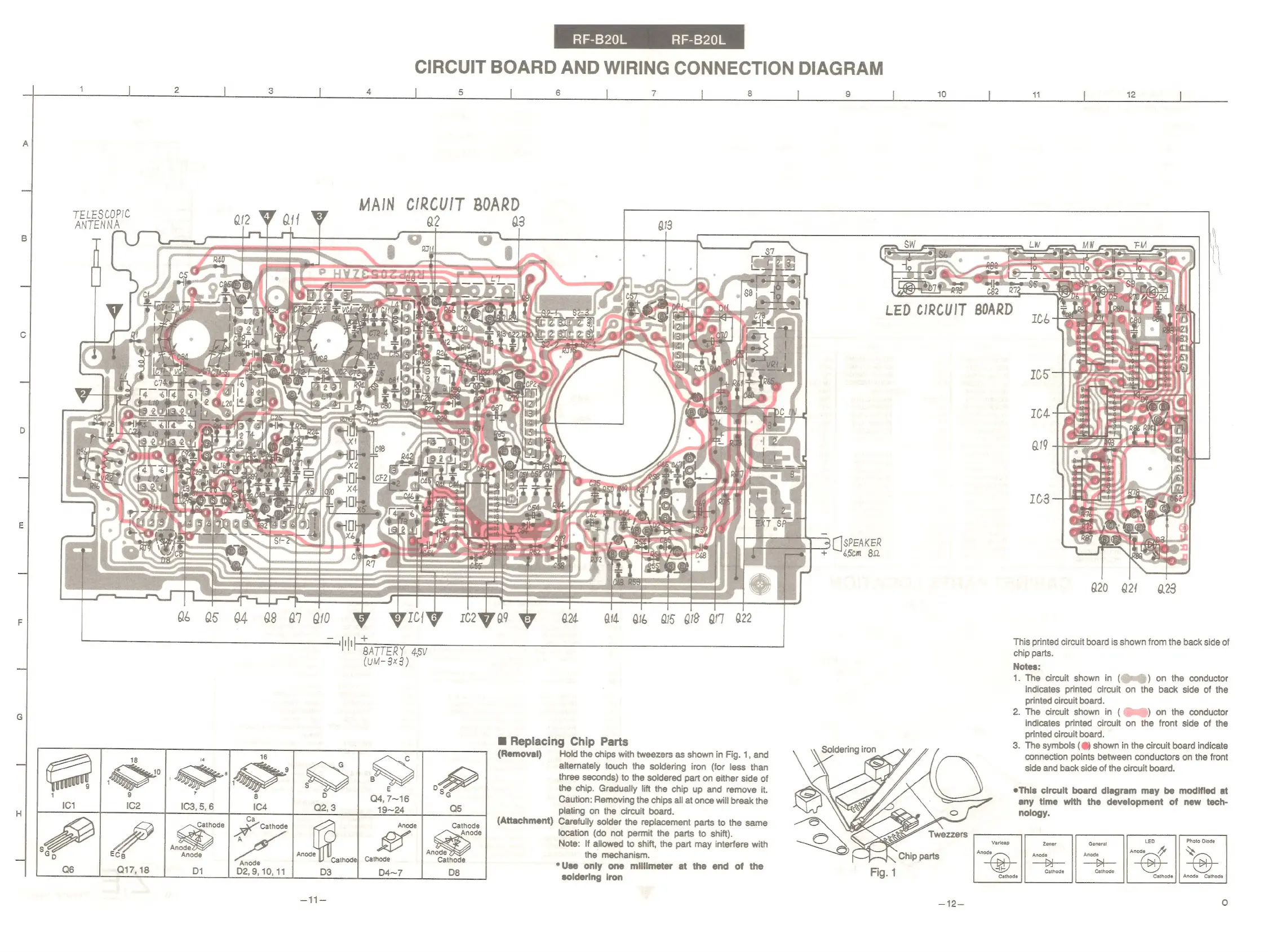
Panasonic RF-B20L - Circuit Board and Wiring Connection Diagram; Replacing Chip Parts (Removal)

Panasonic RF-B20L
8 pages
Print Icon
To Previous Page IconTo Previous Page
Loading...
TELESCOPIC
ANTENNA
ECB
Q17,
18
CIRCUIT
BOARD
AND
WIRING
CONNECTION
DIAGRAM
2 3
4
5
MAIN
CIRCUIT
BOARD
re
oe
rf
hae’
2"
PY
PP
th
Ok
yn
SS)
eee
a
:
pat
amd
=)
$)
ee
Sas
pf
on
ance
af
rocgemle
=f
epee
0
teen
G6
05
G4
88
47
Q10
—H
EVICiIWW
§=mc2
wy
+
BATTERY
45v
(UM-
3x3)
ai
740)
RF-B20L
6
t
8
Bl
We
C
Peer
=
Zane
bo
See
24
aid
O16
a5
QS
QIT
a22
@
Replacing
Chip
Parts
(Removal)
Ca
Cathode
Cathode
Anode
Cathode
Anode
ya
Ser
Anode
Anode
Al
Anode
node
HY
cathodel
Cathode
aoe
Cathode
D1
D2,
9,
10,
11
Ds
=
fft=
Hold
the
chips
with
tweezers
as
shown
in
Fig.
1,
and
alternately
touch
the
soldering
iron
(for
less
than
three
seconds)
to
the
soldered
part
on
either
side
of
the
chip.
Gradually
lift
the
chip
up
and
remove
it.
Caution:
Removing
the
chips
all
at
once
will
break
the
plating
on
the
circuit
board.
(Attachment)
Carefully
solder
the
replacement
parts
to
the
same
location
(do
not
permit
the
parts
to
shift).
Note:
If
allowed
to
shift,
the
part
may
interfere
with
the
mechanism.
*Use
only
one
millimeter
at
the
end
of
the
soldering
iron
9
ry
3
[[SPEAKER
+
—~S5em
82
Soldering
iron
G20
Q2!
23
This
printed
circuit
board
is
shown
from
the
back
side
of
chip
parts.
Notes:
1.
The
circuit
shown
in
(
indicates
printed
circuit
printed
circuit
board.
2.
The
circuit
shown
in
(
(me)
on
the
conductor
indicates
printed
circuit
on
the
front
side
of
the
printed
circuit
board.
3.
The
symbols
(@)
shown
in
the
circuit
board
indicate
connection
points
between
conductors
on
the
front
side
and
back
side
of
the
circuit
board.
))
on
the
conductor
he
back
side
of
the
eThis
circuit
board
diagram
may
be
modified
at
any
time
with
the
development
of
new
tech-
nology.
General
-
Dede
Be
||
Cathode
Anode
Cathode
ie)
pe

Related product manuals