EasyManua.ls Logo

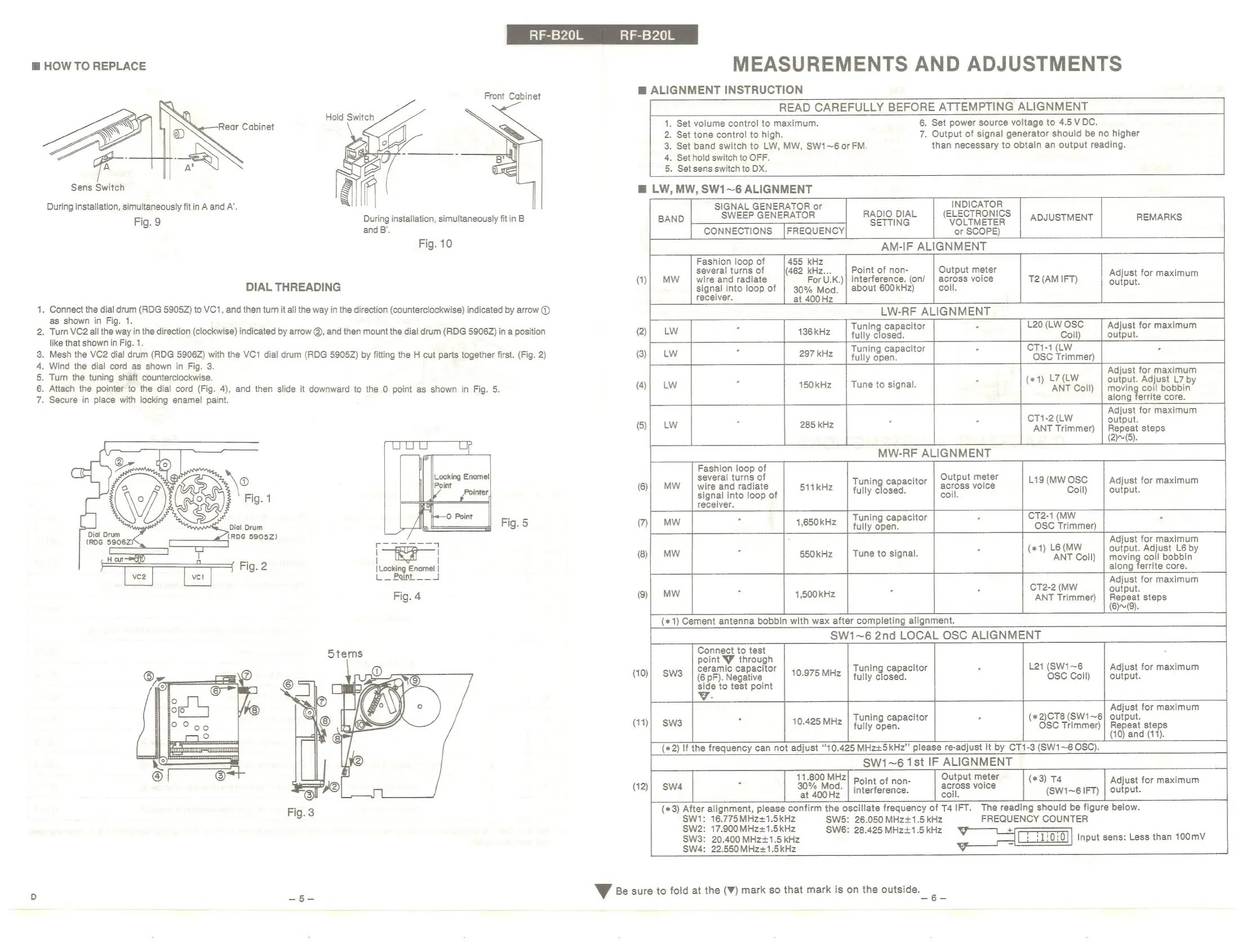
Panasonic RF-B20L - Measurements and Adjustments; How to Replace; Dial Threading; Alignment Instruction

Panasonic RF-B20L
8 pages
Print Icon
To Next Page IconTo Next Page
To Previous Page IconTo Previous Page
Loading...
ai
=740)
aime
740)
m
HOW
TO
REPLACE
ie)
NOD
W
Front
Cabinet
Hold
Switch
Rear
Cabinet
oO
Sens
Switch
c
fi
During
installation,
simultaneously
fit
in
A
and
A’.
Fig.
9
During
installation,
simultaneously
fit
in
B
and
B’.
Fig.
10
DIAL
THREADING
.
Connect
the
dial
drum
(RDG
5905Z)
to
VC1,
and
then
turn
it
all
the
way
in
the
direction
(counterclockwise)
indicated
by
arrow
@)
as
shown
in
Fig.
1.
.
Turn
VC2
all
the
way
in
the
direction
(clockwise)
indicated
by
arrow
@,
and
then
mount
the
dial
drum
(RDG
5906Z)
in
a
position
like
that
shown
in
Fig.
1.
.
Mesh
the
VC2
dial
drum
(RDG
5906Z)
with
the
VC1
dial
drum
(RDG
5905Z)
by
fitting
the
H
cut
parts
together
first.
(Fig.
2)
.
Wind
the
dial
cord
as
shown
in
Fig.
3.
.
Turn
the
tuning
shaft
counterclockwise.
.
Attach
the
pointer
to
the
dial
cord
(Fig.
4),
and
then
slide
it
downward
to
the
0
point
as
shown
in
Fig.
5.
.
Secure
in
place
with
locking
enamel
paint.
|Locking
Enamel
|
L—
Point.
J
Fig.
4
MEASUREMENTS
AND
ADJUSTMENTS
@
ALIGNMENT
INSTRUCTION
READ
CAREFULLY
BEFORE
ATTEMPTING
ALIGNMENT
1.
Set
volume
control
to
maximum.
6.
Set
power
source
voltage
to
4.5
VDC.
2.
Set
tone
control
to
high.
7.
Output
of
signal
generator
should
be
no
higher
3.
Set
band
switch
to
LW,
MW,
SW1~6
or
FM.
than
necessary
to
obtain
an
output
reading.
4.
Set
hold
switch
to
OFF.
5.
Set
sens
switch
to
DX.
mg
LW,
MW,
SW1~6
ALIGNMENT
SWE
I
roa
ag
RADIO
DIAL
(ELECTRONICS
EP
GEN
BAND
SETTING
VOLTMETER
|
ADJUSTMENT
CONNECTIONS
|FREQUENCY
or
SCOPE)
AM-IF
ALIGNMENT
T2
(AM
IFT)
LW-RF
ALIGNMENT
136kH
Tuning
capacitor
L20
(LW
OSC
Adjust
for
maximum
5
fully
closed.
Coil)
output.
Tuning
capacitor
CT1-1
(LW
L7
(LW
Adjust
for
maximum
(*
1)
output.
Adjust
L7
b
150kHz
Tune
to
signal.
ANT
Coil)
|
moving
coil
Bobbin’
along
ferrite
core.
et
Adjust
for
maximum
285
kHz
:
=
output.
ANT
Trimmer)
|
Repeat
steps
P
:
Output
meter
.
F
Tuning
capacitor
:
L19
(MW
OSC
Adjust
for
maximum
fully
closed.
ACIOSS
VOICE
Coil)
output.
CT2-1
(MW
F
(2)(5).
coil.
Tuning
capacitor
beaut
fully
open.
Lot
4
OSC
Trimmer)
je
)
Le
(MW
Adjust
for
eae
:
(#1
output.
Adjust
L6
by
550kHz
|
Tune
to
signal.
ANT
Coil)
|
moving
coil
bobbin
along
ferrite
core.
Adjust
for
maximum
1,500
kHz
CT2-2
(MW
output.
(*
1)
Cement
antenna
bobbin
with
wax
after
completing
alignment.
ANT
Trimmer)
|
Repeat
steps
SW1~6
2nd
LOCAL
OSC
ALIGNMENT
(6)~(9).
Tuning
capacitor
L21
(SW1~6
Adjust
for
maximum
fully
closed.
OSC
Coil)
output.
REMARKS
Fashion
loop
of
several
turns
of
wire
and
radiate
signal
into
loop
of
receiver.
Output
meter
across
voice
coil.
Point
of
non-
interference.
(on/
about
600kHz)
Adjust
for
maximum
(1)
MW
output.
LW
=
OS)
LS
(3)
LW
LW
2
=
=
=
>
Fashion
loop
of
several
turns
of
S
=
=
gS
=
=
wire
and
radiate
signal
into
loop
of
receiver.
511kHz
=
=
=
Ss
=
=
Connect
to
test
point
YW
through
ceramic
capacitor
(10)|
SW3
(6
pF).
Negative
side
to
test
point
10.975
MHz
Adjust
for
maximum
(*
2)CT8
(SW1~6]
output.
OSC
Trimmer)
|
Repeat
steps
(10)
and
(11).
Tuning
capacitor
fully
open.
(11)}
SW3
10.425
MHz
(*
2)
If
the
frequency
can
not
adjust
‘10.425
MHz+5kHz”’
please
re-adjust
it
by
CT1-3
(SW1~6
OSC).
SW1~6
1st
IF
ALIGNMENT
11.800
MHz
F
Output
meter
*3
;
F
Ww.
a
Point
of
non-
:
(*3)
T4
Adjust
for
maximum
-
|
ot
“at
400Fe.
|
interference.
pt
(SW1~6
IFT)
|
output.
(*3)
After
alignment,
please
confirm
the
oscillate
frequency
of
T4
IFT.
The
reading
should
be
figure
below.
SW1:
Ea
am
SW5:
26.050
MHz+1.5
kHz
FREQUENCY
COUNTER
SW2:
17.900
MHz+1.5kHz
SW6:
28.425
MHz+1.5
kHz
4
+
SW3:
20.400
MHz+1.5
kHz
Input
sens:
Less
than
100mV
SW4:
22.550
MHz+1.5kHz
y
a
Vv
Be
sure
to
fold
at
the
(W)
mark
so
that
mark
is
on
the
outside.

Related product manuals