EasyManua.ls Logo

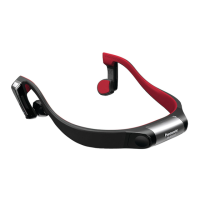
Panasonic RP-BTGS10 - User Manual

Panasonic RP-BTGS10
92 pages
Print Icon
To Next Page IconTo Next Page
Loading...
ENGLISH
FRANÇAIS
ESPAÑOL
PORTUGUÊS
VQT5C48
Owners Manual
Manuel d’utilisation
Instrucciones de funcionamiento
Instruções de Operação
Bone Conduction Headset
Casque à conduction osseuse
Auriculares de conducción ósea
Fone de ouvido com condução óssea
Model No.
N° de modèle
RP-BTGS10
PP
If you have any questions contact
In the U.S.A. and Puerto Rico:
http://www.panasonic.com/support
In Canada:
www.panasonic.ca/english/support
Pour toute question, veuillez contacter
www.panasonic.ca/french/support
Si usted tiene alguna pregunta,
póngase en contacto con
http://www.panasonic.com/support
For U.S.A. and Puerto Rico only
The warranty can be found on pages 22 and 23.
Register online at
www.panasonic.com/register (U.S. customers only)
For Canada only
The warranty can be found on pages 24 and 25.
La garantie se trouve aux pages 22 et 23.
La garantía se puede encontrar en las
páginas 22 y 23.

Table of Contents

Question and Answer IconNeed help?

Do you have a question about the Panasonic RP-BTGS10 and is the answer not in the manual?

Summary

Key Features

What are Bone Conduction Headphones?

Accessories

About Water Resistance

Part Names

Charging

Inserting a Battery

Turning the Power On;Off

Connecting a Bluetooth Device

Initial Bluetooth Connection

Initial setup for Bluetooth connection.

Subsequent Bluetooth Connections

Subsequent connections to paired Bluetooth devices.

How to Wear the Headset

Listening to Music

Battery Operating Times

Battery life for different battery types.

Button Operation

Headset Remote Control

Using headset buttons to control Bluetooth device playback.

Headset Volume Control

How to adjust the headset's volume.

Making a Phone Call

Useful Functions

LED Pattern Selection

Switching between normal and sports LED blinking modes.

Automatic Power Off

Automatic power-off feature when idle.

Low Battery Alerts

Alerts for low battery status.

Restoring to the Factory Settings

Safety Precautions

About Bluetooth

Product Service

Maintenance

Troubleshooting Guide

Bluetooth Connection Issues

Issues with connecting Bluetooth devices.

Audio and Volume Problems

Problems related to no sound, low volume, or bad quality.

Call Issues

Issues with hearing the other person during calls.

Specifications

Copyright, etc.

US and Puerto Rico Limited Warranty

Warranty Limits and Exclusions

Canadian Limited Warranty

Contact Information

Summary

Key Features

What are Bone Conduction Headphones?

Accessories

About Water Resistance

Part Names

Charging

Inserting a Battery

Turning the Power On;Off

Connecting a Bluetooth Device

Initial Bluetooth Connection

Initial setup for Bluetooth connection.

Subsequent Bluetooth Connections

Subsequent connections to paired Bluetooth devices.

How to Wear the Headset

Listening to Music

Battery Operating Times

Battery life for different battery types.

Button Operation

Headset Remote Control

Using headset buttons to control Bluetooth device playback.

Headset Volume Control

How to adjust the headset's volume.

Making a Phone Call

Useful Functions

LED Pattern Selection

Switching between normal and sports LED blinking modes.

Automatic Power Off

Automatic power-off feature when idle.

Low Battery Alerts

Alerts for low battery status.

Restoring to the Factory Settings

Safety Precautions

About Bluetooth

Product Service

Maintenance

Troubleshooting Guide

Bluetooth Connection Issues

Issues with connecting Bluetooth devices.

Audio and Volume Problems

Problems related to no sound, low volume, or bad quality.

Call Issues

Issues with hearing the other person during calls.

Specifications

Copyright, etc.

US and Puerto Rico Limited Warranty

Warranty Limits and Exclusions

Canadian Limited Warranty

Contact Information

Panasonic RP-BTGS10 Specifications

General IconGeneral
Bluetooth Version4.1
WirelessYes
Wireless RangeUp to 10m
MicrophoneYes
Charging Time2.5 hours
Product TypeHeadphones

Related product manuals