EasyManua.ls Logo

Panasonic RS-612US-E - Page 12

Panasonic RS-612US-E
24 pages
Print Icon
To Next Page IconTo Next Page
To Previous Page IconTo Previous Page
Loading...
11
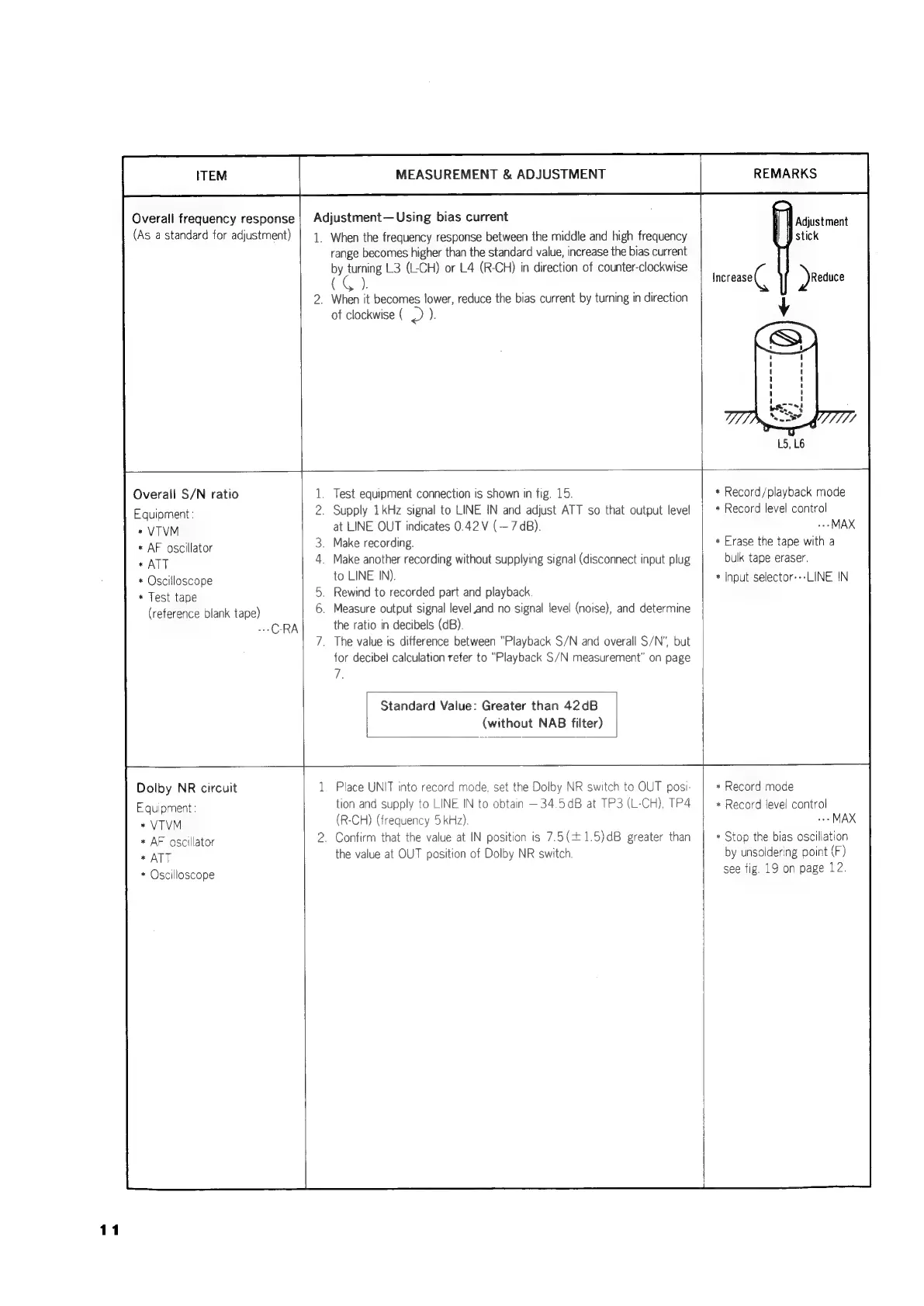
Overall
frequency
response
(As
a
standard
for
adjustment)
MEASUREMENT
&
ADJUSTMENT
Adjustment
Using
bias
current
1.
When
the
frequency
response
between
the
middle
and
high
frequency
range
becomes
higher
than
the
standard
value,
increase
the
bias
current
by
abe
3
(L-CH)
or
L4
(R-CH)
in
direction
of
counter-clockwise
(G).
_
When
it
becomes
lower,
reduce
the
bias
current
by
turning
in
direction
of
clockwise
(
-)
).
REMARKS
Adjustment
Overall
S/N
ratio
Equipment:
*
VTVM
*
AF
oscillator
*
ATT
*
Oscilloscope
*
Test
tape
(reference
blank
tape)
CRA
_
Test
equipment
connection
is
shown
in
fig.
15.
Supply
1kHz
signal
to
LINE
IN
and
adjust
ATT
so
that
output
level
at
LINE
OUT
indicates
0.42
V
(—7
dB).
.
Make
recording.
.
Make
another
recording
without
supplying
signal
(disconnect
input
plug
to
LINE
IN).
_
Rewind
to
recorded
part
and
playback.
.
Measure
output
signal
level
and
no
signal
level
(noise),
and
determine
the
ratio
in
decibels
(dB).
.
The
value
is
difference
between
“Playback
S/N
and
overall
S/N”,
but
for
decibel
calculation
refer
to
“Playback
S/N
measurement”
on
page
7.
Standard
Value:
Greater
than
42dB
(without
NAB
filter)
Dolby
NR
circuit
Equipment:
*
VTVM
*
AF
oscillator
*
ATT
*
Oscilloscope
Place
UNIT
into
record
mode,
set
the
Dolby
NR
switch
to
OUT
posi-
tion
and
supply
to
LINE
IN
to
obtain
—34.5dB
at
TP3
(L-CH),
TP4
(R-CH)
(frequency
5
kHz).
Confirm
that
the
value
at
IN
position
is
7.5(+1.5)dB
greater
than
the
value
at
OUT
position
of
Dolby
NR
switch
*
Record/playback
mode
*
Record
level
control
..-
MAX
*
Erase
the
tape
with
a
bulk
tape
eraser.
*
Input
selector---LINE
IN
*
Record
mode
*
Record
level
control
MAX
*
Stop
the
bias
oscillation
by
unsoldering
point
(F)
see
fig.
19
on
page
12.

Related product manuals