EasyManua.ls Logo

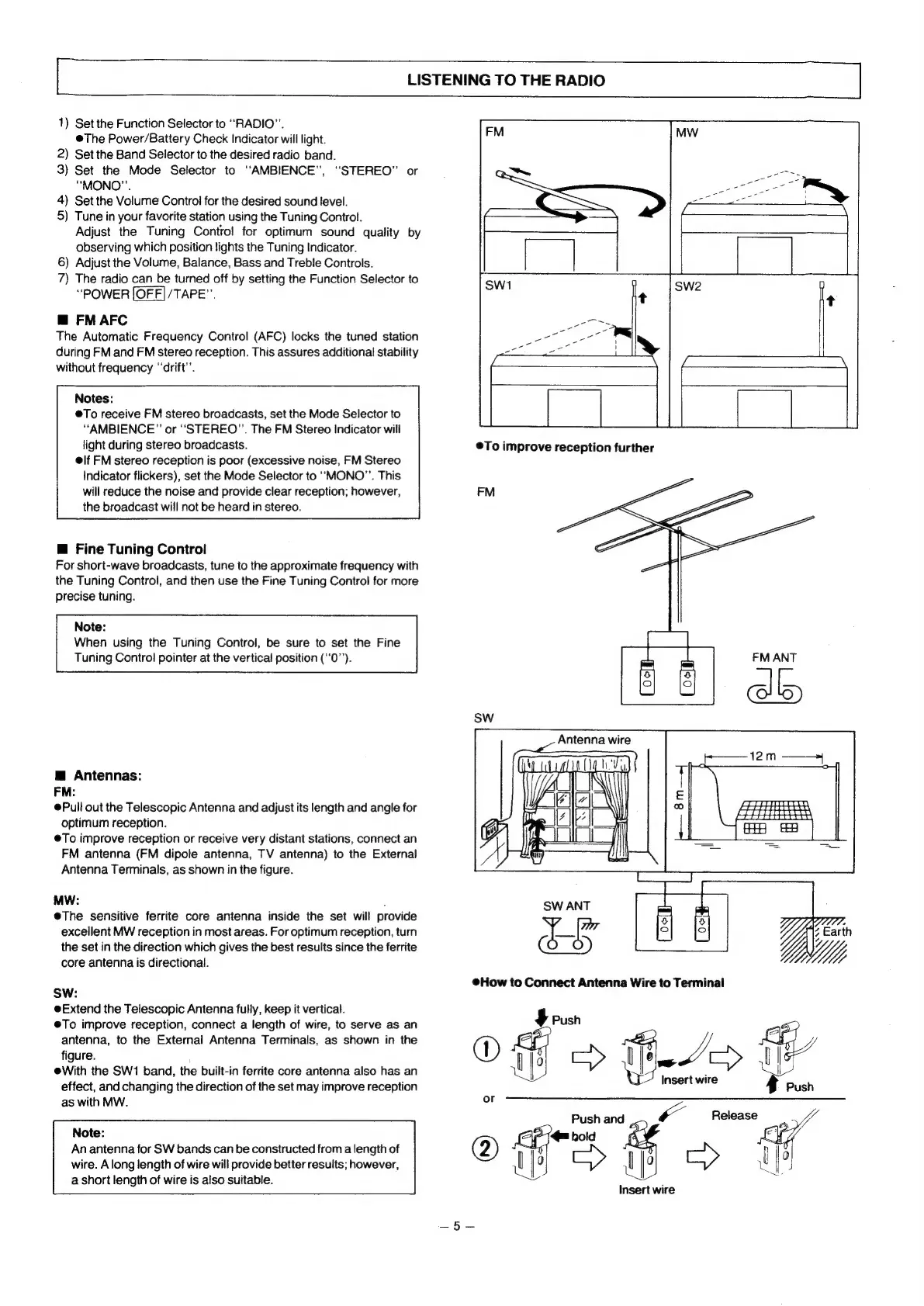
Panasonic RX-5080F - Listening to the Radio; FM AFC; Fine Tuning Control; Antennas

Panasonic RX-5080F
33 pages
Print Icon
To Next Page IconTo Next Page
To Previous Page IconTo Previous Page
Loading...
LISTENING
TO
THE
RADIO
1)
Set
the
Function
Selector
to
“RADIO”.
@The
Power/Battery
Check
Indicator
will
light.
2)
Set
the
Band
Selector
to
the
desired
radio
band.
3)
Set
the
Mode
Selector
to
“AMBIENCE",
“STEREO”
or
“MONO”’.
4)
Set
the
Volume
Control
for
the
desired
sound
level.
5)
Tune
in
your
favorite
station
using
the
Tuning
Control.
Adjust
the.
Tuning
Contro!
for
optimum
sound
quality
by
observing
which
position
lights
the
Tuning
Indicator.
6)
Adjust
the
Volume,
Balance,
Bass
and
Treble
Controls.
7)
The
radio
can
be
turned
off
by
setting
the
Function
Selector
to
“POWER
/TAPE”.
@
FM
AFC
The
Automatic
Frequency
Control
(AFC)
locks
the
tuned
station
during
FM
and
FM
stereo
reception.
This
assures
additional
stability
without
frequency
‘drift’.
Notes:
@To
receive
FM
stereo
broadcasts,
set
the
Mode
Selector
to
“AMBIENCE”
or
“STEREO”.
The
FM
Stereo
Indicator
will
light
during
stereo
broadcasts.
elf
FM
stereo
reception
is
poor
(excessive
noise,
FM
Stereo
Indicator
flickers),
set
the
Mode
Selector
to
“MONO”.
This
will
reduce
the
noise
and
provide
clear
reception;
however,
the
broadcast
will
not
be
heard
in
stereo.
@
Fine
Tuning
Control
For
short-wave
broadcasts,
tune
to
the
approximate
frequency
with
the
Tuning
Control,
and
then
use
the
Fine
Tuning
Control
for
more
precise
tuning.
Note:
When
using
the
Tuning
Control,
be
sure
to
set
the
Fine
Tuning
Control
pointer
at
the
vertical
position
(‘'0’’).
@
Antennas:
FM:
@Pull
out
the
Telescopic
Antenna
and
adjust
its
length
and
angle
for
optimum
reception.
@To
improve
reception
or
receive
very
distant
stations,
connect
an
FM
antenna
(FM
dipole
antenna,
TV
antenna)
to
the
External
Antenna
Terminals,
as
shown
in
the
figure.
MW:
e@The
sensitive
ferrite
core
antenna
inside
the
set
will
provide
excellent
MW
reception
in
most
areas.
For
optimum
reception,
turn
the
set
in
the
direction
which
gives
the
best
results
since
the
ferrite
core
antenna
is
directional.
SW:
Extend
the
Telescopic
Antenna
fully,
keep
it
vertical.
@To
improve
reception,
connect
a
length
of
wire,
to
serve
as
an
antenna,
to
the
External
Antenna
Terminals,
as
shown
in
the
figure.
eWith
the
SW1
band,
the
built-in
ferrite
core
antenna
also
has
an
effect,
and
changing
the
direction
of
the
set
may
improve
reception
as
with
MW.
Note:
An
antenna
for
SW
bands
can
be
constructed
from
a
length
of
wire.
A
long
length
of
wire
will
provide
better
results;
however,
a
short
length
of
wire
is
also
suitable.
FM
Antenna
wire
@How
to
Connect
Antenna
Wire
to
Terminal
$
Push
®
4
eee
13
>
Insert
wire
or
Push
and
Release
ie
wrk
-
ae
3
UY
wire

Related product manuals