EasyManua.ls Logo

Panasonic RX-5080F - Playback; Tape Counter and Reset Button; Pause Button; Fast Forward and Rewind

Panasonic RX-5080F
33 pages
Print Icon
To Next Page IconTo Next Page
To Previous Page IconTo Previous Page
Loading...
|
PLAYBACK
|
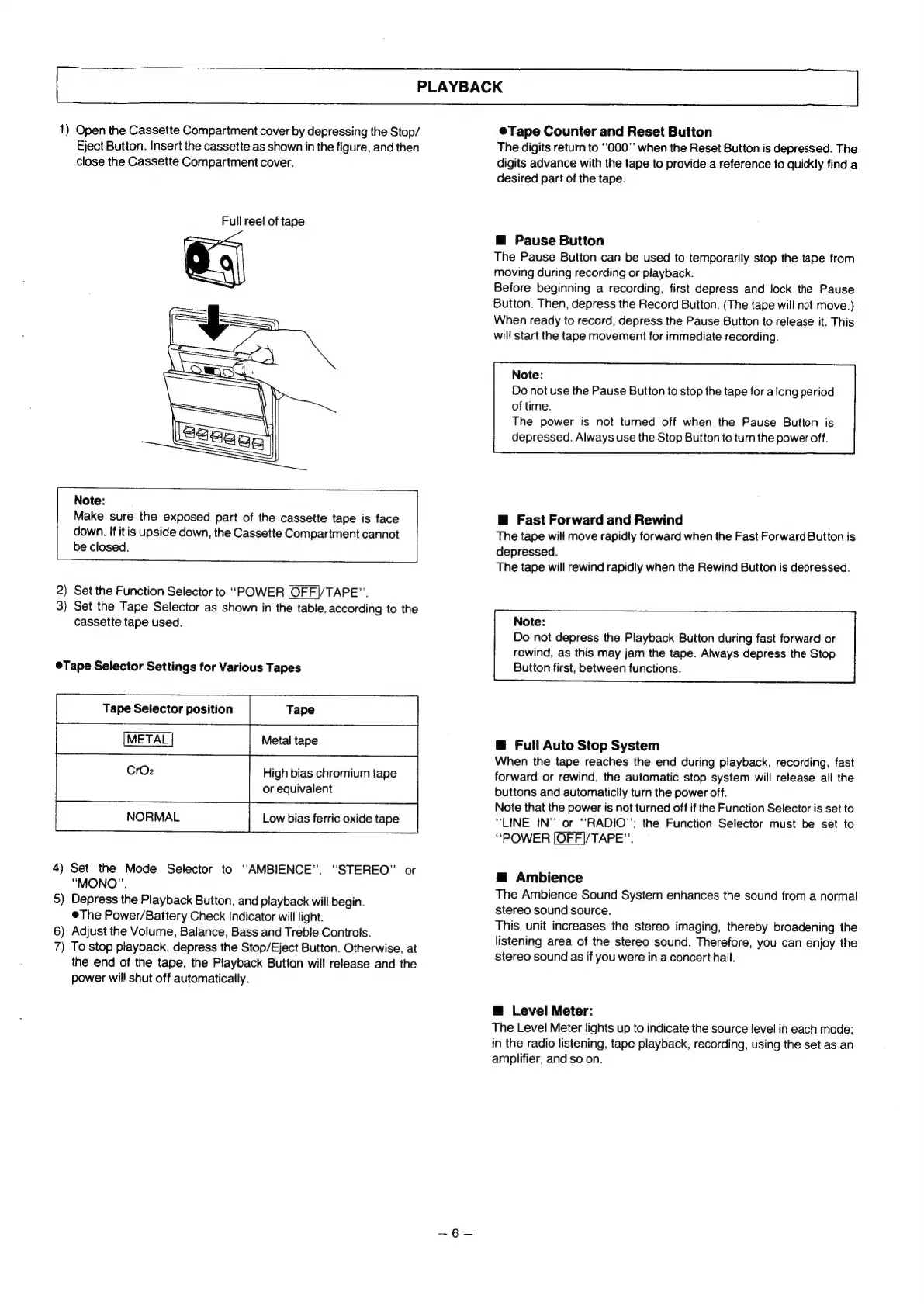
1)
Open
the
Cassette
Compartment
cover
by
depressing
the
Stop/
Eject
Button.
Insert
the
cassette
as
shown
in
the
figure,
and
then
close
the
Cassette
Compartment
cover.
Full
reel
of
tape
Note:
Make
sure
the
exposed
part
of
the
cassette
tape
is
face
down.
If
itis
upside
down,
the
Cassette
Compartment
cannot
be
closed.
2)
Set
the
Function
Selector
to
“POWER
[OFF|/TAPE”.
3)
Set
the
Tape
Selector
as
shown
in
the
table,
according
to
the
cassette
tape
used.
@Tape
Selector
Settings
for
Various
Tapes
Tape
Selector
position
Tape
+--+
METAL
Metal
tape
CrOz2
High
bias
chromium
tape
or
equivalent
NORMAL
Low
bias
ferric
oxide
tape
ae)
i
4)
Set
the
Mode
Selector
to
“AMBIENCE”,
“STEREO”
or
“MONO”.
5)
Depress
the
Playback
Button,
and
playback
will
begin.
©The
Power/Battery
Check
Indicator
will
light.
6)
Adjust
the
Volume,
Balance,
Bass
and
Treble
Controls.
7)
To
stop
playback,
depress
the
Stop/Eject
Button.
Otherwise,
at
the
end
of
the
tape,
the
Playback
Buttan
will
release
and
the
power
will
shut
off
automatically.
@Tape
Counter
and
Reset
Button
The
digits
return
to
‘‘000"’
when
the
Reset
Button
is
depressed.
The
digits
advance
with
the
tape
to
provide
a
reference
to
quickly
find
a
desired
part
of
the
tape.
™@
Pause
Button
The
Pause
Button
can
be
used
to
temporarily
stop
the
tape
from
moving
during
recording
or
playback.
Before
beginning
a
recording,
first
depress
and
lock
the
Pause
Button.
Then,
depress
the
Record
Button.
(The
tape
will
not
move.)
When
ready
to
record,
depress
the
Pause
Button
to
release
it.
This
will
start
the
tape
movement
for
immediate
recording.
Note:
Do
not
use
the
Pause
Button
to
stop
the
tape
for
along
period
of
time.
The
power
is
not
turned
off
when
the
Pause
Button
is
depressed.
Always
use
the
Stop
Button
to
turn
the
power
off.
@
Fast
Forward
and
Rewind
The
tape
will
move
rapidly
forward
when
the
Fast
Forward
Button
is
depressed.
The
tape
will
rewind
rapidly
when
the
Rewind
Button
is
depressed.
Note:
Do
not
depress
the
Playback
Button
during
fast
forward
or
rewind,
as
this
may
jam
the
tape.
Always
depress
the
Stop
Button
first,
between
functions.
@
Full
Auto
Stop
System
When
the
tape
reaches
the
end
during
playback,
recording,
fast
forward
or
rewind,
the
automatic
stop
system
will
release
all
the
buttons
and
automaticlly
turn
the
power
off.
Note
that
the
power
is
not
turned
off
if
the
Function
Selector
is
set
to
“LINE
IN"
or
“RADIO”;
the
Function
Selector
must
be
set
to
“POWER
[OFF]/TAPE”.
@
Ambience
The
Ambience
Sound
System
enhances
the
sound
from
a
normal
stereo
sound
source.
This
unit
increases
the
stereo
imaging,
thereby
broadening
the
listening
area
of
the
stereo
sound.
Therefore,
you
can
enjoy
the
stereo
sound
as
if
you
were
in
a
concert
hall.
@
Level
Meter:
The
Level
Meter
lights
up
to
indicate
the
source
level
in
each
mode;
in
the
radio
listening,
tape
playback,
recording,
using
the
set
as
an
amplifier,
and
so
on.

Related product manuals