EasyManua.ls Logo

Panasonic RX-C300 - Cassette Deck; Tuner Amplifier; Rear Panels

Panasonic RX-C300
20 pages
Print Icon
To Next Page IconTo Next Page
To Previous Page IconTo Previous Page
Loading...
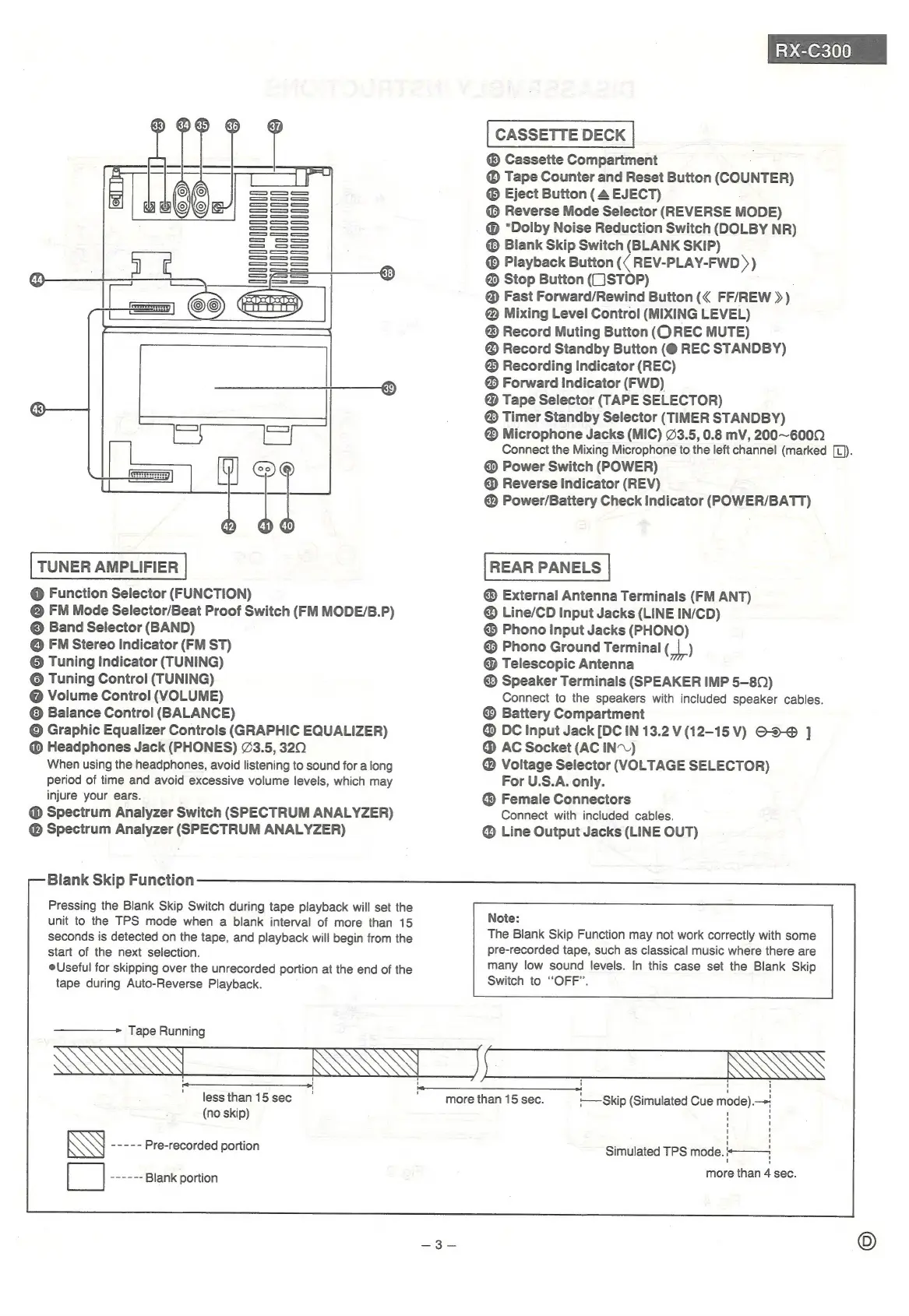
TUNER
AMPLIFIER
@
Function
Selector
(FUNCTION)
@
FM
Mode
Selector/Beat
Proof
Switch
(FM
MODE/B.P)
©
Band
Selector
(BAND)
@
FM
Stereo
Indicator
(FM
ST)
©
Tuning
Indicator
(TUNING)
©
Tuning
Control
(TUNING)
@
Volume
Control
(VOLUME)
©
Balance
Control!
(BALANCE)
©
Graphic
Equalizer
Controls
(GRAPHIC
EQUALIZER)
@
Headphones
Jack
(PHONES)
23.5,
320
When
using
the
headphones,
avoid
listening
to
sound
for
a
long
period
of
time
and
avoid
excessive
volume
levels,
which
may
injure
your
ears.
@
Spectrum
Analyzer
Switch
(SPECTRUM
ANALYZER)
@
Spectrum
Analyzer
(SPECTRUM
ANALYZER)
Blank
Skip
Function
Pressing
the
Blank
Skip
Switch
during
tape
playback
will
set
the
unit
to
the
TPS
mode
when
a
blank
interval
of
more
than
15
seconds
is
detected
on
the
tape,
and
playback
will
begin
from
the
start
of
the
next
selection.
eUseful
for
skipping
over
the
unrecorded
portion
at
the
end
of
the
tape
during
Auto-Reverse
Playback.
—————>
Tape
Running
Ln
DG
Ox630)0)
CASSETTE
DECK
®
Cassette
Compartment
Tape
Counter
and
Reset
Button
(COUNTER)
®
Eject
Button
(4
EJECT)
Reverse
Mode
Selector
(REVERSE
MODE)
@
“Dolby
Noise
Reduction
Switch
(DOLBY
NR)
®
Blank
Skip
Switch
(BLANK
SKIP)
®
Playback
Button
({
REV-PLAY-FWD
»
)
@
Stop
Button
(1JSTOP)
@
Fast
Forward/Rewind
Button
FF/REW
»)
@
Mixing
Level
Control
(MIXING
LEVEL)
®
Record
Muting
Button
(Q
REC
MUTE)
Record
Standby
Button
(@
REC
STANDBY)
®
Recording
Indicator
(REC)
®
Forward
Indicator
(FWD)
@
Tape
Selector
(TAPE
SELECTOR)
®
Timer
Standby
Selector
(TIMER
STANDBY)
®
Microphone
Jacks
(MIC)
23.5,
0.8
mV,
200~600Q
Connect
the
Mixing
Microphone
to
the
left
channel
(marked
[L)).
@
Power
Switch
(POWER)
@
Reverse
Indicator
(REV)
@
Power/Battery
Check
Indicator
(POWER/BATT)
REAR
PANELS
®
External
Antenna
Terminals
(FM
ANT)
Line/CD
Input
Jacks
(LINE
IN/CD)
®
Phono
Input
Jacks
(PHONO)
©
Phono
Ground
Terminal
(_|
)
@
Telescopic
Antenna
Speaker
Terminals
(SPEAKER
IMP
5-80)
Connect
to
the
speakers
with
included
speaker
cables.
Battery
Compartment
@
DC
Input
Jack
[DC
IN
13.2
VV
(12-15V)
O-5-@
]
@
AC
Socket
(AC
IN.)
@
Voltage
Selector
(VOLTAGE
SELECTOR)
For
U.S.A.
only.
Female
Connectors
Connect
with
included
cables.
@
Line
Output
Jacks
(LINE
OUT)
Note:
The
Blank
Skip
Function
may
not
work
correctly
with
some
pre-recorded
tape,
such
as
classical
music
where
there
are
many
low
sound
levels.
In
this
case
set
the
Blank
Skip
Switch
to
“OFF”.
SSS
ESS
ENS
less
than
15
sec
(no
skip)
aera
Pre-recorded
portion
Heese
Blank
portion
more
than
15
sec.
-—
Skip
(Simulated
Cue
eo
Simulated
TPS
fees
i
more
than
4
sec.

Related product manuals