EasyManua.ls Logo

Panasonic RX-C300 - Page 7

Panasonic RX-C300
20 pages
Print Icon
To Next Page IconTo Next Page
To Previous Page IconTo Previous Page
Loading...
3
YG.
Oz
10)
0am
2D,
O01
010)
&
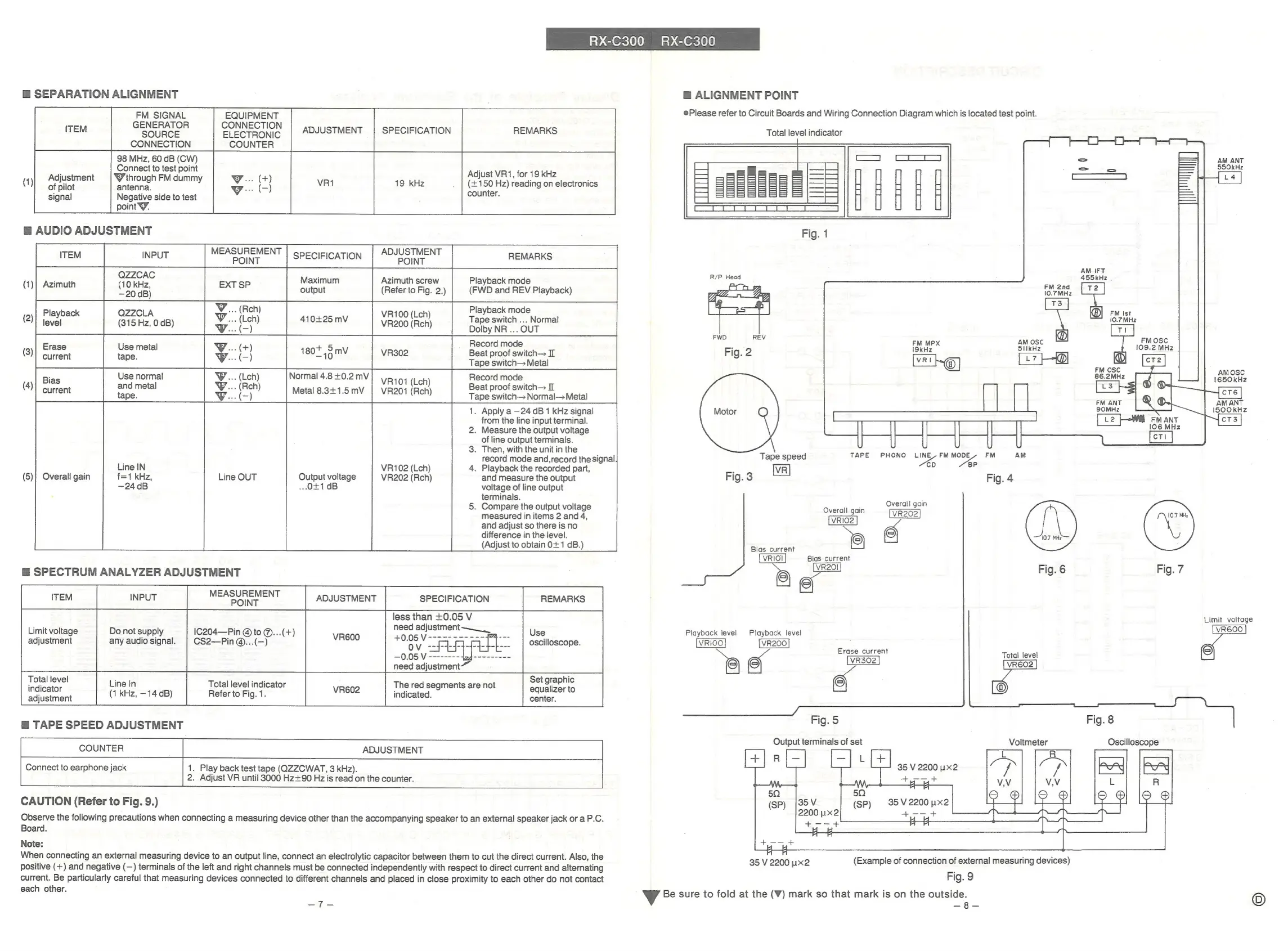
SEPARATION
ALIGNMENT
FM
SIGNAL
GENERATOR
SOURCE
CONNECTION
EQUIPMENT
CONNECTION
ELECTRONIC
COUNTER
ADJUSTMENT
SPECIFICATION
REMARKS
98
MHz,
60
dB
(CW)
Connect
to
test
point
W
through
FM
dummy
antenna.
Negative
side
to
test
point
Y.
Adjust
VR1,
for
19
kHz
(+150
Hz)
reading
on
electronics
counter.
Adjustment
of
pilot
signal
@
AUDIO
ADJUSTMENT
MEASUREMENT
ITEM
INPUT
POINT
ADJUSTMENT
SPECIFICATION
POINT
REMARKS
QZZCAC
: ;
:
Maximum
Azimuth
screw
Playback
mode
(1)
a
20
ne}
EXT
SP
(Refer
to
Fig.
2.)
|
(FWD
and
REV
Playback)
WY...
(Reh)
Playback
mode
mij
genase
aia
dB)
VY.
(ich)
410+25
mV
Me
tee
Tape
switch
...
Normal
,
W...
(-)
Dolby
NR
...
OUT
Record
mode
(3)
Ese
nn
¥:
2
180"
43
mV
VR302
Beat
proof
switch—
II
:
dil
Tape
switch—
Metal
;
Use
normal
WY...
(Leh)
Normal
4.8
+0.2
mV
Record
mode
Bias
VR101
(Lch)
:
(4)
and
metal
WY...
(Reh)
Beat
proof
switch
II
current
tape.
W.(-)
Metal
8.341.5mV
|
VR201
(Roh)
Tape
switch—
Normal—
Metal
1.
Apply
a
—24
dB
1
KHz
signal
from
the
line
input
terminal.
2.
Measure
the
output
voltage
of
line
output
terminals.
3.
Then,
with
the
unit
in
the
record
mode
and,record
the
signal
Line
IN
VR102
(Lch)
4.
Playback
the
recorded
part,
(5)
f=1
kHz,
Output
voltage
VR202
(Reh)
and
measure
the
output
—24dB
...0+1
dB
voltage
of
line
output
terminals.
5.
Compare
the
output
voltage
measured
in
items
2
and
4,
and
adjust
so
there
is
no
difference
in
the
level.
(Adjust
to
obtain
0+1
dB.)
REMARKS
Use
oscilloscope.
Overall
gain
Line
OUT
@
SPECTRUM
ANALYZER
ADJUSTMENT
MEASUREMENT
ITEM
INPUT
POINT
ADJUSTMENT
1C204—Pin
@
to
@...(+)
CS2—Pin
@...(—)
SPECIFICATION
less
than
+0.05
V
need
adjustment
—___
Limit
voltage
adjustment
Do
not
supply
any
audio
signal.
need
adjustment~
Total
level
snl
Set
graphic
fats
Line
In
Total
level
indicator
The
red
segments
are
not
:
indicator
=
:
VR602
es
equalizer
to
adjustment
ec
AN
[vee
|
Rarorneeas
center.
@
TAPE
SPEED
ADJUSTMENT
COUNTER
Connect
to
earphone
jack
ADJUSTMENT
1.
Play
back
test
tape
(QZZCWAT,
3
kHz).
2.
Adjust
VR
until
3000
Hz+90
Hz
is
read
on
the
counter.
CAUTION
(Refer
to
Fig.
9.)
Observe
the
following
precautions
when
connecting
a
measuring
device
other
than
the
accompanying
speaker
to
an
external
speaker
jack
or
a
P.C.
Board.
Note:
When
connecting
an
external
measuring
device
to
an
output
line,
connect
an
electrolytic
capacitor
between
them
to
cut
the
direct
current.
Also,
the
positive
(+)
and
negative
(—)
terminals
of
the
left
and
right
channels
must
be
connected
independently
with
respect
to
direct
current
and
alternating
current.
Be
particularly
careful
that
measuring
devices
connected
to
different
channels
and
placed
in
close
proximity
to
each
other
do
not
contact
each
other.
Hf
=
@
ALIGNMENT
POINT
@Please
refer
to
Circuit
Boards
and
Wiring
Connection
Diagram
which
is
located
test
point.
Total
level
indicator
R/P
Head
FWD
REV
Fig.
2
&)
Tape
speed
TAPE
PHONO
LINE.
FM
MODE
FM
AM
Ao
6P
Fig.
3
Fig.
4
é
teat
Overall
gain
verall
gain
[VR202]
VRIO2
Bias
current
iQ)
VRIOI
Bias
current
e
VR20l
Fig.
6
Playback
level
Playback
level
VRIOO
VR200
Erase
current
Total
level
Fig.
5
Output
terminals
of
set
35
V
2200
x2
35
V
2200
ux2
+--+
AM
IFT
455kHz
Fig.
7
Fig.
8
Oscilloscope
(Example
of
connection
of
external
measuring
devices)
Fig.
9
Vv
Be
sure
to
fold
at
the
(V)
mark
so
that
mark
is
on
the
outside.
=
3
35
V
2200
ux2
AM
ANT
SSOkHz
AMOSC
1650kHz
AM
ANT
Limit
voltage
VR6OO

Related product manuals