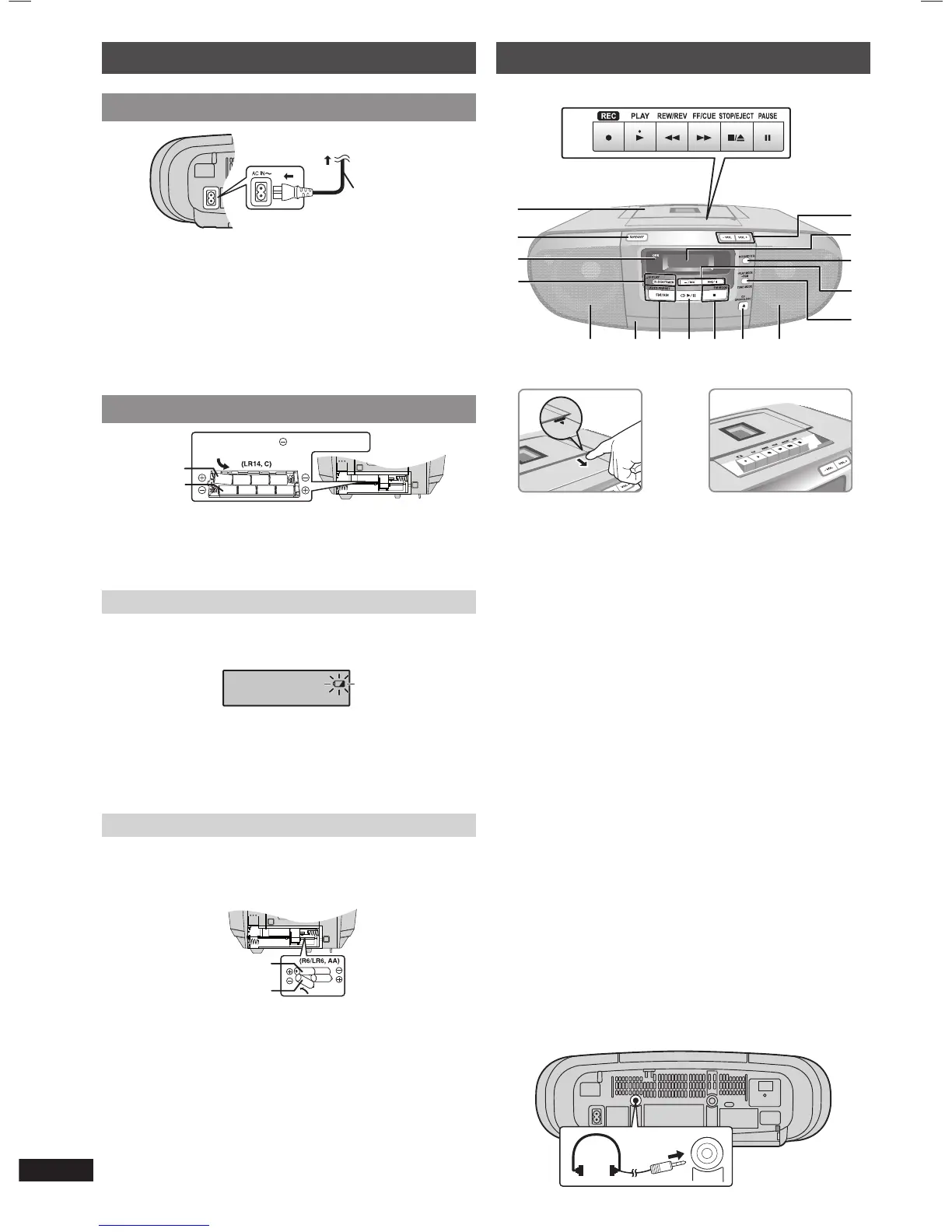
Using batteries (not included)
567
8
1
2
43
Inner row
Outer row
Press towards while inserting
the battery.
• The unit cannot be powered by batteries if the AC mains lead
is connected. Disconnect the AC mains lead from the unit to
operate on battery power.
• Use only alkaline batteries.
When to change the batteries
When the battery indicator begins fl ashing, replace all 8 of
the batteries. It is also a good idea to replace all the batteries
before recording.
✒
Note
Before any function starts, the battery indicator may fl ash
although the batteries are not drained. The indicator will display
its current status when the unit is powered from the household
mains socket by using the AC mains lead.
Memory back-up
When the power supply is interrupted, the current time, timer
settings and radio stations you have set are saved if you have
inserted back-up batteries (not included).
These batteries do not power the unit.
21
3
4
Inner row
Outer row
When to change the batteries
The batteries last about a year.
Connect the unit to AC power before replacing the batteries.
Before connecting or disconnecting the AC mains lead, press
[8/x, STOP/EJECT] to stop the tape and press [TAPE/OFF]
to turn the unit off. The back-up batteries ware out faster if the
cord is disconnected with the power still on.
✒
Note
Use either alkaline or manganese batteries.
Overview of controls
A
M
N
B
IDF
C
GH
L
J
K
P
DE
O
A Tape mode /standby switch
Unit will be in standby mode.
B OPR (operation) indicator
The indicator lights up when the unit is turned on.
C Clock or timer setting, play timer setting
D Speakers
These speakers do not have magnetic shielding. Do not
place them near televisions, personal computers or other
devices easily infl uenced by magnetism.
E Disc tray
F Tuner (FM/AM) selection, auto preset selection
G Disc play or pause
H Stop disc playback, MONO selection for FM mode
I Disc tray open or close
J Play mode function, program function, tuning mode
selection
K Track skip or search, check program content, preset
channel selection, tuning function, time adjustment
L Sound equalizer (EQ) selection
M Display panel
N Volume control
O Cassette play operations
P Cassette deck
Headphone jack (PHONES)
Plug type: Ø 3.5 mm stereo (not included)
• Avoid listening for prolonged periods of time to prevent
hearing damage.
• Excessive sound pressure from earphones and headphones
can cause hearing loss.
PHONES
RQTX1147-1B_gb.indd 4RQTX1147-1B_gb.indd 4 3/30/2010 10:24:12 AM3/30/2010 10:24:12 AM


 To Next Page