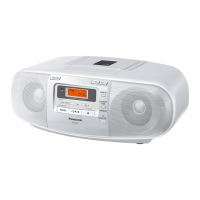
The Panasonic RX-DS12 is a portable stereo CD system designed for personal audio enjoyment, offering a combination of CD, cassette, and radio functionalities. This compact unit is engineered for ease of use and portability, allowing users to enjoy their favorite music at home or on the go.
Function Description:
The RX-DS12 serves as a versatile audio player, integrating three primary functions:
- CD Player: It plays standard compact discs, offering features like track skipping, rapid forwarding/reversing (search), and play/pause functionality. The CD player is designed to start playback from track 1 and continue sequentially until the last track, with an automatic stop feature. It also includes a display panel to show track numbers and other relevant information.
- Cassette Deck: The unit features a cassette deck capable of playing and recording normal position (TYPE I) tapes. It supports playback, fast forward, rewind, and pause functions. The cassette deck incorporates a full auto-stop system that releases operation buttons when the tape reaches its end during playback, recording, fast forward, or rewind.
- Radio Tuner: It includes an AM/FM radio tuner, allowing users to listen to broadcast stations. The tuning is manual, using a dedicated dial, and the unit provides guidance for adjusting antennas for optimal reception, including a telescopic antenna for FM and an internal ferrite core antenna for AM.
Beyond playback, the RX-DS12 also offers recording capabilities:
- Recording Radio Programs: Users can record radio broadcasts onto cassette tapes. The process involves tuning to the desired station and initiating recording on the cassette deck.
- Recording Compact Discs: The unit allows for recording audio from CDs onto cassette tapes. This feature enables users to create their own mixtapes from their CD collection, with options to record entire CDs or select specific tracks.
Usage Features:
The RX-DS12 is designed with user convenience in mind, incorporating several features to enhance the listening experience:
- Power Sources: The unit can be powered by household AC current using the included power cable or by six "D" size batteries for portable use. This dual power option makes it suitable for various environments.
- Volume Control: A slide-type volume control allows for easy adjustment of the audio output to the desired level.
- XBS (Extra Bass System): An XBS switch is provided to enhance deep bass frequencies, offering a richer sound experience, especially for music genres that benefit from strong bass.
- Headphones Jack: A 3.5 mm stereo headphones jack is included for private listening, allowing users to enjoy their music without disturbing others.
- Selector Switch: A multi-position selector switch (SELECTOR) allows users to easily switch between different functions: TAPE/OFF, AM, FM, and CD.
- Cassette Operation Buttons: Dedicated buttons for cassette operations include REC (record), PLAY, REW/REV (rewind/review), FF/CUE (fast forward/cue), STOP/EJECT, and PAUSE, providing comprehensive control over tape functions.
- CD Operation Buttons: CD controls include STOP, SKIP/SEARCH buttons (forward and backward), and PLAY/PAUSE, offering intuitive navigation and playback control for compact discs.
- Display Panel: A clear display panel shows relevant information, such as track numbers for CDs, aiding in navigation and status monitoring.
- Safety Features: The manual emphasizes safety precautions, including proper power cord handling, avoiding moisture, and ensuring adequate ventilation. It also highlights the importance of using the correct type of compact discs and cassette tapes to prevent damage to the unit.
- Listening Caution: The manual includes a section on listening caution, advising users to set the volume at a safe level to prevent hearing damage, promoting responsible audio consumption.
Maintenance Features:
To ensure the longevity and optimal performance of the RX-DS12, several maintenance guidelines are provided:
- External Surface Cleaning: The cabinet, panel, and controls should be cleaned with a soft cloth lightly moistened with a mild detergent solution. Users are advised against using abrasive pads, scouring powder, or solvents like alcohol or benzine, which could damage the finish.
- Tape Head Care: Regular cleaning of the tape heads is recommended after approximately every 10 hours of use to maintain sound quality for both recording and playback. This involves opening the cassette lid, pressing the REC button (while holding the tab inside the deck), and cleaning the tape-contacting portions with a cotton swab. Alcohol-based cleaners are specifically advised against for head cleaning.
- Lens Care (CD Player): For the CD player, the lens should be cleaned with a blower (not included) to remove dust. For extremely dirty lenses, a cotton swab can be used, and a specific lens cleaner kit (SZZP1038C) is recommended.
- Battery Replacement: Guidelines are provided for when to replace batteries (e.g., if sound is distorted or the unit fails to operate properly) and proper battery handling (e.g., not mixing new and old batteries, correct polarity, removing batteries during long non-use periods).
- Disc and Tape Storage: The manual offers advice on proper storage of compact discs and cassette tapes to prevent damage, such as avoiding direct sunlight, humid or dusty areas, and strong magnetic fields, which can affect their quality and usability.
- Condensation Management: Instructions are given for handling condensation that may form on the CD lens unit due to sudden temperature changes, advising users to turn on the power and wait for about an hour for the moisture to evaporate before operating.
- Troubleshooting Guide: A comprehensive troubleshooting guide is included to help users identify and resolve common issues, such as problems with CD playback, tape ejection, recording, radio reception, and power. This guide offers probable causes and suggested remedies, empowering users to perform basic diagnostics before seeking professional service.
- Service Information: For issues that cannot be resolved through troubleshooting, users are directed to authorized service personnel, with contact information provided for service centers. The manual explicitly states that users should not attempt to open the unit or perform repairs themselves.

 Need help?
 General

 To Next Page