Power
Sources
Common Operations
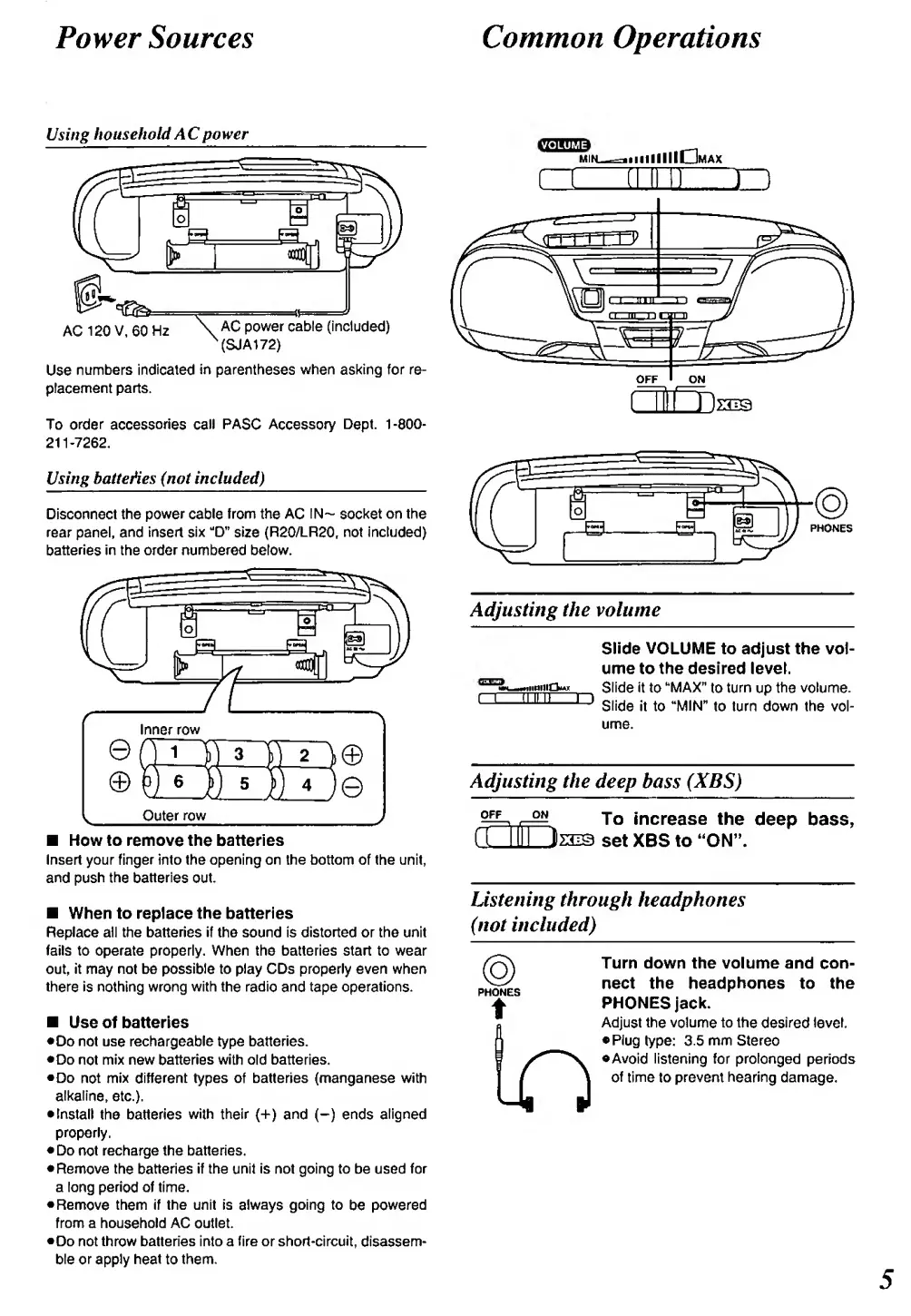
Using
household
A
Cpower
AC120V,60H2
. AC power cable (Included)
^{SJA172)
Use
numbers indicated
in
parentheses
when
asking for re-
placement parts.
To
order
accessories
call PASC
Accessory
Dept.
1-800-
211-7262,
Using
batte^es (not included)
Disconnect the
power
cable
from
the
AC
IN-
socket
on
the
rear panel, and
insert six
"D"
size
(R2Q/LR20,
not
Included)
batteries
In the order numbered
below.
Inner
row
Outer
row
How
to
remove the
batteries
Insert
your finger Into the opening
on the bottom of the unit,
and push the
batteries
out.
When to replace the batteries
Replace
all the batteries if the sound is
distorted or the unit
fails to operate
properly.
When the batteries start to
wear
out,
it may
not be
possible to play CDs properly even
when
there is nothing
wrong with
the radio
and tape
operations.
Use of batteries
•Do not
use
rechargeable type
batteries.
•
Do
not
mix
new
batteries with
old batteries.
•
Do
not
mix
different types of batteries (manganese with
alkaline,
etc.).
•
Install
the batteries
with
their
(+)
and
(-)
ends
aligned
properly.
•Do
not
recharge the batteries.
•Remove
the batteries
If the unit is not going to be used for
a
long
period
of time.
•
Remove
them if the unit is
always
going to
be
powered
from a
household AC
outlet.
•Do not throw batteries Into a fire or
short-circuit,
disassem-
ble or apply heat
to
them.
CZL
iiiiIIIGmax
] n
PHONES
Adjusting the volume
Slide VOLUME
to adjust the vol-
ume to the desired
level.
Slide it to
""MAX"
to
turn
up
the volume.
Slide
it to
"MIN"
to turn down the vol-
ume.
Adjusting
the deep bass
(XBS)
OFF
-
—
>
To increase
the
deep bass,
n Mil laiQ
set
XBS to "ON".
Listening
through
headphones
(not included)
@
PHONES
t
In
Turn down the volume and
con-
nect the
headphones
to the
PHONES
Jack.
Adjust
the volume
to
the
desired
level.
•
Plug
type:
3.5
mm
Stereo
•
Avoid
listening
for prolonged periods
of
time to prevent
hearing
damage.



 To Next Page