EasyManua.ls Logo

Panasonic RX-DS12 - Listening to CDs; Starting and Stopping CD Play; Track Navigation

Panasonic RX-DS12
12 pages
Print Icon
To Next Page IconTo Next Page
To Previous Page IconTo Previous Page
Loading...
Listening
to
CDs
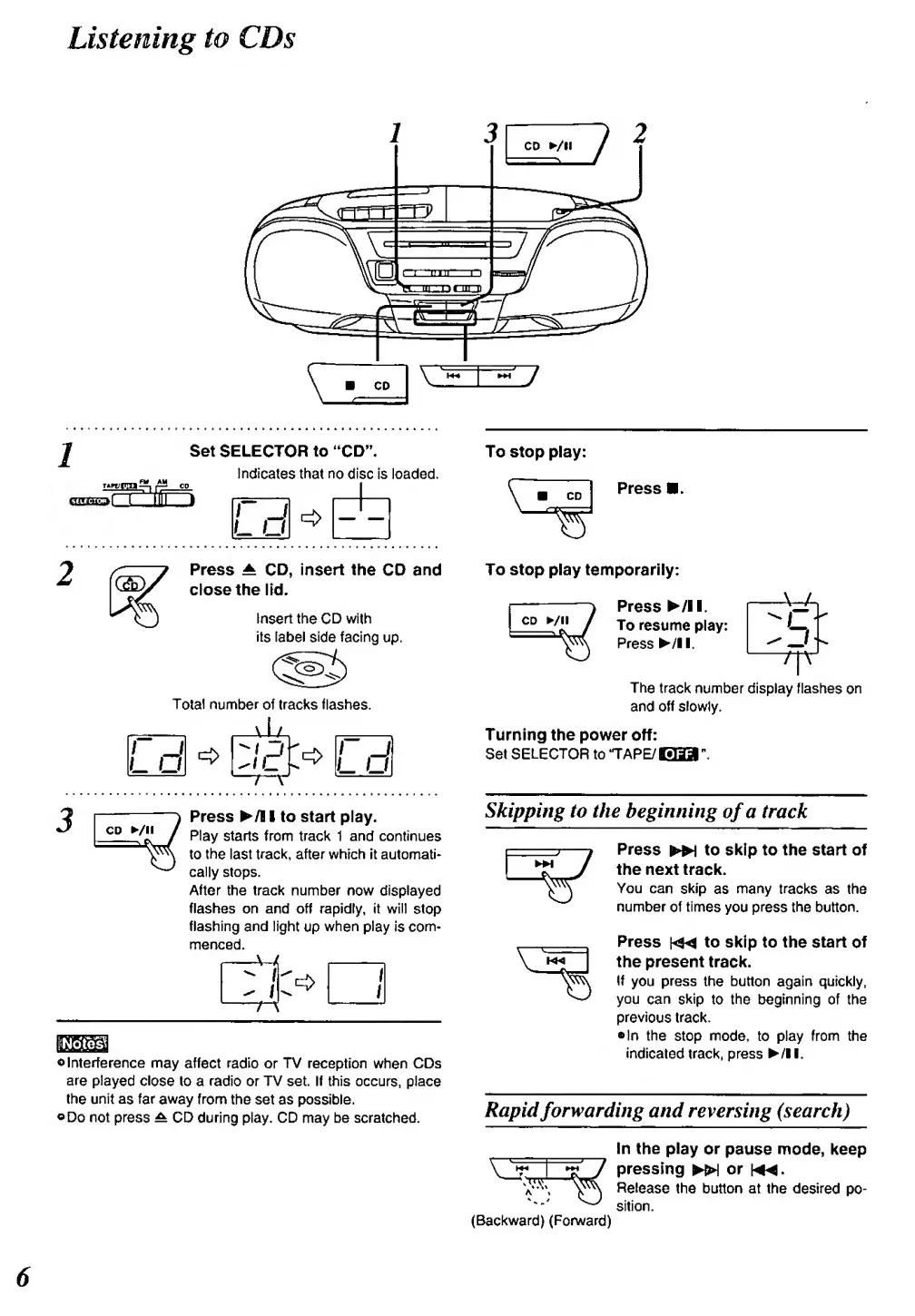
Set
SELECTOR
to
"CD".
Indicates
that
no
disc is loaded.
ft
Ld
2
Press A
CD,
insert the
CD and
close the
lid.
Insert the CD
with
its label
side
facing
up.
Total
number of tracks flashes.
Id
id
CD
/!!
Press ^/l I to
start
play.
Play
starts from
track 1 and continues
to
the
last
track,
after which it autonnati>
cally stops.
After the track number
now
displayed
flashes on and off rapidly, it will
stop
flashing and light
up
when
play
is
com-
menced.
A-
iNotesl
o
Interference may
affect
radio
or TV reception when CDs
are
played close to a radio or TV set. If
this occurs, place
the
unit
as far
away from the set as
possible.
oDo
not
press
^
CD during play. CD may be
scratched.
To stop play:
V
CD
Press a.
To stop play
temporarily:
CD /!!
/
Press
^/ll.
To resume
play:
Press
^/ll.
-rn
The
track
number display flashes
on
and
off
slowly.
Turning the power
off:
Set
SELECTOR
to
'TAPE/EBa"
Skipping to the
beginning
of
a track
Press
^
to skip to the start of
the next track.
You can
skip
as
many
tracks
as the
number
of times
you
press the button.
Press
to skip to
the
start
of
the
present track.
If
you
press
the button
again
quickly,
you can
skip
to
the beginning of the
prevk)us track.
•In
the
stop
mode,
to play from the
indk;ated
track, press ^/ll.
Rapid
forwarding
and reversing (search)
(Backward) (Forward)
In the
play
or
pause mode, keep
7
pressing
^
or
h«4.
^
Release
the button at
the desired
po-
sition.
6

Related product manuals