EasyManua.ls Logo

Panasonic RX-DS12 - Listening to Tapes; Tape Playback Operations; Tape Search and Rewind

Panasonic RX-DS12
12 pages
Print Icon
To Next Page IconTo Next Page
To Previous Page IconTo Previous Page
Loading...
Listening to
Tapes
Only
normal tapes
can
be used.
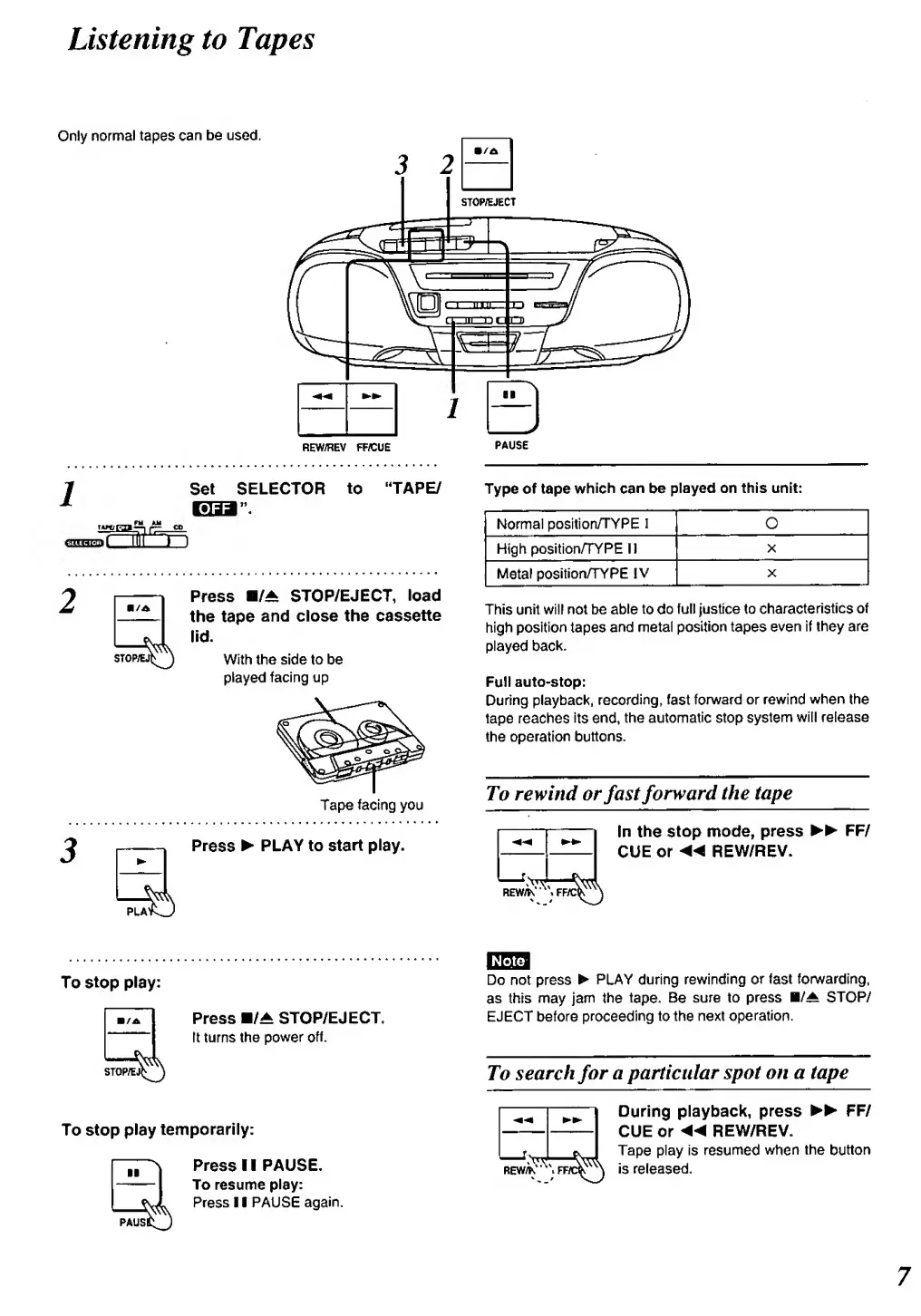
REW/REV FFiCUE
Set
SELECTOR
to
"TAPE/
Press
B/^ STOP/EJECT,
load
the tape
and close the
cassette
lid.
With the side to be
played
facing up
Tape
facing
you
Press
^ PLAY to
start
play.
PAUSE
Type of tape
which
can
be
played
on this unit:
Normal position/TYPE
I
O
High
position/TYPE II
X
Metal
position/TYPE
IV
X
This
unit will not be
able
to
do
full justice
to
characteristics
of
high
position
tapes
and
metal
position
tapes
even
If they are
played
back.
Full auto-stop:
During
playback,
recording, fast
forward or rewind
when
the
tape reaches
its end,
the
automatic
stop
system
will release
the
operation buttons.
To
rewind or
fast
forward
the tape
f>
REW/h'
In
the
stop
mode, press
FF/
CUE
or
«
REW/REV.
To
stop
play:
STOWE^^
To stop
play
temporarily:
Press
B/^
STOP/EJECT.
It turns the
power off.
Press
1 1 PAUSE.
To
resume
play:
Press
1 1 PAUSE
again.
Do not press
PLAY
during
rewinding or fast
fonwarding.
as
this may
jam
the
tape.
Be
sure to press
H/^
STOP/
EJECT before
proceeding to
the
next operation.
To
search
for
a
particular
spot on
a tape
REW/K
During playback, press
FF/
CUE
or
«REW/REV.
Tape
play is
resumed when
the
button
is
released.

Related product manuals