EasyManua.ls Logo

Panasonic RX-DS12 - Listening to the Radio; Tuning Stations; Recording Radio Programs; Preparing for Recording

Panasonic RX-DS12
12 pages
Print Icon
To Next Page IconTo Next Page
To Previous Page IconTo Previous Page
Loading...
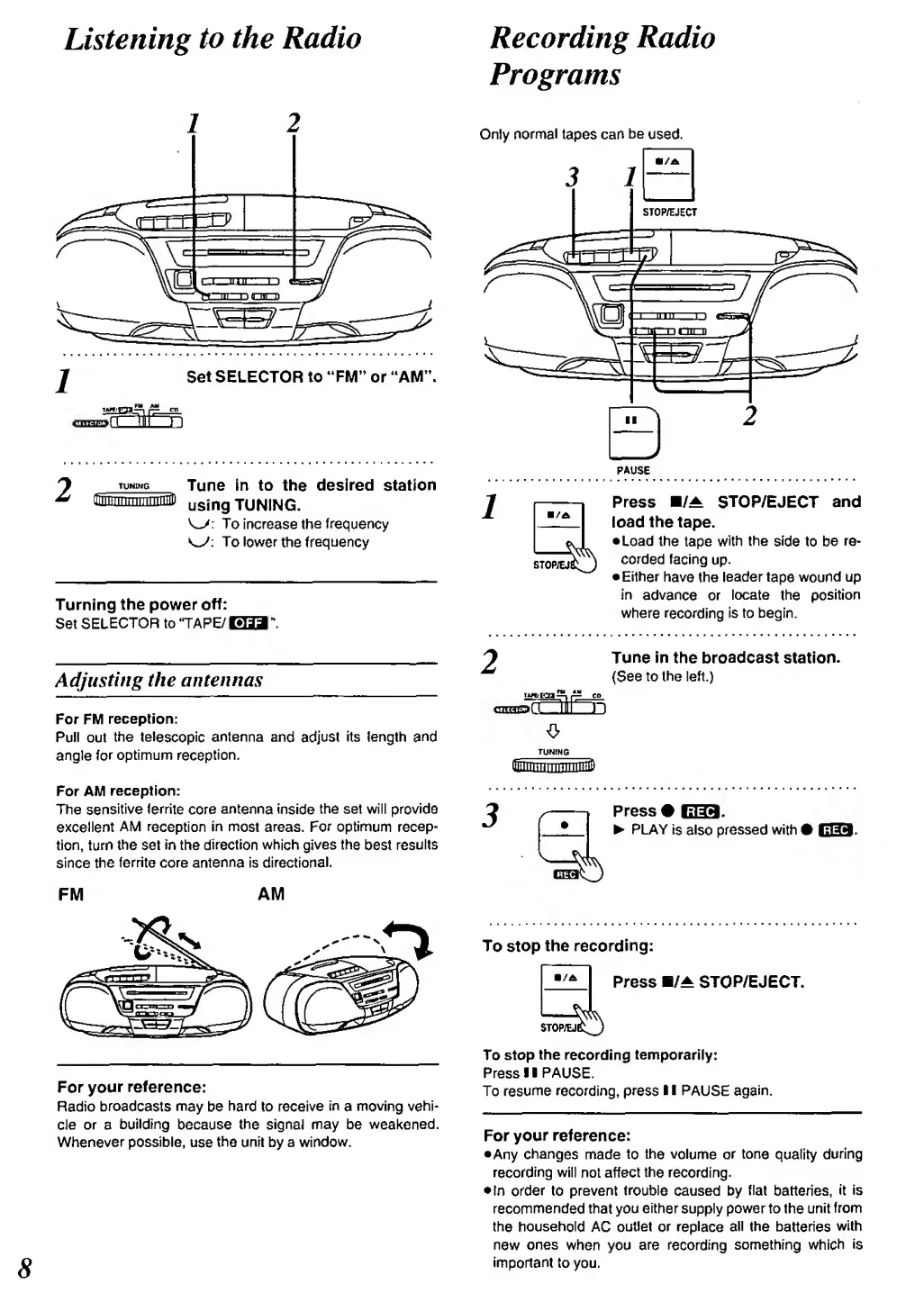
Listening
to the
Radio
J
Set SELECTOR to
"FM"
or "AM
"
T*«JS&^
CP
TUNING
Tune
in to
the desired station
gnnnrnnTTTinniiiP
using
tuning.
To
increase
tlie frequency
K^:
To lower
the
frequency
Turning
the power
off:
Set
SELECTOR
to TAPE/
El
Adjusting
the antennas
For FM
reception:
Pull out
the
telescopic
antenna
and adjust
its length and
angle
for
optimunrt
reception.
For AM
reception:
The
sensitive
territe
core
antenna
inside
the set will provide
excellent
AM
reception
in
most areas. For
optimum recep-
tion, turn
the set
in
the
direction which gives the
best
results
since the
ferrite
core
antenna
is
directional.
FIM
AM
For
your
reference:
Radio
broadcasts may
be
hard
to receive
in
a
moving vehi-
cle
or a
building
because
the signal may
be
wealcened.
Whenever possible,
use
the
unit by a
window.
Recording
Radio
Programs
Only
normal
tapes can
be
used.
3
PAUSE
Press
B/^
STOP/EJECT
and
load
the
tape.
•Load
the
tape
with
the
side
to
be
re-
corded
facing
up.
•Either
have
the
leader
tape
wound
up
in
advance
or
locate
the
position
where
recording
is to begin.
Tune
in the broadcast
station.
(See
to the
left.)
Press
liiHsi'
^
PLAY
is
also
pressed
with i
To stop
the
recording:
Press
H/A
STOP/EJECT.
To stop
the
recording
temporarily:
Press
1
1
PAUSE
To
resume
recording, press
II
PAUSE
For
your reference:
•Any
changes
made
to the
volume
or tone
quality
during
recording will not affect
the
recording.
In order to prevent
trouble
caused by
flat
batteries,
it is
recommended that
you
either
supply
power
to
the
unit
from
the household
AC
outlet
or
replace
all
the
batteries
with
new
ones
when you are recording
something which
is
important
to
you.

Related product manuals