EasyManua.ls Logo

Panasonic RX-SA60 - Tape Playback

Panasonic RX-SA60
18 pages
Print Icon
To Next Page IconTo Next Page
To Previous Page IconTo Previous Page
Loading...
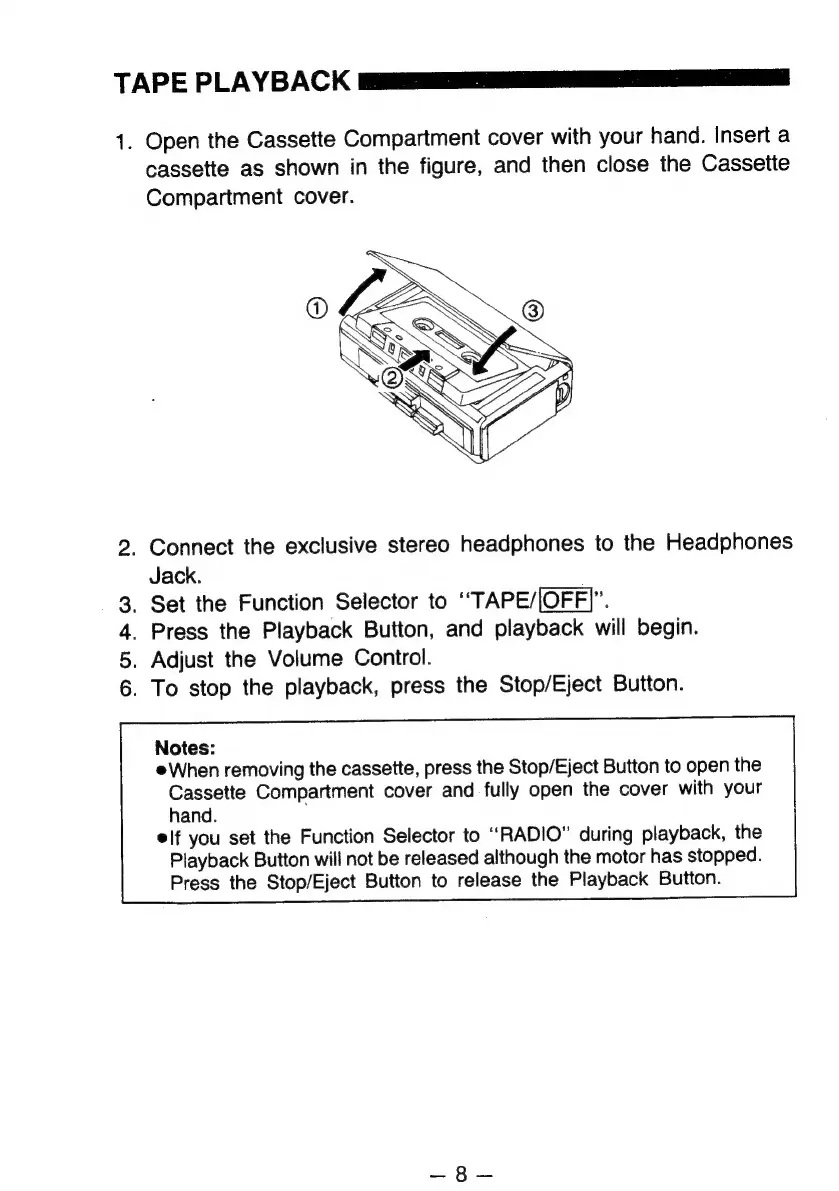
TAPE
PLAYBACK
1.
Open
the
Cassette
Compartment
cover
with
your
hand.
Insert
a
cassette
as
shown
in
the
figure,
and
then
close
the
Cassette
Compartment
cover.
nh
_
Connect
the
exclusive
stereo
headphones
to
the
Headphones
Jack.
.
Set
the
Function
Selector
to
“TAPE/|OFF]”.
Press
the
Playback
Button,
and
playback
will
begin.
Adjust
the
Volume
Control.
To
stop
the
playback,
press
the
Stop/Eject
Button.
3
4.
5.
6.
Notes:
When
removing
the
cassette,
press
the
Stop/Eject
Button
to
open
the
Cassette
Compartment
cover
and
fully
open
the
cover
with
your
hand.
elf
you
set
the
Function
Selector
to
“RADIO”
during
playback,
the
Playback
Button
will
not
be
released
although
the
motor
has
stopped.
Press
the
Stop/Eject
Button
to
release
the
Playback
Button.

Related product manuals