
 Need help?
Do you have a question about the Panasonic RX-FT530 and is the answer not in the manual?
General safety instructions and warnings for operating the unit.
Conditions under which the unit requires professional servicing.
User's role in servicing and when to refer to qualified personnel.
Instructions for connecting the unit to a household AC power outlet.
Guidance on inserting and removing batteries for portable operation.
How to select radio bands, tune stations, and adjust volume/tone.
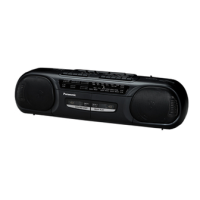
The Panasonic RX-FT530 is a Stereo Radio Cassette Recorder designed for versatile audio playback and recording. This portable unit combines the functionalities of a radio tuner and a dual cassette deck, allowing users to enjoy music from various sources and create their own recordings.
The RX-FT530 serves as a comprehensive audio entertainment system, offering both radio reception and cassette tape operations. It features a stereo radio tuner capable of receiving both FM and AM broadcasts. For FM reception, it supports stereo broadcasts, indicated by an "FM ST" light when tuned in. The unit includes a telescopic antenna for FM and relies on its internal ferrite rod antenna for AM, with optimal reception achieved by adjusting the unit's direction.
The dual cassette deck is a core feature, providing both playback and recording capabilities. It supports normal tapes and includes two decks: Deck 1 primarily for playback and Deck 2 for both playback and recording. A notable feature is the "Automatic Playback Relay," which allows continuous listening by automatically switching from Deck 1 to Deck 2 once the first tape finishes. This is particularly useful for extended listening sessions without interruption.
Recording functionality is robust, enabling users to record from the radio, the built-in microphone, or external equipment connected via the CD/LINE IN jacks. The recording level is automatically adjusted, simplifying the process. For radio recordings, especially AM broadcasts, a "Beat Proof" (B.P) selector helps reduce unwanted beat signals or whistle noises, ensuring clearer recordings. When recording from an external source like a portable CD player, the unit offers a "Synchro-start function," which initiates recording on Deck 2 simultaneously with playback from Deck 1 or the external source, making it easy to duplicate tapes or record from other devices. The unit also includes a pause button for temporary interruptions during playback or recording, allowing users to resume exactly where they left off.
The RX-FT530 also features a built-in microphone, making it convenient for voice recording or capturing ambient sounds. For private listening, a headphone jack is provided, which automatically mutes the speakers when headphones are connected. The unit's sound can be adjusted using the volume and tone controls, allowing users to customize the audio output to their preference.
Operating the RX-FT530 is straightforward, designed for ease of use. To power the unit, users can either connect it to a household AC outlet using the supplied AC power cord or insert six "D" size batteries for portable operation. The battery compartment is clearly marked for correct insertion.
For tape playback, users select "TAPE/OFF" with the function selector, open the cassette compartment, insert a normal tape with the exposed side facing up, and press the PLAY button. Fast forward and rewind functions are available, allowing quick navigation through tapes. During playback, a "cue" or "review" feature allows users to monitor the recorded sound at high speed by pressing and holding the respective buttons. The unit also features a full auto-stop mechanism, which automatically stops the tape when it reaches the end.
Radio listening involves setting the function selector to "RADIO," choosing the desired band (FM or AM), and using the tuning control to find a broadcast. The FM stereo indicator lights up when a stereo broadcast is received. If FM reception is poor, switching the band to "FM" (non-stereo) can improve clarity by reducing noise.
Recording is initiated by inserting a tape into Deck 2, selecting the desired source (radio, built-in microphone, or CD/LINE IN), and pressing the RECORD button. For recording from external equipment, the CD/LINE IN jacks are used, and the function selector is set to "CD/LINE." The "EDITING/B.P" switch allows users to select between "NORMAL" and "HIGH" speed recording when duplicating tapes from Deck 1 to Deck 2, or to activate the beat proof function for AM radio recordings.
The unit's portability is enhanced by a sturdy handle, making it easy to carry. The design emphasizes user convenience, with clearly labeled controls and a logical layout.
Maintaining the RX-FT530 involves simple, routine care to ensure optimal performance and longevity. The cabinet, panel, and controls should be cleaned with a soft cloth lightly moistened with a mild detergent solution. Abrasive pads, scouring powder, or solvents like alcohol or benzine should be avoided as they can damage the unit's finish.
For the cassette decks, regular cleaning of the tape heads, pinch roller, and capstan is recommended after approximately every 10 hours of use to maintain sound quality for both recording and playback. This can be done with a cotton swab or a soft, lint-free cloth slightly moistened with isopropyl alcohol. If distortion or poor sound quality persists, demagnetizing the head assembly with a demagnetizer from an audio store is advised.
Tape care is also important. Users are cautioned against using cassette tapes exceeding 90 minutes for repeated stopping, starting, rewinding, and fast forwarding, as these thinner tapes are prone to stretching and entanglement. If a tape loosens, taking up the slack before use can prevent breakage. To protect recorded sounds from accidental erasure, users can remove the erase-prevention tabs on the cassette. To re-record on a protected cassette, covering the slot with adhesive tape is necessary. Proper tape storage is also emphasized, advising against storing tapes in high temperatures, high humidity, strong magnetic fields, or direct sunlight, as these conditions can damage the tapes or erase recordings.
The manual also provides general safety precautions, including proper power source connection, avoiding moisture and heat, and ensuring adequate ventilation. It advises users not to attempt servicing the unit themselves and to refer all servicing to qualified personnel.
 Radio
Radio| FM frequency range | 88-108 MHz |
|---|---|
| AM frequency range | 525-1705 kHz |
 Tape Recorder
| track system | 4 track, 2 channel, stereo |
|---|---|
| recording system | AC bias, magnet erase |
| frequency range | 70—12000 Hz (Normal) |
 Power
Power| power requirement | AC; 120 V, 60 Hz |
|---|---|
| power consumption | 15W |
| battery | 9 V (six “D” size batteries) |
Speakers| woofer size | 10 cm (4”) |
|---|---|
| tweeter size | 1.5 cm (%6") |
 Ports & Interfaces
| input jack | CD/LINE 1N; 398 mV/47 kQ |
|---|---|
| output jack | HEADPHONES; 320 |
 Weight and Dimensions
| dimensions | 566x146x160 mm (2216 X544" X 6Y16") |
|---|---|
| weight | 2.8 kg without batteries (6 lb. 3 oz.) |





 To Next Page