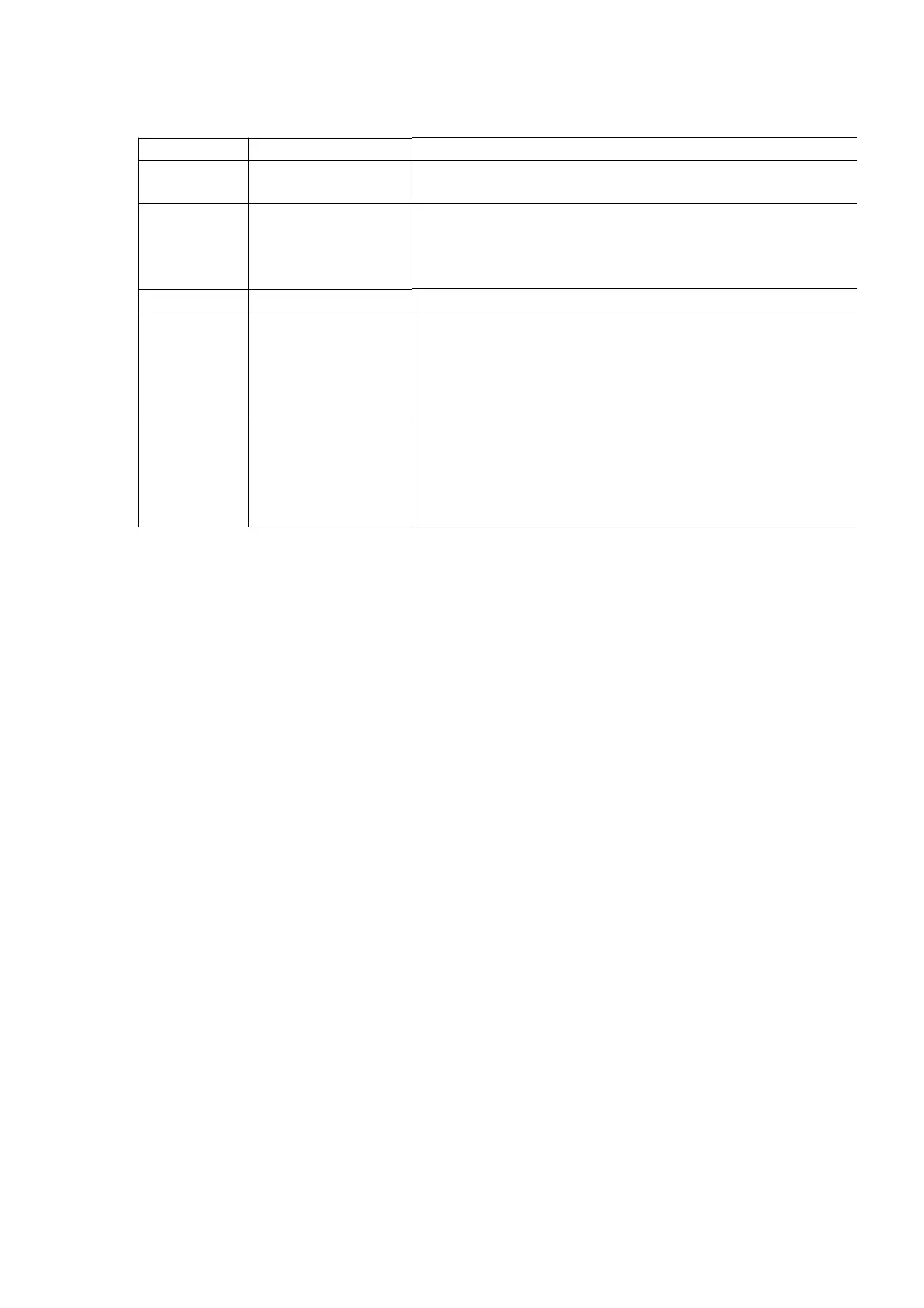
Error Code Problem Condition Possible Cause
MD F15 Interval till MD starts
playing is too long
Pickup home position sense switch (S8) is defective; check
replace if neccessary.
MD F26 MD is loaded but
cannot be played
Communication error between the servo processor IC and
microprocessor IC (system control). Check if the flexible
is disconnected.
Displayed when the disc is scratched too.
F22 MD cannot be loaded MD loading motor or MD loading mechanism error; check
F28 MD cannot be loaded Confirm that the disc is not catching on anything.
The connection (flexible circuit board or connector cable)
MD unit and the MD servo circuit board is disconnected or
check and replace ifneccessary.
The MD unit may be malfunctioning; replace it.
F29 MD cannot be ejected Confirm that the disc is not catching anything.
The connection (flexible circuit board or connector cable)
MD unit and the MD servo circuit board is disconnected or
check and replace if neccessary.
TheMD unit may be malfunctioning; replace it.
10. Measurement and Adjustment
10.1. Laser Power Adjustment
Adjust each laser power : read power for reading (play) and write power for writing (record).
10.1.1. Necessary Instruments
- Laser power meter (Advantest TQ8210 or compatible meter)
- Test disc (Pre-mastered disc RFKV0006 or RFKV0014)
- Recordable disc available on sales root (with music recorded)
- Insulated driver for adjustment such as a ceramic driver
- Jitter meter
10.1.2. Set the Unit to the Adjustment Mode
1. Perform the item “8.1.3. Checking for the MD Servo P.C.B. and MD
Connector P.C.B.” in “Operation Check and Main Component
Replacement Procedures”.
2. Turn the power on.
3. Press CD play button with no CD, cassette or MD loaded.
4. While pressing STOP button on the unit, press 4 and 7 on the
remote control. The unit enters doctor mode for adjustment.
Cautions
1. About handling the MD unit
33









 To Next Page