EasyManua.ls Logo

Panasonic SC-AK29 - User Manual

Panasonic SC-AK29
32 pages
Print Icon
To Next Page IconTo Next Page
Loading...
RQT5258-3P
P
CD Stereo System
Operating Instructions
Model No. SC-AK29
SC-AK24
SC-AK18
Before connecting, operating or adjusting this product, please read these
instructions completely.
Please keep this manual for future reference.
PC
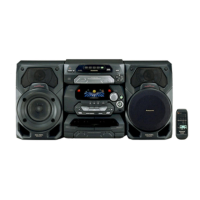
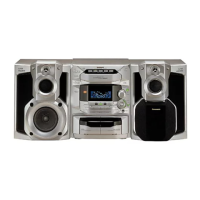
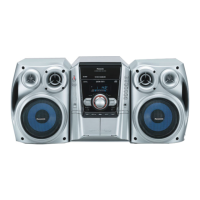
The illustrations show SC-AK29.

Questions and Answers

  • H
    Heather BoydSep 23, 2025
    What does “F61” on Panasonic SC-AK29 display mean?
    • J
      Jared ButlerSep 23, 2025
      If “F61” appears on the display, and the speaker wires are not shorted, then there is a power supply problem. Consult your dealer for assistance.
  • A
    April ClaytonAug 23, 2025
    How to fix no sound on Panasonic SC-AK29?
    • B
      bgonzalezAug 23, 2025
      If there is no sound when playing a source on your Panasonic Stereo System, the (+) and (–) wires of the speaker cords may be shorted. Switch the system to standby mode, reconnect the speaker cords so they are not shorted, and then switch the power back on.
  • C
    Colton AdamsAug 25, 2025
    How to fix reversed left and right sounds on Panasonic SC-AK29?
    • T
      Thomas McintyreAug 25, 2025
      If the left and right sounds are reversed on your Panasonic Stereo System, the left and right connections to the speaker are likely reversed. Connect the speaker cords correctly.
  • T
    Tonya WestAug 27, 2025
    What to do if Panasonic SC-AK29 Stereo System displays “– – : – –”?
    • M
      Margaret ShepherdAug 27, 2025
      If “– – : – –” appears on the display of your Panasonic Stereo System, it could be because you plugged in the power cord for the first time or there was a recent power failure. You should set the time.
  • T
    Trevor CooperAug 27, 2025
    Why does Panasonic SC-AK29 display 'ERROR' message?
    • T
      Tyler McculloughAug 27, 2025
      If the “ERROR” message appears on the display of your Panasonic Stereo System, it indicates that an incorrect operation has been performed. Operate the unit correctly by following the operating instructions.
  • C
    christopherjohnsonSep 18, 2025
    What to do if there is condensation inside the Panasonic SC-AK29 CD changer?
    • J
      John VasquezSep 18, 2025
      If there is condensation inside the CD changer of your Panasonic Stereo System, wait for 60 minutes before using the CD player.
  • J
    Jacob WilliamsSep 15, 2025
    What to do if Panasonic Stereo System disc is dirty?
    • B
      Becky WilsonSep 15, 2025
      Wipe the disc with a soft cloth if the disc of your Panasonic Stereo System is dirty.
  • A
    Amber RobertsSep 16, 2025
    Why is the location of musical instruments not well defined on Panasonic Stereo System?
    • W
      Wesley BishopSep 16, 2025
      If the location of the various musical instruments is not well defined on your Panasonic Stereo System, the (+) and (–) connections to one of the speakers may be reversed. Connect the speaker cords correctly.
  • D
    Denise CherrySep 6, 2025
    What to do if my Panasonic Stereo System has a scratched disc?
    • T
      Tracey BoltonSep 7, 2025
      If your Panasonic Stereo System has a scratched disc, replace the disc with a new one.
  • R
    Richard CarterSep 3, 2025
    How to improve distorted sound during stereo broadcast on Panasonic SC-AK29?
    • E
      Erica CookSep 3, 2025
      If the sound during a stereo broadcast is highly distorted on your Panasonic Stereo System, there may be a building or mountain nearby. Use a high-grade outdoor antenna and install it in a good location, height, and orientation for reception.

Summary

Precautions and Safety Guidelines

Safety Instructions

Guidelines for power source, polarization, cord protection, and nonuse periods.

Remote Control Operation

Battery Installation and Use

Instructions for inserting and handling batteries in the remote control.

Correct Method of Use

Details on proper orientation and distance for remote control operation.

System Connections

Basic Connections for Supplied Accessories

Instructions for connecting FM antenna, AM antenna, and speakers.

Optional Antenna and External Unit Connections

Front Panel Controls Overview

Main Unit Controls

Details of controls located on the main unit A with reference pages.

Center Console Controls

Details of controls located on the center console B with reference pages.

Remote Control Button Functions

Remote Control Button Descriptions

List of remote control buttons and their corresponding functions and page references.

Radio Operations: Presetting Broadcasts

Presetting Radio Broadcasts

Guide to automatically or manually presetting radio stations for easy tuning.

Listening to Radio Broadcasts

Auto Tuning for Radio

Method for automatically tuning into radio stations.

Compact Disc Handling and Care

Listening to Compact Discs (Core Operations)

Stopping Disc Playback

How to stop playback of a CD.

One-Touch CD Play

How to start CD playback automatically from standby mode.

Playback Controls

Instructions for pausing, searching, and skipping tracks during playback.

Advanced CD Playback Features

Direct Access Play

How to select and play a specific track directly.

Repeat Play Function

How to set the unit to repeat playback of all tracks or specific tracks.

Random Play Function

How to play tracks in a random order.

Program Playback for CDs

Program Play Function

How to program a sequence of tracks for playback.

CD Manager Function for Special Tracks

Cassette Tape Playback

Tape Compatibility

Information on tape types that can be played correctly.

Tape Playback Controls

How to play, fast-forward, rewind, and adjust volume for tapes.

Recording Preparation and Basics

Recording Radio Broadcasts

Recording from Compact Discs

Recording Special CDs with CD Manager

Play;Record Timer Operation

Timer Settings and Confirmation

Troubleshooting Common Issues

System-Wide Problems

Solutions for common issues affecting the entire system.

FM Broadcast Troubleshooting

Guidance for resolving noise and reception issues during FM listening.

AM Broadcast Troubleshooting

Solutions for beat sounds and hums during AM listening.

Troubleshooting Specific Scenarios

TV Interference Issues

How to resolve picture disruption when a TV is nearby.

Cassette Deck and Disc Playback Issues

Solutions for common problems with tape decks and CD players.

Remote Control and Maintenance

Troubleshooting remote control issues and basic maintenance tips.

System Specifications

Panasonic SC-AK29 Specifications

SC-AK29

Amplifier Specifications IconAmplifier Specifications
RMS power output (60 Hz–120 Hz, both channels driven)70 W per channel (6 Ω)
RMS power output (120 Hz–14 kHz, both channels driven)30 W per channel (6 Ω)
Total Bi-Amp power100 W per channel
General Specifications IconGeneral Specifications
Power supplyAC 120 V, 60 Hz
Power consumption165 W
Dimensions (WxHxD)270 x 330 x 335 mm
Speaker Specifications IconSpeaker Specifications
Type4 way speaker system
Super Woofer17 cm (6[11]/16˝) cone type
Weight5.1 kg (11.2 lb.)

SC-AK24

Amplifier Specifications IconAmplifier Specifications
RMS power output (60 Hz–120 Hz, both channels driven)55 W per channel (6 Ω)
RMS power output (120 Hz–14 kHz, both channels driven)20 W per channel (6 Ω)
Total Bi-Amp power75 W per channel
General Specifications IconGeneral Specifications
Power supplyAC 120 V, 60 Hz
Power consumption130 W
Dimensions (WxHxD)270 x 330 x 335 mm
Speaker Specifications IconSpeaker Specifications
Type3 way speaker system
Super Woofer14 cm (5[1]/2˝) cone type
Weight4.5 kg (9.9 lb.)

SC-AK18

Amplifier Specifications IconAmplifier Specifications
RMS power output (1 kHz, both channels driven)50 W per channel (6 Ω)
RMS power output (70 Hz–16 kHz, both channels driven)46 W per channel (6 Ω)
Input sensitivity AUX250 mV
General Specifications IconGeneral Specifications
Power supplyAC 120 V, 60 Hz
Power consumption145 W
Dimensions (WxHxD)270 x 330 x 310 mm
Speaker Specifications IconSpeaker Specifications
Type2 way speaker system
Woofer12 cm (4[23]/32˝) cone type
Weight3.0 kg (6.6 lb.)

Related product manuals