12
VQT3X49
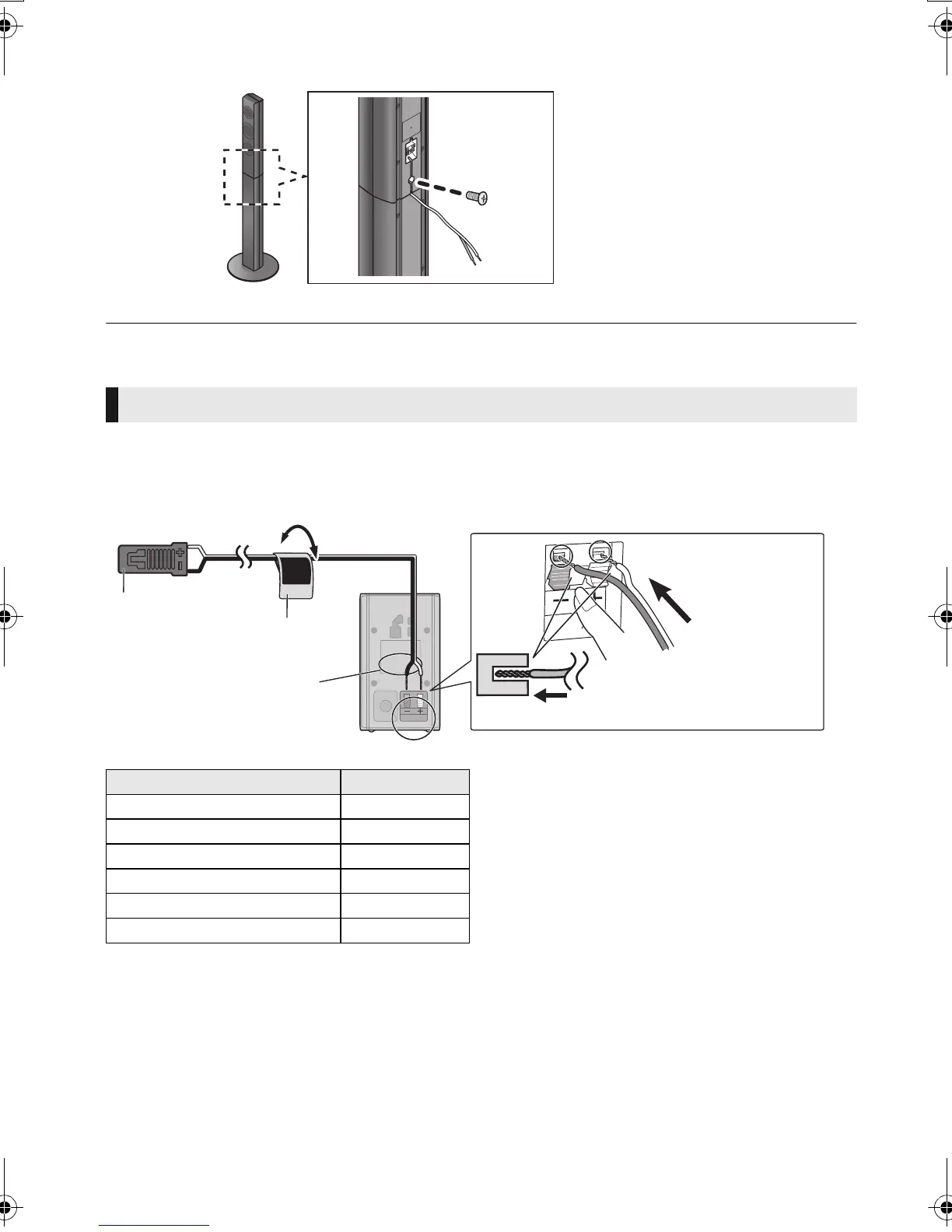
4 Tighten the screw (supplied) securely.
≥ To prevent damage or scratches, lay down a soft cloth and perform assembly on it.
Attach the speaker cable sticker (supplied) and connect the speaker cables to the speakers.
≥ When connecting speakers with the optional wireless system SH-FX71 (> 10), use the supplied
speaker cables of SH-FX71.
e.g., Surround speaker
Connecting the speaker cables
Push
r: White
s: Blue line
Speaker cable sticker (supplied)
Connector
Speaker indication
Speaker cable sticker Connector
FRONT Lch 1 WHITE
FRONT Rch 2 RED
SURROUND Lch 3 BLUE
SURROUND Rch 4 GRAY
CENTER 5 GREEN
SUBWOOFER 6 PURPLE
SC-BTT490P_eng.book 12 ページ 2012年2月22日 水曜日 午前9時1分



 To Next Page