Advanced
operations
41
VQT3X49
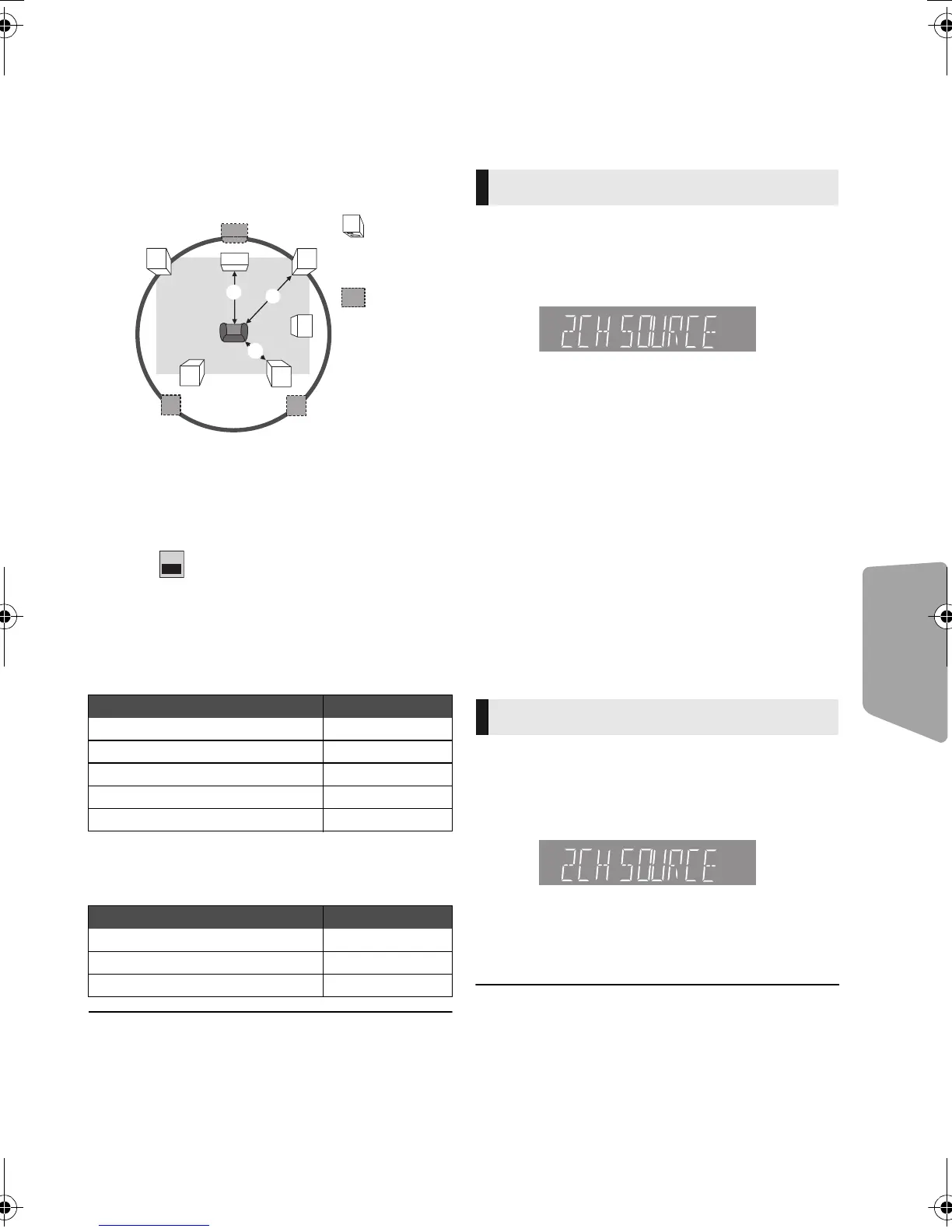
∫ Delay time
For optimum listening with 5.1-channel sound, all
the speakers, except for the subwoofer, should be
the same distance from the seating position.
If either distance 1 or 2 is less than 3,
measure the distance and adjust the time to make
up for the difference (see the table below).
1 2 3: Primary listening distance
A Actual speaker position
B Ideal speaker position
1 Press [3, 4, 2, 1] to select the distance
box ( ) and press [OK].
2 Press [3, 4] to select the setting and
press [OK].
Delay time for the Center speaker
Subtract the distance 1 from 3
Delay time for the Surround and Surround
back speakers
Subtract the distance 2 from 3
To finish the speaker setting
Press [3, 4, 2, 1] to select “Complete” and
press [OK].
Enjoying sound effects
from all speakers
For more details on each setting, refer to “Audio
Settings” on the Option menu(> 34)
1 Press [SURROUND].
2 Press [3, 4] to select “MULTI CH SOURCE”
or “2CH SOURCE”, and then press [OK].
e.g.,
3
While the selected mode is displayed
Press [
3
,
4
] to select the desired setting. (
>
34)
∫ Adjusting speaker level during
play
1 Press [CH SELECT] to activate the speaker
setting mode.
2 Press [CH SELECT] several times to select
the speaker.
≥Press [2, 1] to adjust the balance of
the front speakers.
3
Press [
3
] (increase) or [
4
] (decrease) to adjust
the speaker level for each speaker.
s6 dB to r6 dB
1 Press [SOUND].
2
Press [
3
,
4
]
to
select “2CH SOURCE” or
“ ALL SOURCE”, and then press [OK].
e.g.,
3 While the selected mode is displayed
Press [3, 4] to select the desired setting and
press [OK].
Repeat this procedure if necessary. (> 34)
≥ The sound effects/modes may not be available or have no
effect with some sources.
≥ You may experience a reduction in sound quality when
these sound effects/modes are used with some sources. If
this occurs, turn the sound effects/modes off.
Distance (Approx.) Setting
34 cm (1 ft. 1 in.) 1.0 ms
68 cm (2 ft. 2 in.) 2.0 ms
102 cm (3 ft. 4 in.) 3.0 ms
136 cm (4 ft. 5 in.) 4.0 ms
170 cm (5 ft. 6 in.) 5.0 ms
Distance (Approx.) Setting
170 cm (5 ft. 6 in.) 5.0 ms
340cm (11ft. 1in.) 10.0 ms
510 cm (16 ft. 8 in.) 15.0 ms
Surround Effects
Sound Effects
SC-BTT490P_eng.book 41 ページ 2012年2月22日 水曜日 午前9時1分





 To Next Page