DVD/CD
F:I
PLAYMODE
1,
SELECT
_ _ prezi pLAy to start *
I i
_-_ L-_ _- E i
I: :___________c:__.......... r_;L_____:
L_ .... _ ...............................
ZTt'_!I'll
• This function works with video CDs without PBC and audio CDs.
eThis function allows you to program up to 18 tracks.
eYou can operate the program play function interactively in conjuc-
tion with the TV set.
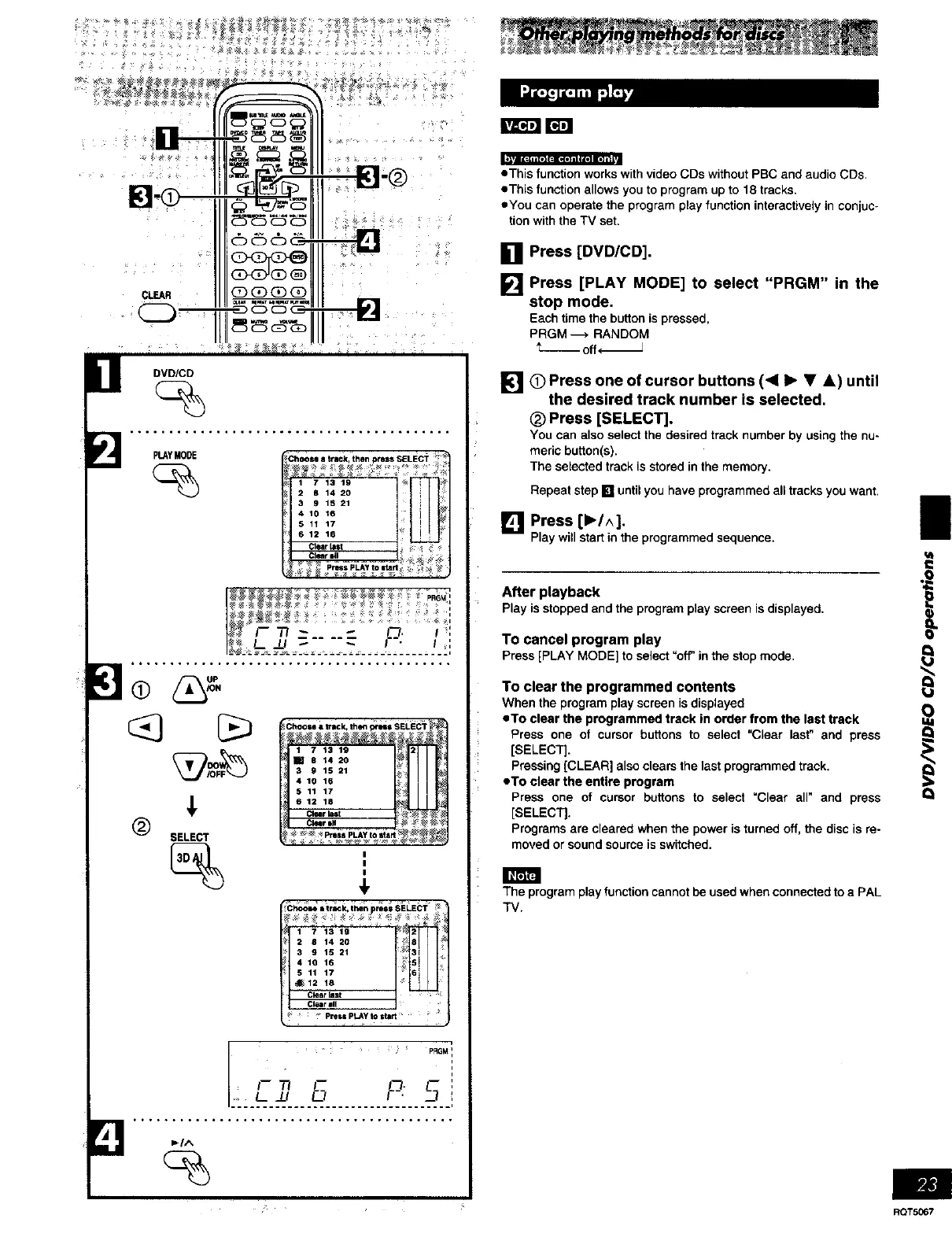
[] Press [DVD/CD].
[] Press [PLAY MODE] to select "PRGM" in the
stop mode.
Eachtime thebuttonis pressed,
PRGM ---, RANDOM
_- Off* J
[] 0 Press one of cursor buttons (<11_ • &) until
the desired track number is selected,
(_ Press [SELECT].
You can also select the desired track number by using the nu-
meric button(s).
The selected track is stored in the memory.
Repeat step [] until you have programmed all tracks you want.
[] Press [1_/^].
Playwillstartin theprogrammedsequence.
After playback
Playis stoppedand the programplayscreenisdisplayed,
To cancel program play
Press[PLAYMODE]to select"off'inthe stopmode,
To clear the programmed contents
When the program play screen is displayed
eTo clear the programmed track in order from the last track
Press one of cursor buttons to select "Clear last" and press
[SELECT].
Pressing [CLEAR] also clears the last programmed track.
eTo clear the entire program
Press one of cursor buttons to select "Clear all" and press
[SELECT].
Programs are cleared when the power is turned off, the disc is re-
moved or sound source is switched.
The programplay function cannotbe used whenconnectedto a PAL
TV.
I
i
RQT5067















 To Next Page