m
i
Q
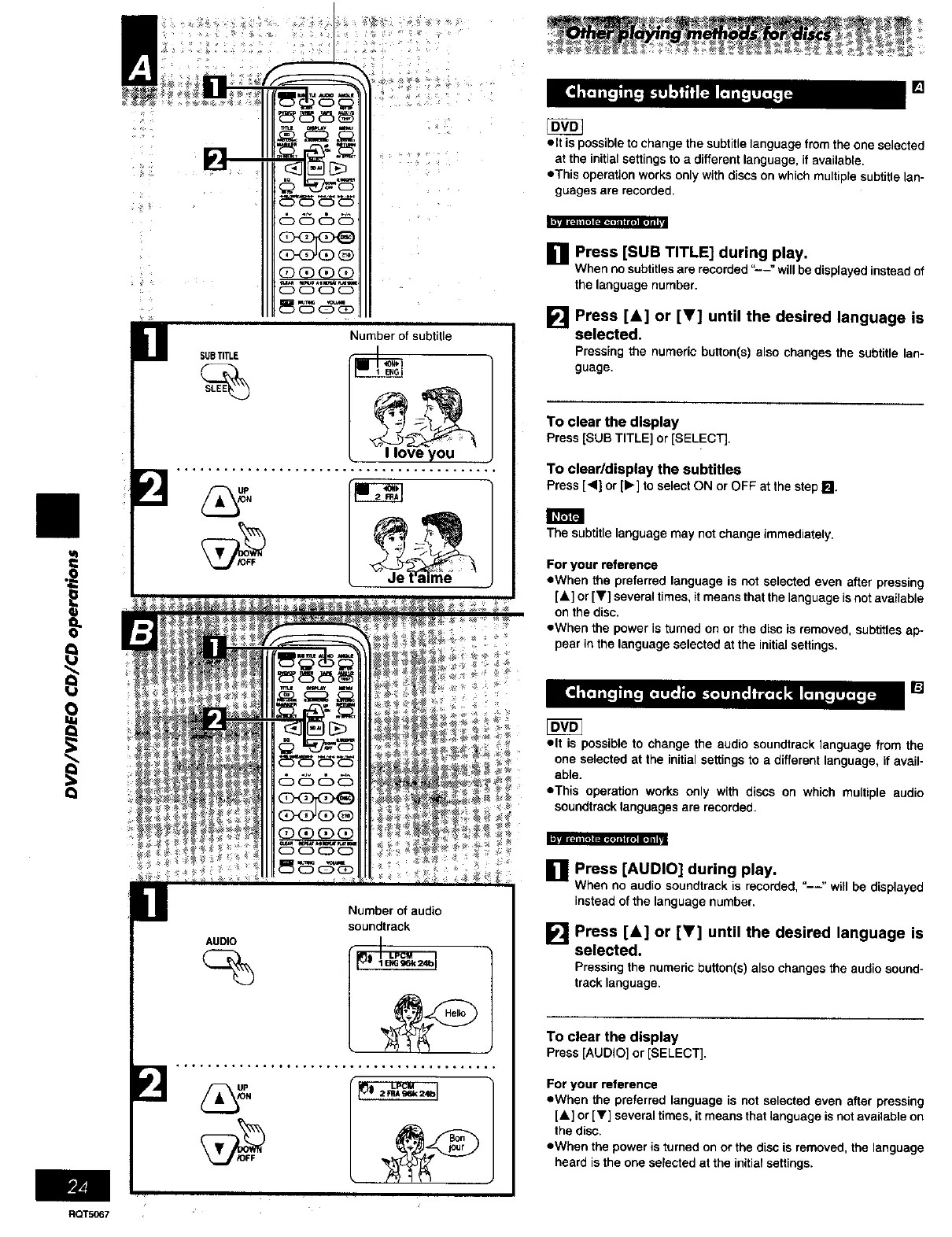
Number of subtitle
SUBTITLE
....... ......, .......... .,.... ......... *.
_l_n ¢:1n[o ]a:_I_] aIKIg] me] i i
AUDIO
Number of audio
soundtrack
[]
• It is possible to change the subtitle language from the one selected
at the initial settings to a different language, if available.
eThis operation works only with discs on which multiple subtitle lan-
guages are recorded.
| _Tiii ,=lille] (-Jl=:llll I ,rollg]ll LvJ
[] Press [SUB TITLE] during play.
When no subtitles are recorded =--" will be displayed instead of
the language number.
[] Press [A] or [V] until the desired language is
selected,
Pressing the numeric button(s) also changes the subtitle lan-
guage.
To clear the display
Press[SUBTITLE]or [SELECT].
To clear/display the subtitles
Press [<] or [1_]to selectON orOFF at thestepIffJ
The subtitle language may not change immediately.
For your reference
eWhen the preferred language is not selected even after pressing
[&] or [T] several times, itmeans that the language isnot available
on the disc.
eWhen the power is turned on or the dLscis removed, subtitles ap-
pear in the language selected at the initial settings.
• It is possible to change the audio soundtrack language from the
one selected at the initial settings to a different language, if avail-
able.
eThis operation works only with discs on which multiple audio
soundtreck languages are recorded.
]Press [AUDIO] during play.
Whenno audiosoundtrackis recorded,"--" willbe displayed
insteadofthe languagenumber.
[] Press [&] or [Y] until the desired language is
selected.
Pressingthe numericbutton(s)alsochangesthe audiosound-
tracklanguage.
To clear the display
Press [AUDIO]or [SELECT].
For your reference
eWhen the preferred language is not selected even after pressing
[A] or [T] several times, it means that language is not available on
the disc.
eWhen the power is turned on or the disc is removed, the language
heard is the one selected at the initial settings.
RQT5067















 To Next Page