i
==
1
1€
OPEN/
CLOSE
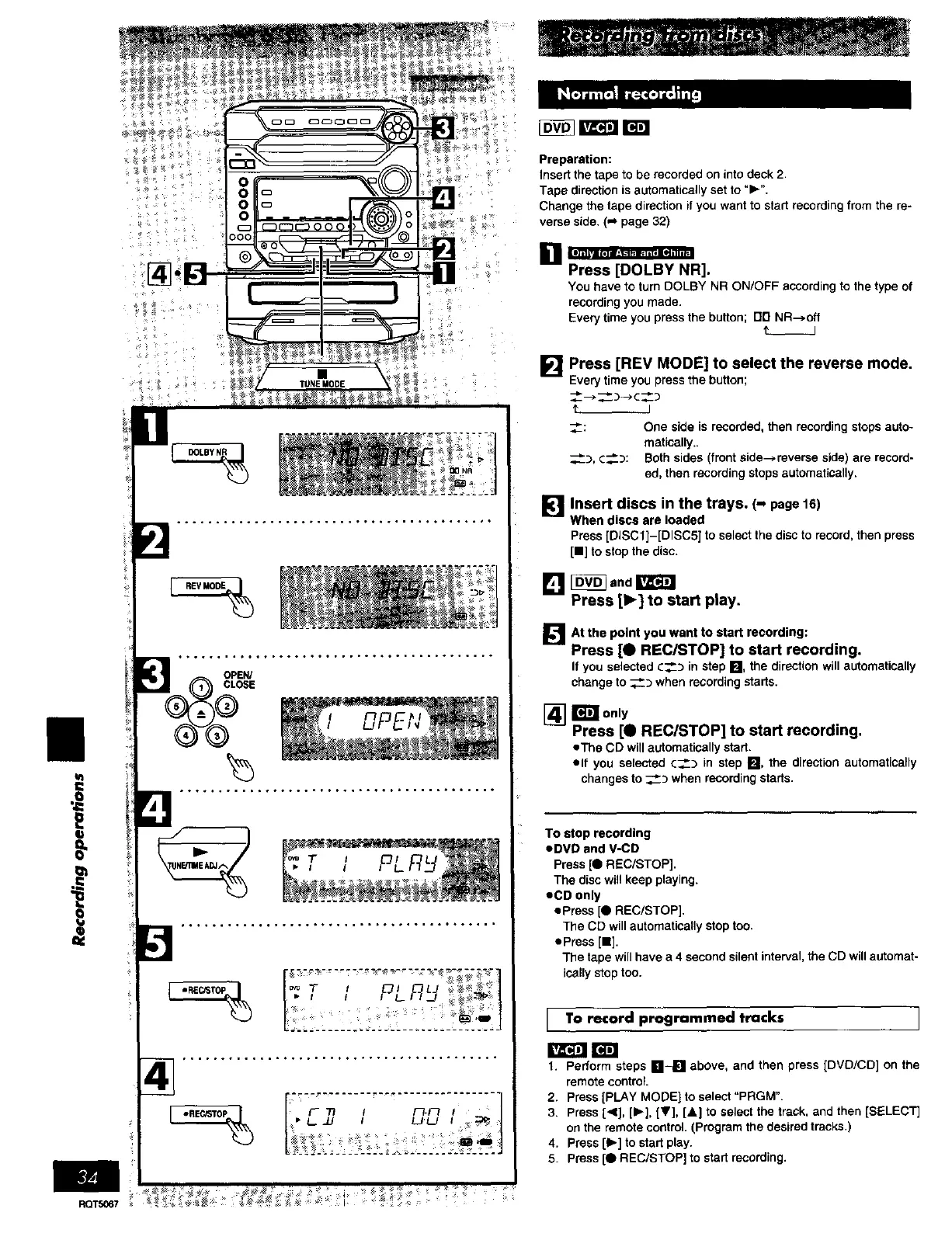
Preparation:
Insert the tape to be recorded on into deck 2.
Tape direction is automatically set to =b-".
Change the tape direction if you want to start recording from the re-
verse side. (-_ page 32)
[]
i¢ t _, , ,.. i i*
Press [DOLBY NR].
You have to turn DOLBY NR ON/OFF according to the type of
recording you made.
Every time you press the button; lid NR-->off
t.__l
[] Press [REV MODE] to select the reverse mode.
Everytimeyou pressthe button;
t I
-_': One side is recorded, then recording stops auto-
matically..
__3, c_3: Both sides (front side-,reverse side) are record-
ed, then recording stops automatically.
I_ Insert discs in the trays. (- page 16)
When discs are loaded
Press[DISC1]-[DISC5] to selectthediscto record,thenpress
[11]tostopthedisc.
Press [1_] to start play.
OAt the want to start recording:
point you
Press [O REC/STOP] to start recording.
If you selectedc_ in stepIkl, the direction willautomatically
changeto ___ whenrecording starts.
[_] r_J_l only
Press [0 REC/STOP] to start recording.
eThe CD will automatically start.
elf you selected ¢___ in step I_1, the direction automatically
changes to --_:_ when recording starts.
To stop recording
eDVD and V-CD
Press [@ REC/STOP].
The disc will keep playing.
eCD only
ePress [@ REC/STOP],
The CD will automatically stop too.
ePress [11].
The tape will have a 4 second silent interval, the CD will automat-
ically stop too.
To record programmed tracks ]
1. Perform steps Irll-kl above, and then press [DVD/CD] on the
remote control.
2. Press [pLAY MODE] to select "PRGM'.
3. Press [_1], [1_], [V], [_1,] to select the track, and then [SIELECT]
on the remote control. (Program the desired tracks.)
4. Press [1_] to start play.
5. Press [O REC/BTOP] to start recording.
RQTS067















 To Next Page