OPEN/
CLOSE
_ ,°...... ............ ....... ........ .....,
CDEDIT
!,
NI
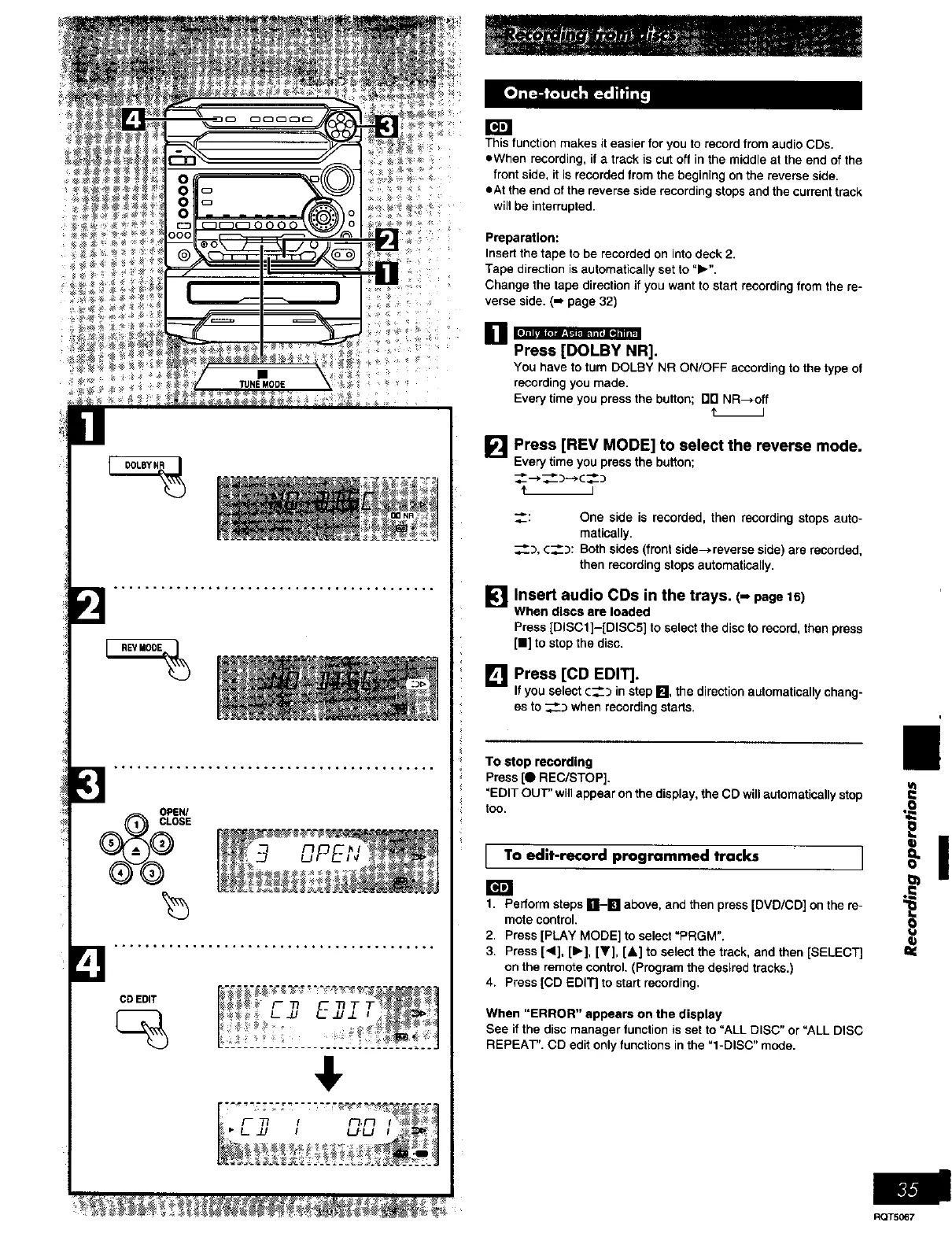
This function makes it easier for you to record from audio CDs.
eWhen recording, if a track is cut off in the middle at the end of the
front side, it is recorded from the begining on the reverse side.
eAt the end of the reverse side recording stops and the current track
will be interrupted.
Preparation:
Insert the tape to be recorded on into deck 2.
Tape direction is automatically set to "1_".
Change the tape direction if you want to start recording from the re-
verse side. (-* page 32)
[]
Q • * , ,
Press [DOLBY NR].
You have to tum DOLBY NR ON/OFF according to the type of
recording you made,
Every time you press the button; DD NR--*off
t__J
[] Press [REV MODE] to select the reverse mode.
Everytime youpressthebutton;
_: One side is recorded, then recording stops auto-
matically.
_..3, c_: Both sides (front side->reverse side) are recorded,
then recording stops automatically.
!_1 Insert audio COs in the
trays, (-
page
16)
M
When discs are loaded
Press [DISC1]-[DISC5] to select the disc to record, then press
[11]to stop the disc.
[] Press [CD EDIT].
If youselectc____in stepFJ, thedirectionautomaticallychang-
esto __:_ when recordingstarts.
i
I!
TO stop recording
Press [0 REC/STOP].
"EDIT OUT" will appear on the display, the CD will automatically stop
too. ,_
I T° edit'rec°rd pr°grammed tracks I _"
1. Perform steps R-IN above, and then press [DVD/CD] on the re- _1_
mote control.
2. Press [PLAY MODE] to select "PRGM". _b
3. Press [<1], [_-], [V], [&] to select the track, and then [SELECT]
on the remote control. (Program the desired tracks.)
4. Press [CD EDIT] to start recording.
When "ERROR" appears on the display
See if the disc manager function is set to "ALL DISC" or "ALL DISC
REPEAT". CD edit only functions in the =l-DISC" mode.
RQT5_7















 To Next Page