I
Tape-to-tape recording
F]
0
I,/
¢J
DECKt/2
T I'-I LT_I-- _. ]
TRPE
, ...................................
Tape direction of the tape you are
recording onto t
::!
, .............................
For U.S.A. and Canada
The recording level will be recorded as they are on the tape being
played back.
For others
The recording level and the Dolby effect will be recorded as they are
on the tape being played back.
Preparation:
Insert the cassettes.
For playback: into deck 1
For recording: into deck 2
Tape direction is automatically set to "_-".
Change the tape direction if you want to start recording from the re-
verse side (-,, page 32)
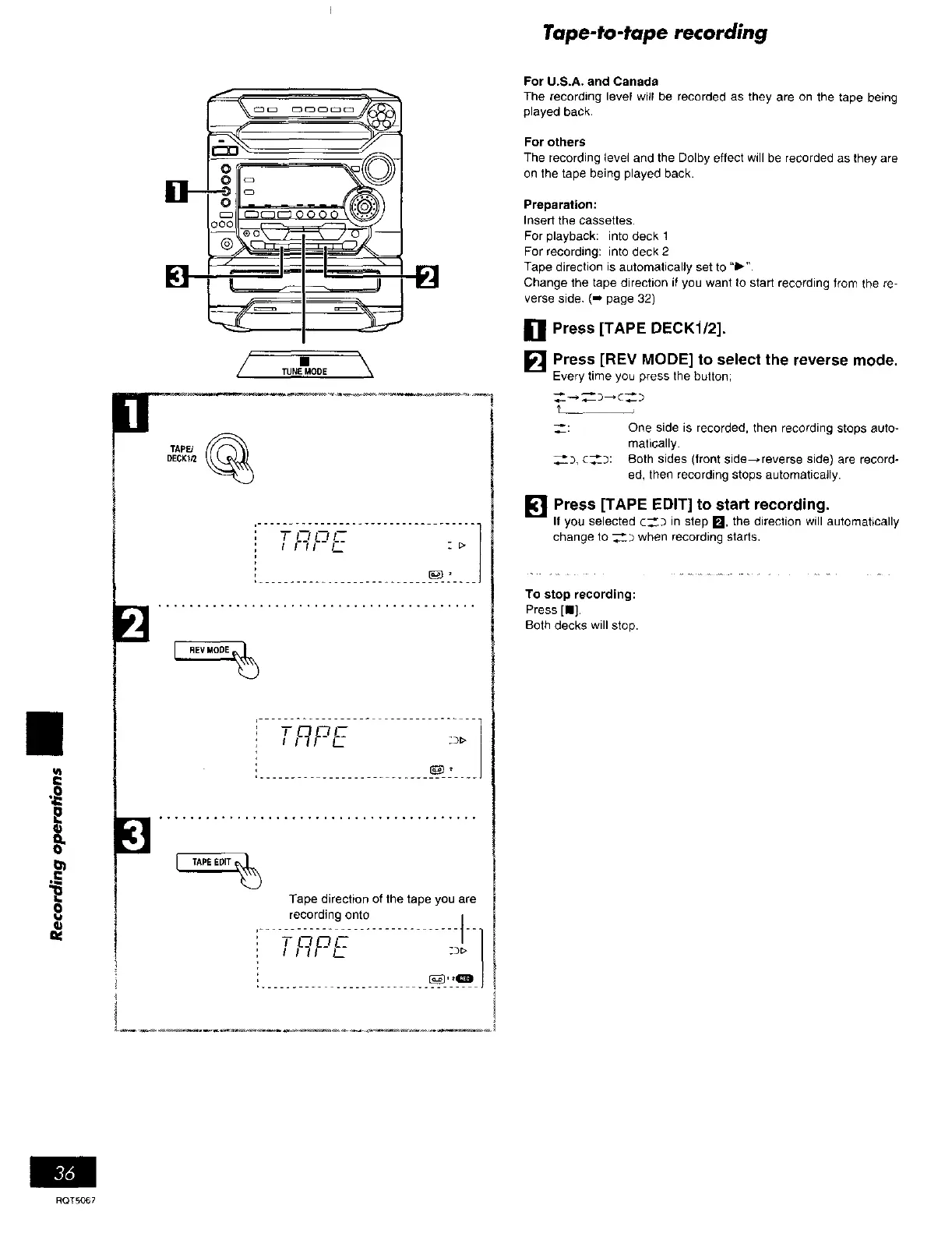
[] Press [TAPE DECK1/2].
[] Press [REV MODE] to select the reverse mode,
Every time you press the button;
_-_c_
't
_: One side is recorded, then recording stops auto-
matically.
__D, c__3: Both sides (front side--reverse side) are record-
ed, then recording stops automatically.
[] Press [TAPE EDIT] to start recording.
If you selected C__._ in step B, the direction will automatically
change to __b when recording starts,
To stop recording:
Press [111.
Both decks will stop.
ROTS067















 To Next Page