l
]
o
I
RQT5067
1
®
NOCeNtre"- - .UJ.,III.VLJI ]L
•?_ +'+, +',.,
•-!.!. _. _
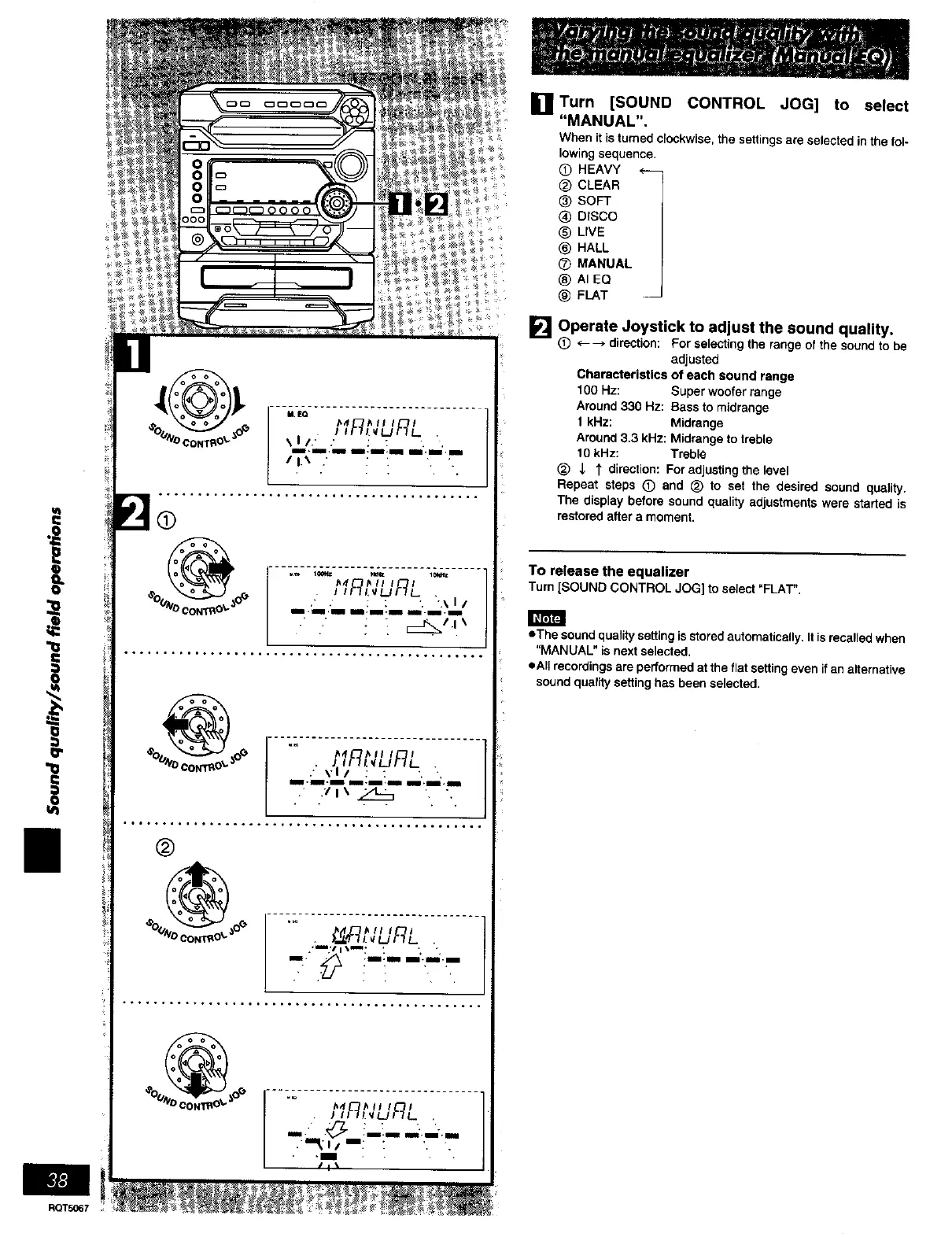
i]Turn [SOUND CONTROL JOG] to select
"MANUAL".
When it is turned ClOCkwise,the settings ere selected in the fol-
lowing sequence•
(_) HEAVY <---
® CLEAR
® SOFT
® DrSCO
® LIVE
® HALL
® MANUAL
® AI EQ
® FLAT --
[]
Operate Joystick to adjust the sound quality.
® <----> direction: For selecting the range of the sound to be
adjusted
Characteristics of each sound range
100 Hz: Super woofer range
Around 330 Hz: Bass to midrange
1 kHz: Midrange
Around 3.3 kHz: Midrange to treble
10 kHz: Treble
(_ ,_ I' direction: For adjusting the _veL
Repeat steps (D and (_ to set the desired sound quality.
The display before sound quality adjustments were started is
restored after a moment.
To release the equalizer
Turn[SOUND CONTROL JOG] to select=FLAT".
• The sound quality setting is stored automatically. It is recalled when
"MANUAL" is next selected,
eAll recordings are performed at the flat setting even ifan alternative
sound quality setting hss been selected.















 To Next Page