=t,i j_l Jl[ol rJl_'o_ i11ill iHii
FIQT5067
°.°°.°o°.o,...o,,,ooo°.oooo°o°oo...,,...oo...,
(_ VOLUME
........
,o°°.o,,°..,.... .... ° .... ° .... .. ......... °o,..
®
@
• Use this mode when playing sources recorded with Dolby Digital.
• There are no special steps required to playback Dolby Digital
DVDs. This system automatically switches to 5.1ch (6ch) input
when a 5.1ch (6ch) DVD is played.
Preparation:
If you have connected a subwoofer (not included), press and hold
[S.WOOFER] for about 2 seconds so "SUB W ON" isshown on the
display.
Playback the source (DVD).
rlrl DIGITAL indicator will lightup.
To adjust the volume of each speaker [] ]
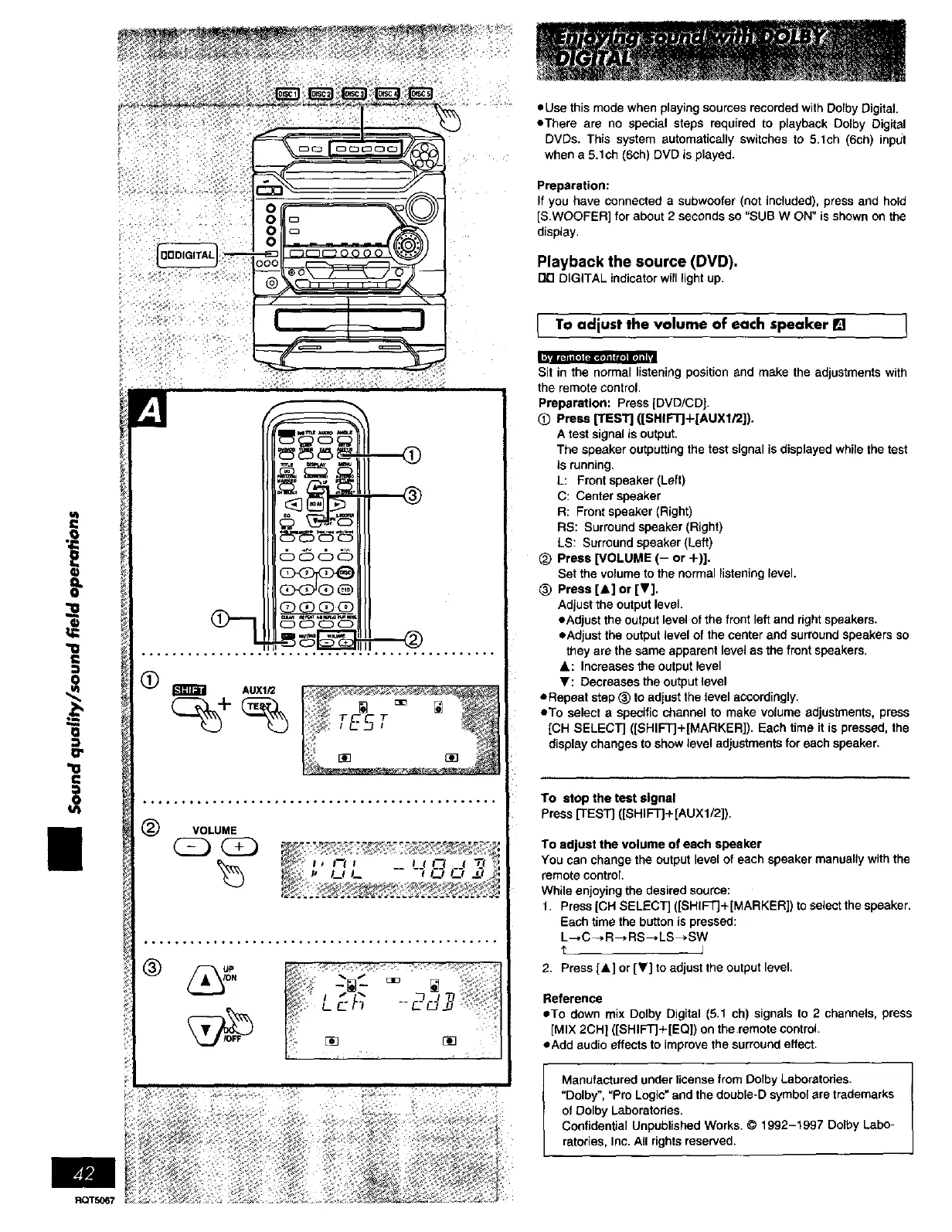
Sit in the normal listening position and make the adjustments with
the remote control.
Preparation: Press [DVD/CD].
@ PressFEST] ((SHIF'rJ+[AUX1i2]).
A test signal is output.
The speaker outputting the test signal is displayed while the test
is running.
L: Front speaker (Left)
C: Center speaker
R: Front speaker (Right)
RS: Surround speaker (Right)
LS: Surround speaker (Left)
_) Press [VOLUME (- or +)].
Set the volume to the normal listening level.
(_ Press [_] or [T].
Adjust the output level.
• Adjust the output level of the front left and right speakers.
• Adjust the output level of the center and surround speakers so
they are the same apparent level as the front speakers.
&: Increases the output level
_: Decreases the output level
ORepeat step (_ to adjust the level accordingly.
• To select a specific channel to make volume adjustments, press
[CH SELECT] ([SHIFTJ+[MARKER]). Each time it is pressed, the
display changes to show level adjustments for each speaker.
To stop the test signal
Press [TEST] ([SHIFT]+[AUX1/2]).
To adjust the volume of each speaker
You can change the output level of each speaker manually wtth the
remote control
While enjoying the desired source:
1. Press [CH SELECT] ([SHIFT]+[MARKER]) to select the speaker.
Each time the button is pressed:
L--, C --_R--_RS--, LS _ SW
2. Press [A] or [_] to adjust the output level.
Reference
• To dawn mix Dolby Digital (5.1 ch) signals to 2 channels, press
[MIX 2CH l ([SHIFT]+[EQ]) on the remote control.
• Add audio effects to improve the surround effect.
Manufactured under license from Dolby Laboratories.
"Dolby", "pro Logic"and the double-D symbol are trademarks
of Dolby Laboratories.
Confidential Unpublished Works. © 1992-1997 Dolby Labo-
ratories, Inc. All rights reserved.















 To Next Page